Exidia
Participant
March 30, 2024
Question

Catalog has the files, but aren't synced.

  • March 30, 2024
  • 4 replies
  • 218 views

LR classic shows 37k photos, but they aren't synced, and won't sync.
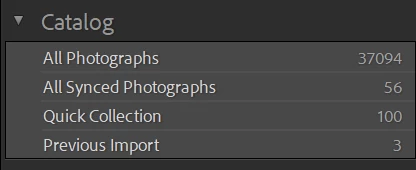


They were OK, but I pressed g to get grid view of some selected images and everything went haywire!

4 replies

Rob_Cullen
Community Expert
Community Expert
April 1, 2024

Are you asking about all those parent folders that show '0' images in the folder panel?

When you click the disclosure triangles do you see photos in sub-folders?

What setting do you have in the Library Menu for-


Regards. My System: Windows-11, Lightroom-Classic 15.1.1, Photoshop 27.3.1, ACR 18.1.1, Lightroom 9.0, Lr-iOS 10.4.0, Bridge 16.0.2 .
GoldingD
Legend
March 31, 2024

That ? mark next to Multi. Missing folder. see:


Exidia
ExidiaAuthor
Participant
March 31, 2024

Many thanks for the kind and quick response, but I've realised I hadn't framed the question correctly.  I'm not trying to sync images outside of Lightroom classic, I'm trying to get the images inside my pc (shown under All Photographs) to appear in Images (G:) in Folders.  They were all there 2 days ago, but have gone.  The files of images themselves are intact, arranged as shown in the screen shot below.

I back up daily, but the latest .data file, the 2nd one Adobe added, seems corrupt.  Should I try to find a back up of that and re-install?  And if so can you point me in the direction of how, please, as I'm lost and worried!


Rob_Cullen
Community Expert
Community Expert
March 31, 2024

Lightroom-Classic will not automatically sync 'All Photographs' in a LrC catalog.

You can only sync photos that you place in Standard Collections, and mark those Collections to Sync.

If you expect all 37094 photos to sync to the Cloud then they need to be in Collections that syncs.

SYNC SETUP IN CLASSIC


And be aware that LrC syncs photos to the Lightroom Cloud as smaller proxy files (aka Smart Previews) that are limited in pixel dimensions to 2560px long edge. These proxy files in the CLoud to not occupy any of your Cloud space (that might be 20GB.)


Regards. My System: Windows-11, Lightroom-Classic 15.1.1, Photoshop 27.3.1, ACR 18.1.1, Lightroom 9.0, Lr-iOS 10.4.0, Bridge 16.0.2 .