Alzibiff
Participant
July 18, 2018
Answered

Catalog - same photos, same location but shown twice

  • July 18, 2018
  • 1 reply
  • 2717 views

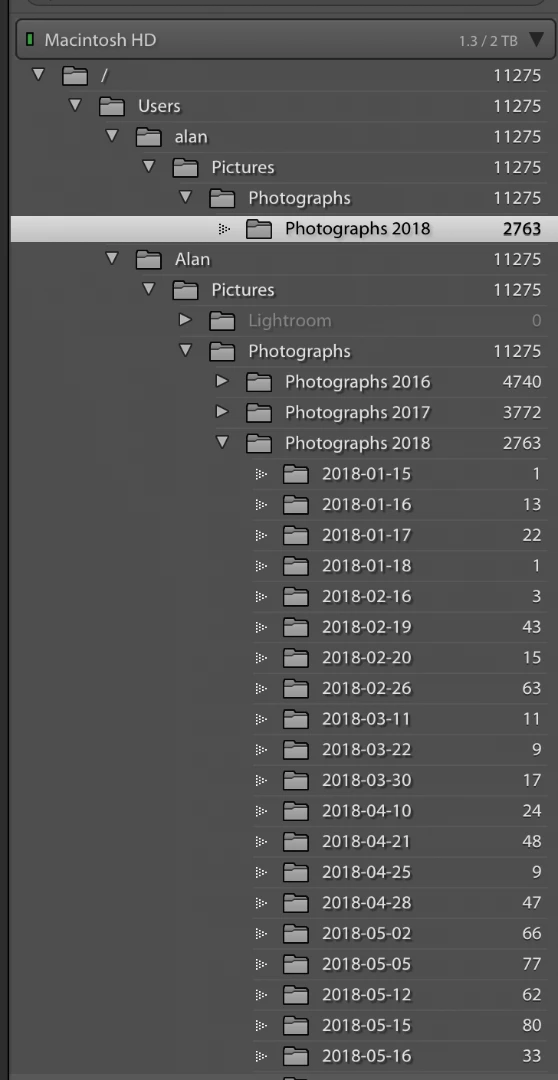
I am sure that this is a common problem but have been unable to find any answers when searching the forum. I have just migrated my files and catalog from one iMAC to another and on my new iMAC have two references to each image. Screenshot shows this in detail better than I can describe. I am the user: "Alan" and "alan" , (there is only one account) and as said, the image files are not duplicated, just the catalog entry. If I delete one of the duplicates, all the photographs disappear from the other.

    This topic has been closed for replies.
    Correct answer JohanElzenga

    This is a well-known problem, called the 'Capitalisation problem'. Basically, what happens is that you have two different user folders, one called 'Alan' and the other one called 'alan'. In other words, the names are the same, except for the capitalisation. Because MacOS is case-insensitive, it sees those two folders as one and the same folder and so it deals with this without you even being aware of it. But Lightroom is case-sensitive, so Lightroom does see two different folders.


    Most likely, your 'real' user folder (the one you see in the Finder) is 'Alan', so you have to merge the other one (but check this first). Here's how to do that:

    1. Backup your catalog.

    2. In the MacOS Finder, not in Lightroom, create a folder directly on Macintosh HD. Call it whatever you want, say "Capitals Fix".

    3. In Lightroom, right-click on the "alan" folder in the Lightroom Folders Panel and select "Update Folder Location". In the file browser that then opens, browse to and select the "Capitals Fix" folder.

    4. Don't be alarmed as the 'alan' folder will disappear from the Folders Panel, "Capitals Fix" will appear but all the sub-folders that were listed under 'alan' will now have "?" marks.

    5. Now right-click on "Capitals Fix" in the Folders Panel, and again choose "Update Folder Location". This time browse to and select the "Alan" folder. You may get a "Merge" dialog box, select "Merge" and everything should resolve itself.

    1 reply

    JohanElzenga
    Community Expert
    JohanElzengaCommunity ExpertCorrect answer
    Community Expert
    July 18, 2018

    This is a well-known problem, called the 'Capitalisation problem'. Basically, what happens is that you have two different user folders, one called 'Alan' and the other one called 'alan'. In other words, the names are the same, except for the capitalisation. Because MacOS is case-insensitive, it sees those two folders as one and the same folder and so it deals with this without you even being aware of it. But Lightroom is case-sensitive, so Lightroom does see two different folders.


    Most likely, your 'real' user folder (the one you see in the Finder) is 'Alan', so you have to merge the other one (but check this first). Here's how to do that:

    1. Backup your catalog.

    2. In the MacOS Finder, not in Lightroom, create a folder directly on Macintosh HD. Call it whatever you want, say "Capitals Fix".

    3. In Lightroom, right-click on the "alan" folder in the Lightroom Folders Panel and select "Update Folder Location". In the file browser that then opens, browse to and select the "Capitals Fix" folder.

    4. Don't be alarmed as the 'alan' folder will disappear from the Folders Panel, "Capitals Fix" will appear but all the sub-folders that were listed under 'alan' will now have "?" marks.

    5. Now right-click on "Capitals Fix" in the Folders Panel, and again choose "Update Folder Location". This time browse to and select the "Alan" folder. You may get a "Merge" dialog box, select "Merge" and everything should resolve itself.
    -- Johan W. Elzenga
    Known Participant
    October 17, 2023

    Hi - this solution doesn't work for me because i am not having a capitalization issue as you can see from my screenshot.  LrC just created a new view when i imported folders in August.  The folders on the top view are not in the bottom view. 

    JohanElzenga
    Community Expert
    Community Expert
    October 17, 2023

    No, you cannot conclude this from your screenshot. This is a common misunderstanding. The capitalization difference can be anywhere in the entire path, not just in the part that is shown in the Lightroom folder panel. It often is in your user folder name, for example. So yes, this is almost certainly the capitalization problem as described in this thread.


    -- Johan W. Elzenga