
Participant
June 4, 2020
Resuelto

Catolouge folders showing zero??

  • June 4, 2020
  • 2 respuestas
  • 2331 visualizaciones

Hi, hoping I can explain this clearly. When I open LR in the Library panel I can see my current catolouge and all it's sub folders, the issue is each folder is showing a total of 0 images. When I look up these folders through windows explorer I can see all images are there. LR isn't saying I have missing photos it's just saying I have zero photos?? Any help on what to do would be great.
Este tema ha sido cerrado para respuestas.
Mejor respuesta de gary_sc

Hi Rodpatto,


I can see in your screenshot that every folder there has sub-folders. The reason why the main folder is showing zero is that you have a settingset to show that.


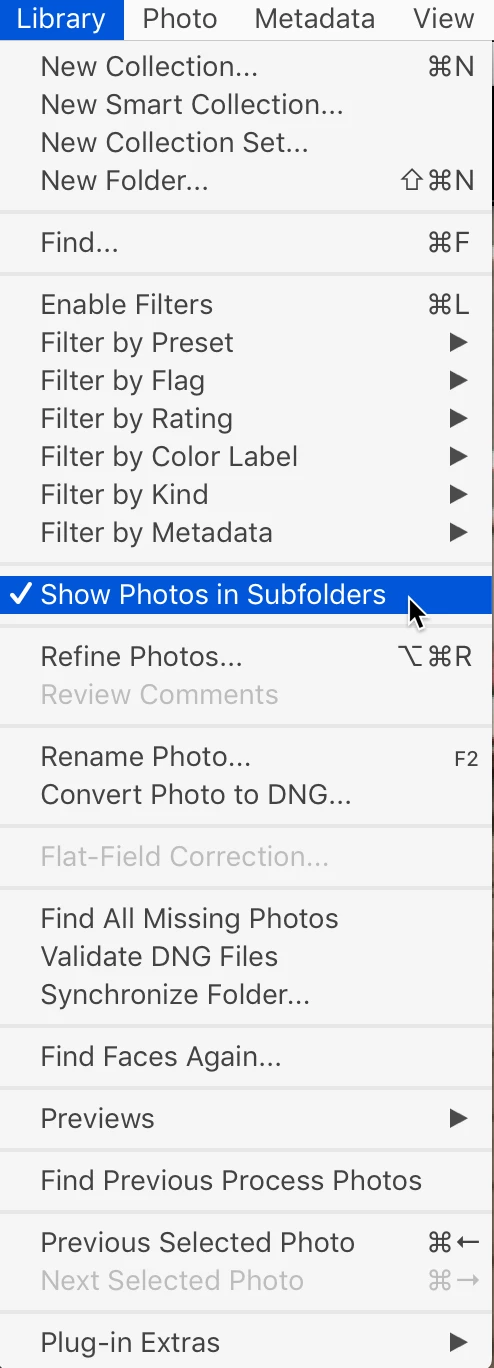
Go to your Library menu, and down to Photo in Subfolders and select that. Unselect that to undo it.


Good luck!


2 respuestas

Participant
January 5, 2023

I have this same problem but the sub-folders box is checked. I checked and unchecked, a few times and no changes. Any other suggestions? Thank you! 

Participant
February 4, 2023

+1 I'm experiencing the same issue that @Hppy66 has identified. This seems like a software bug as I have not experienced this issue prior to the latest update and I've been using LRC for several years.

dj_paige
Legend
February 4, 2023
quote

+1 I'm experiencing the same issue that @Hppy66 has identified. This seems like a software bug as I have not experienced this issue prior to the latest update and I've been using LRC for several years.


By @Van Life Travelogue


There is an answer marked correct in this thread, please try it.

dj_paige
Legend
June 4, 2020

Next to All Photographs, what number does Lightroom show?


I withdraw my question as I think Gary SC has nailed it.

gary_sc
Community Expert
gary_scCommunity ExpertRespuesta
Community Expert
June 4, 2020

Hi Rodpatto,


I can see in your screenshot that every folder there has sub-folders. The reason why the main folder is showing zero is that you have a settingset to show that.


Go to your Library menu, and down to Photo in Subfolders and select that. Unselect that to undo it.


Good luck!


Participant
June 5, 2020

Thanks Gary, I will have a look at that - my daughter was going through some of her shots and said she clicked on something?? I guess you found what that was - Thank you