Known Participant
July 30, 2017
Answered

Change auto save location Lightroom CC

  • July 30, 2017
  • 1 reply
  • 8288 views

Hi,

I cant find where to change the auto save location in Lightroom CC. It auto saves to C: but I want 😧

Thanks,

Glenn

    This topic has been closed for replies.
    Correct answer F. McLion

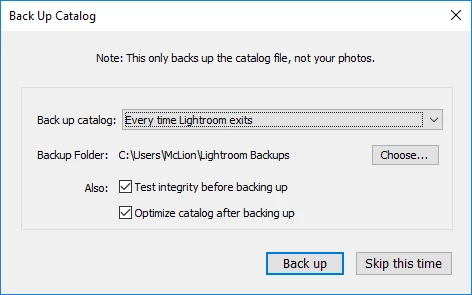
    It's you that selects the location of the backup - seen the Choose button. Your last selection will be used until you change it again.
    1 reply

    F. McLion
    Community Expert
    Community Expert
    July 30, 2017

    'AutoSave' what ?

    --- Got your issue resolved? Please label the response as 'Correct Answer' to help your fellow community members find a solution to similar problems. ---
    Known Participant
    July 30, 2017

    The only auto save in Lightroom. Where it backs up your work. Catalog settings, backup catalog files.

    F. McLion
    Community Expert
    Community Expert
    July 31, 2017

    This is where the problem lies. You must not be using Lightroom CC. You didn't notice the difference? Your button says "Choose" mine says "Show". That tells me that your one you can choose, my one I can only view, not alter. Your one says "Backup Catalog" my one says "Catalog Settings" I dont have "Select Folder" It doesn't come up. You can only view the destination folder, not alter it. Thats the problem I said right at the start.


    You are looking at the wrong dialog. You are looking here, where you set up the Backup to be active:

    The Dialog where you can select comes once the Backup starts. You can not set it in any of the preferences before it actually starts.

    Simply set as above and then close LR.

    --- Got your issue resolved? Please label the response as 'Correct Answer' to help your fellow community members find a solution to similar problems. ---