Inspiring
December 29, 2017
Answered

Changing LR File Location - How To Point LR to New Location

  • December 29, 2017
  • 1 reply
  • 46623 views

I copied (Carbon Copy Cloner) my entire LR library to a brand new hard drive enclosure. Moving forward, I want to work from the new enclosure.

What are the steps to redirect LR to the new location? In short, the next time I launch LR, it needs to load from the new enclosure.

Preparation steps:

(1) The location of the Catalogs are set and will not change. They are on a completely separate hard drive.

(2) I have more than one backup of all the data.

(3) I have LR set up (desktop short cut) so LR opens directly from the .Ircat. If you're not familiar with this, I can provide more information.

System:

(1) macOS High Sierra (V 10.13.2)

(2) Thunderbolt2 to 2013 MacPro

(3) RAID 10 enclosure

Thank you in advanced for your assistance.

Rafael

This topic has been closed for replies.
Correct answer Rob_Cullen

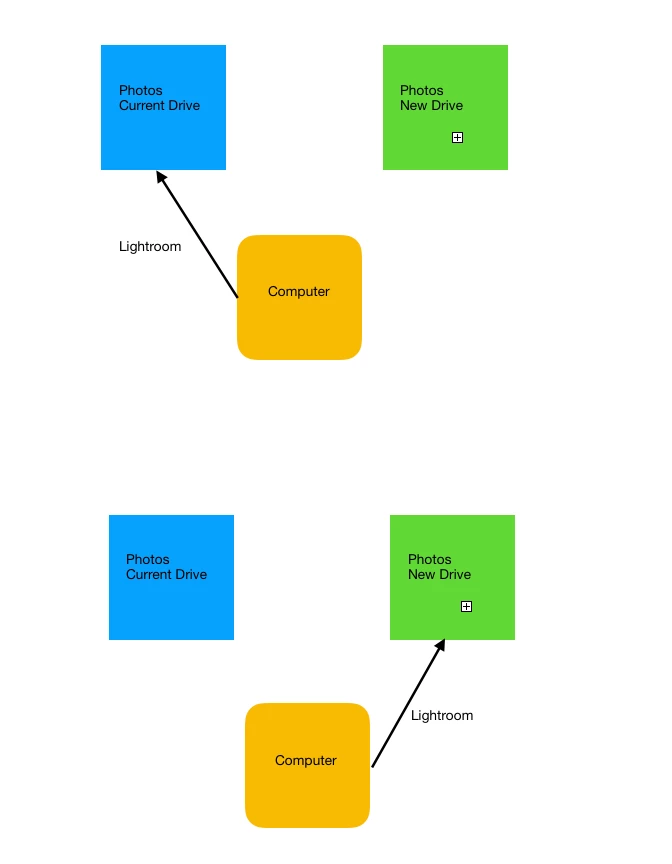
I've attached an images which shows what I'm attempting.

(1) Disconnect computer from current hard drive bay with all LR photos.

(2) Connect the computer to a new hard drive bay with all the LR photos.

When I disconnect the current bay, LR (I assume) is going to inquire, "where are the photos?", by placing a question mark on each folder. I would like to direct the computer (and LR) to the new bay/location.

If I right click on a given folder and select "find missing folder" and direct it to the new drive, will this work? Is this the proper manner to make this change?

Thank you,

R


And Victoria Bampton has a concise method for moving photo files-

https://www.lightroomqueen.com/move-photos-another-hard-drive-leaving-catalog/

1 reply

ManiacJoe
Inspiring
December 29, 2017

The location of the catalog and the location of the image files are completely separate and easy to move around.

Sounds like you want to change the location of the original image files from one drive to another. If so, that is an easy fix.

Open LR

Go to the Folders panel

Right-click on the top-most folder that you want to change,

select "change location", navigate to the new drive

Repeat as needed for each top-most folder you want to change.

Inspiring
December 29, 2017

I'm not sure I understand "top-most folder". When I right click on a folder these are the options that appear. See attached image.

Inspiring
December 29, 2017

And yes, you are correct. I want to point LR to where the original files will be located on the new enclosure.