
Participant
June 9, 2017
Answered

Clone tool

  • June 9, 2017
  • 1 reply
  • 620 views

How do I select an object to remove while using the cloning tool? For some reason the cursor is in a shape of a hand and it only zooms in and out. I'm new to Light Room and can't seem to figure how to stop it from zoom in and out.
    This topic has been closed for replies.
    Correct answer Per Berntsen

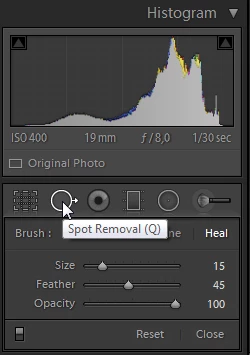
    To use the clone tool (actually named the Spot removal tool), press  Q, or click the icon below the histogram.

    To temporarily access the zoom tool, press the spacebar.

    To exit the clone tool, press Q again, or click the icon.

    1 reply

    Per Berntsen
    Community Expert
    Per BerntsenCommunity ExpertCorrect answer
    Community Expert
    June 9, 2017

    To use the clone tool (actually named the Spot removal tool), press  Q, or click the icon below the histogram.

    To temporarily access the zoom tool, press the spacebar.

    To exit the clone tool, press Q again, or click the icon.