
Question
Cloud syncing of photos with AI masks
There seems to be a significant bug syncing photos with AI masks between Lr desktop and LrC classic.
- The bug makes syncing photos with AI masks between Lr desktop and LrC classic unworkably unreliable.
- Around 90% of AI masks created in Lr desktop and around 30% of AI masks created in LrC classic results in those photos being blocked from editing in Lr desktop / Lr mobile / Lr web - as soon as I sync LrC classic
- If I do sync photos with AI masks from Lr desktop to LrC classic, almost all those photos then become “blocked” in Lr desktop (and in Lr mobile and in Lr web) and I am then unable to do any further editing in Lr desktop, unless I first “reset” (and loose) all my previous settings (edits).
- This undermines the logic of the Lightroom ecosystem, because I cannot use AI masks if I want to sync those photos to LrC.
I travel 300 days per year and upload and edit most of my 20,000 photos a year using Lr desktop on my MacBook.
- When I get home, I then sync my MacStudio desktop with the cloud. This worked perfectly until about 4 months ago
- I was perfectly happy paying Adobe £30 per month.
- I then started having more and more photos that “synced metadata” endlessly in LrC classic and were then blocked from any further editing in Lr desktop / Lr mobile / Lr web.
- This started happening to more and more of my photos and has now become a serious problem for my workflow.
- I am no longer happy paying £30 per month to Adobe.
- So I spent the last 5 days trying to work out what the cause / trigger / problem was.
- The answer is AI masks
Sake good order, my set up is as follows (each with the latest current versions):
- MacBook Pro
- Sonoma 14.2.1
- Lr desktop 7.1.2
- MacStudio Pro
- Sonoma 14.2.1
- LrC classic 13.1 and Camera Raw 16.1
- Lr desktop 7.1.2
- iPhone 14 Pro
- IOS 17.2.1
- Lr mobile 9.1.0
More details
- When I sync photos with AI masks to/from LrC classic the following happens:
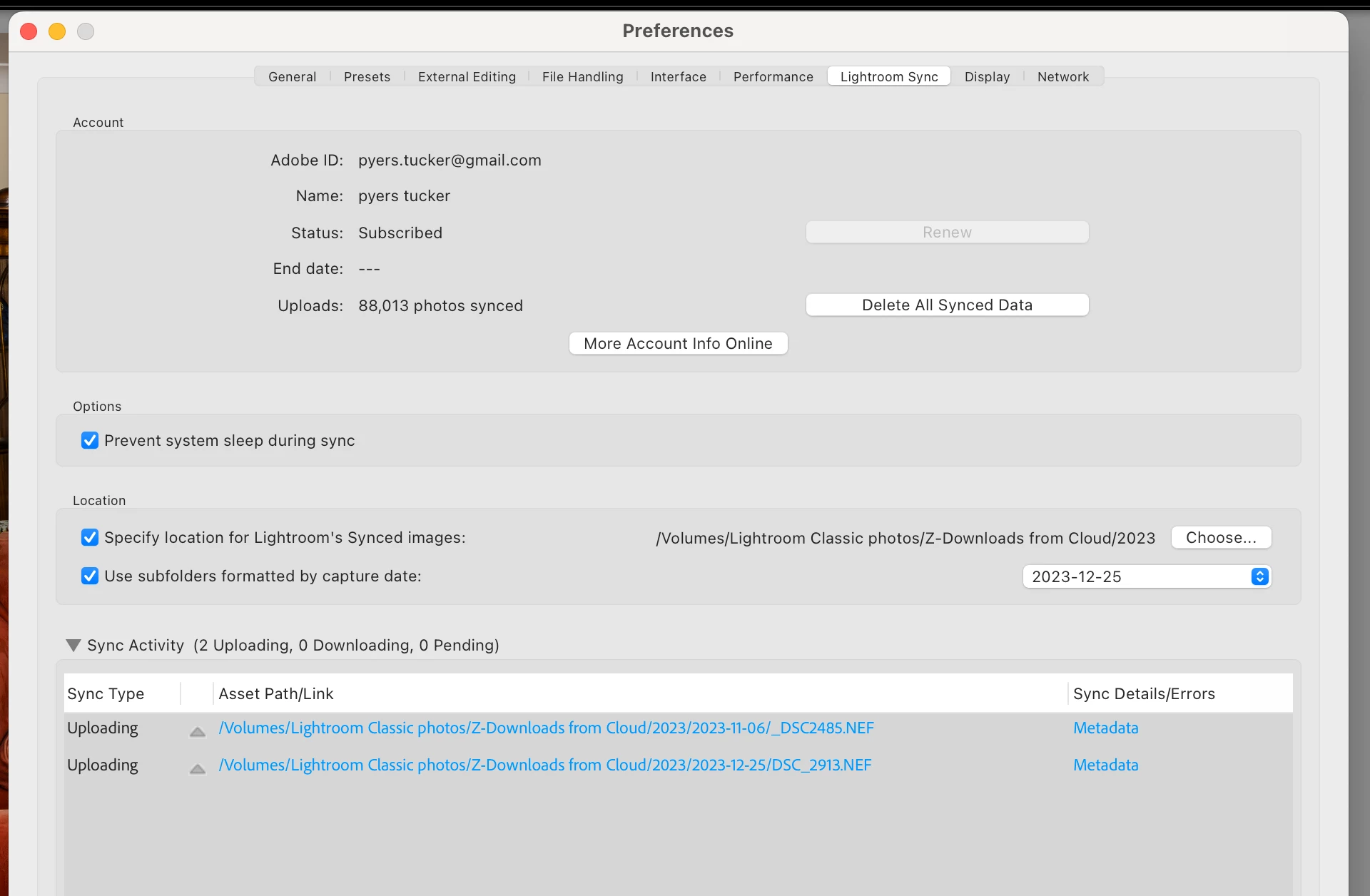
- The Cloud sync window of LrC shows that photos with AI masks sync endlessly (many days - never stopped). NB the LrC Catalog pane on the left does NOT show any “sync errors”. Here is a screen shot from the LrC classic Cloud sync window:
- When you try to edit any photos which are shown in the LrC Cloud sync window as “Uploading Metadata” in Lr desktop, Lr mobile or Lr web, I get the following warning pane:
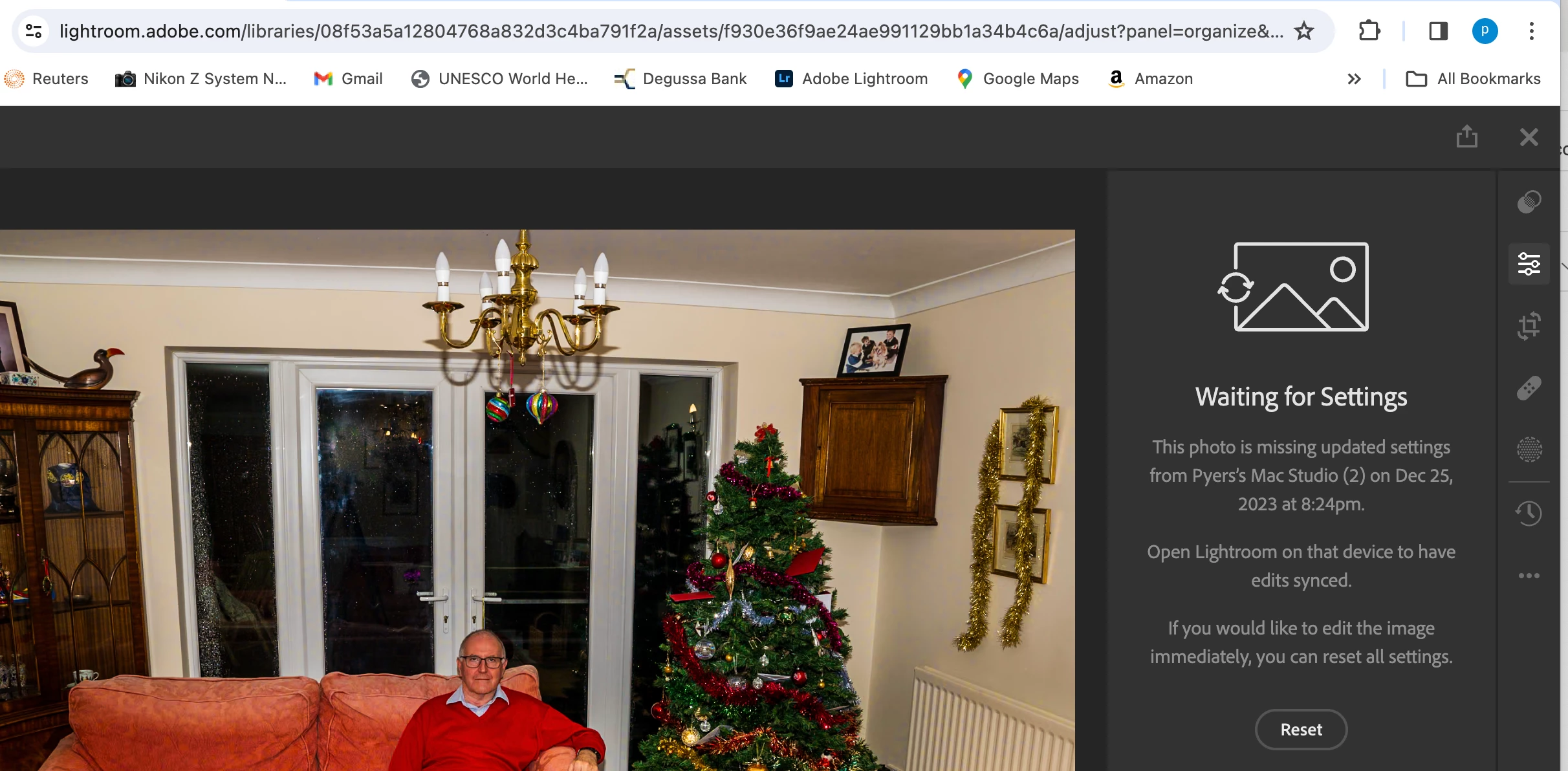
- If I reset the settings, then I have to start my editing for that photo from scratch again.
- If I try to add an AI mask again, as soon as I sync with LrC classic, the same problem happens and the photo again gets blocked “waiting for settings”.
- Removing the photo from Lightroom and from disk (LrC classic) and re-importing it does not solve the problem. As soon as I put an AI mask in a photo and sync with LrC classic, the same problem re-occurs.
- I have tried making other minor edits such as adding +1 to exposure (as suggested online by a number of Adobe engineers), but that makes no difference.
- Curiously, photos with AI masks made in Lr desktop do show correctly in LrC classic and CAN be further edited in LrC classic (but NOT in Lr desktop, Lr mobile or Lr web).
- If I delete the AI masks in LrC classic, the endless “upload metadata” sync disappears within a few minutes – and the rest of my edits remain (eg are saved). That photo is then also no longer “blocked” in Lr desktop, Lr mobile, Lr web and I can edit it again.
- Just so long as I do NOT add any AI masks… else I immediately get the same problem again.
- I then tested whether creating the AI masks in Lr desktop or in Lr classic made a difference – it does:
- Around 95% (16/17) of the AI masks I created in Lr mobile cause the endless “upload metadata” sync and block any further editing in Lr desktop, Lr mobile or Lr web (but only after syncing with LrClassic)
- But only around 20% (3/16) of AI masks I created in LrC caused the same problem, when I then synced LrC classic with the Cloud (and with Lr desktop, Lr mobile and Lr web)
- Lastly, I also tried rebuilding sync data from LrC classic (press “option” key in Cloud sync window in LrC classic)
- Given I have 90,000+ photos this takes around 14 hours, so I have only done it once.
- It does seem to fix the problem and removes the endless "upload metadata" sync problem – and removes the block from editing those photos with AI masks in Lr desktop, Lr mobile and Lr web.
- But it is completely impractical to have to rebuild all my sync data every time I upload photos with AI masks created in Lr desktop on my laptop…
Please can you help sort this out, as it seems impossible to edit and create AI masks in Lr desktop AND sync with LrC classic…?
 AdChoices