Participant
May 7, 2024
Answered

COLOR CAMBIA AL IMPORTAR FOTOS A LIGHTROOM CLASSIC

  • May 7, 2024
  • 2 replies
  • 1382 views

hola espero puedan ayudarme cuando intento importar alguna foto en raw a lightroom en la vista previa se ven los colores planos(como deben ser) pero a la hora de darle a la pestaña revelar estos cambian, en algunas fotos casi no haya mucho cambio pero en otras literal me quema los blancos y las altas luces y no entiendo el porque

This topic has been closed for replies.
Correct answer Per Berntsen

@Cesar372440410b13 wrote:

Hello I hope you can help me when I try to import some photo in raw to lightroom in the preview you can see the flat colors (as they should be) but when it comes to hitting the develop tab these change, in some photos there is almost not much change but in others it literally burns the whites and highlights and I don't understand why


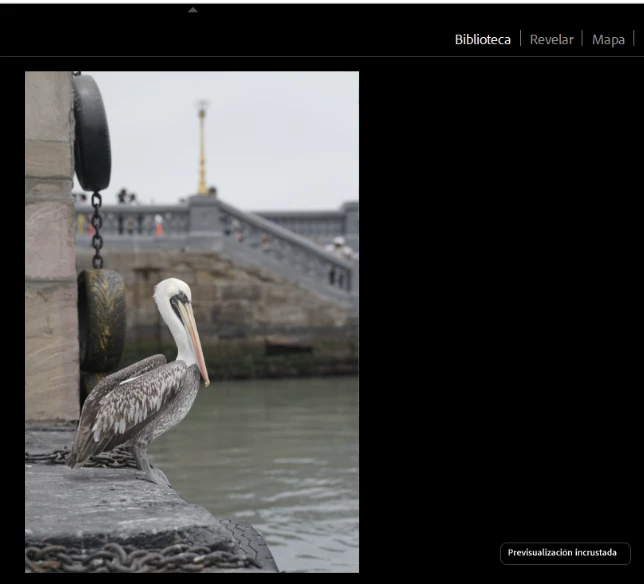
The image you see in Library is the jpg preview embedded in the raw file. (previsualizacion incrustada)

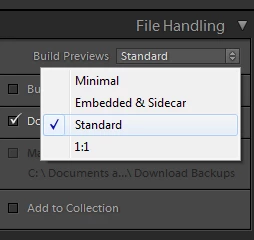
It is displayed because you have chosen Embedded & Sidecar under File handling > Build previews in the Import dialog.

The embedded preview includes any settings you have made in the camera (like Picture styles).

These settings are also written to the raw file, but LrC doesn't understand them and ignores them.

Choose any other option than Embedded & Sidecar when importing, and Library and Develop will display identically.


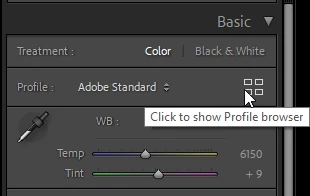
If Adobe has provided camera matching profiles for your camera, there might be one that mimics your camera settings.

Open the profile browser in Develop to find out.

If you find a profile that you like, you can set LrC to use this profile automatically on import.

See https://helpx.adobe.com/lightroom-classic/help/raw-defaults.html


2 replies

Per Berntsen
Community Expert
Per BerntsenCommunity ExpertCorrect answer
Community Expert
May 7, 2024

@Cesar372440410b13 wrote:

Hello I hope you can help me when I try to import some photo in raw to lightroom in the preview you can see the flat colors (as they should be) but when it comes to hitting the develop tab these change, in some photos there is almost not much change but in others it literally burns the whites and highlights and I don't understand why


The image you see in Library is the jpg preview embedded in the raw file. (previsualizacion incrustada)

It is displayed because you have chosen Embedded & Sidecar under File handling > Build previews in the Import dialog.

The embedded preview includes any settings you have made in the camera (like Picture styles).

These settings are also written to the raw file, but LrC doesn't understand them and ignores them.

Choose any other option than Embedded & Sidecar when importing, and Library and Develop will display identically.


If Adobe has provided camera matching profiles for your camera, there might be one that mimics your camera settings.

Open the profile browser in Develop to find out.

If you find a profile that you like, you can set LrC to use this profile automatically on import.

See https://helpx.adobe.com/lightroom-classic/help/raw-defaults.html


kglad
Community Expert
Community Expert
May 7, 2024

in the future, to find the best place to post your message, use the list here, https://community.adobe.com/

p.s. i don't think the adobe website, and forums in particular, are easy to navigate, so don't spend a lot of time searching that forum list. do your best and we'll move the post (like this one has already been moved) if it helps you get responses.


<"moved from using the community">
Participant
May 7, 2024

muchas gracias, me funciono
