Participant
February 17, 2013
Answered

Color purple shortcut for Lightroom?

  • February 17, 2013
  • 4 replies
  • 30956 views

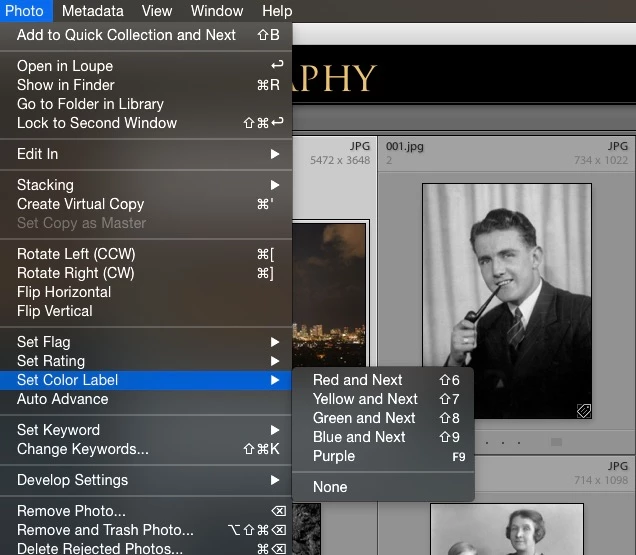
I can't figure out the shortcut for the color purple when organizing my pictures on Lightroom. There is a shortcut for all the other four colors. They're numbers 6-9, so did Adobe just not give purple shortcut because they ran out of numbers?

Correct answer StephenJHutchinson

At this point, I'm assuming you're on a Mac. It may be possible to rig a keystroke up using OS or keyboard app/plugin, if it would be worth doing(?)


Rob, there is indeed a way to do it on a Mac

1) Open up your Mac's System Preferences

2) Navigate to Keyboard

3) Choose the Shortcuts tab

4) Click the "+" icon to add a shortcut.

5) In the Application: dropdown box, choose Adobe Photoshop Lightroom

6) For Menu Title use the exact word: Purple

7) Choose a keyboard shortcut. For me I've chosen F9 because it isn't used in Lightroom and it's right near "9" which is used for Blue.

That's all there is to it.

Here's a screenshot of what it looks like:
4 replies

Participant
May 28, 2025

This is exactly what I was looking to do - add a purple shortcut. however in Mac OS Sequoia - there is no option to add shortrcuts to adobe apps - both lightroom classic and photoshop are missing from the list of available apps in the drop down selector - accessed from System settings>Keyboard>Keyboard SHortcuts>app shortcuts -> plus button - app list drop down. I tried giving full disk access to both apps in case that was preventing it - but still unable to add shortcuts for those apps. Does anyone have an updated solution on this for OS Sequoia and these two apps? Thanks.

Participant
May 28, 2025

update: I found that you have to select "other" at the bottom of the app list - and them select the app manually. I was able to do this and then add the Purple shortcut for F9.  SOLVED!

skyoctane74
Inspiring
September 11, 2020

I know this is an old post but never too late to receive this awesome tip and to say a massive thanks to the OP 🙂 Cheers!!!

areohbee
Legend
February 17, 2013

Ctrl-9:

R

Participant
February 17, 2013

Is this screen shot from lightroom on a windows computer?

areohbee
Legend
February 17, 2013

At this point, I'm assuming you're on a Mac. It may be possible to rig a keystroke up using OS or keyboard app/plugin, if it would be worth doing(?)

Participating Frequently
February 17, 2013

KristaMarieSetera wrote:

They're numbers 6-9, so did Adobe just not give purple shortcut because they ran out of numbers?

Correct...
