Participant
February 17, 2013
Answered

Color purple shortcut for Lightroom?

  • February 17, 2013
  • 4 replies
  • 30969 views

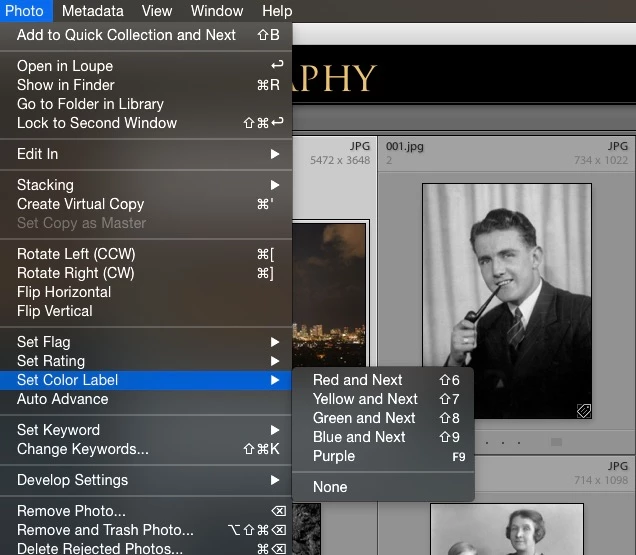
I can't figure out the shortcut for the color purple when organizing my pictures on Lightroom. There is a shortcut for all the other four colors. They're numbers 6-9, so did Adobe just not give purple shortcut because they ran out of numbers?

Correct answer StephenJHutchinson

At this point, I'm assuming you're on a Mac. It may be possible to rig a keystroke up using OS or keyboard app/plugin, if it would be worth doing(?)


Rob, there is indeed a way to do it on a Mac

1) Open up your Mac's System Preferences

2) Navigate to Keyboard

3) Choose the Shortcuts tab

4) Click the "+" icon to add a shortcut.

5) In the Application: dropdown box, choose Adobe Photoshop Lightroom

6) For Menu Title use the exact word: Purple

7) Choose a keyboard shortcut. For me I've chosen F9 because it isn't used in Lightroom and it's right near "9" which is used for Blue.

That's all there is to it.

Here's a screenshot of what it looks like:
4 replies

Participant
May 28, 2025

This is exactly what I was looking to do - add a purple shortcut. however in Mac OS Sequoia - there is no option to add shortrcuts to adobe apps - both lightroom classic and photoshop are missing from the list of available apps in the drop down selector - accessed from System settings>Keyboard>Keyboard SHortcuts>app shortcuts -> plus button - app list drop down. I tried giving full disk access to both apps in case that was preventing it - but still unable to add shortcuts for those apps. Does anyone have an updated solution on this for OS Sequoia and these two apps? Thanks.

Participant
May 28, 2025

update: I found that you have to select "other" at the bottom of the app list - and them select the app manually. I was able to do this and then add the Purple shortcut for F9.  SOLVED!

skyoctane74
Inspiring
September 11, 2020

I know this is an old post but never too late to receive this awesome tip and to say a massive thanks to the OP 🙂 Cheers!!!

areohbee
Legend
February 17, 2013

Ctrl-9:

R

Rob_Cullen
Community Expert
Community Expert
April 8, 2016

Rob Cole's  Post#2-

I have Windows-10 and cannot see  the Ctrl+9 shortcut for Purple!

Has Rob defined it somewhere in the OS? How was it achieved?

Regards. My System: Windows-11, Lightroom-Classic 15.1.1, Photoshop 27.3.1, ACR 18.1.1, Lightroom 9.0, Lr-iOS 10.4.0, Bridge 16.0.2 .
Participant
January 24, 2017

Rob must have hacked things and forgot.

Use notepad.exe to create/edit the following file - you may need to create the "en" subfolder or substitute another language if your install is not English:

C:\Program Files\Adobe\Adobe Lightroom\Resources\en\TranslatedStrings.txt

Add the following line, including the quotes:

"$$$/AgLibrary/Menu/Photo/Label/Toggle5Shortcut=Ctrl+9"

Save As with encoding of ANSI

Restart LR

For other versions of LR add the version number to the Adobe Lightroom folder name.


Hello!

I've created the shortcut in the System Preferences but it is not showing up in LR.

I'm running a Mac with OS Sierra 10.12.2 and LR CC.

I tried to find a text file to make changes to in the Library folders but was unsuccessful.

Participating Frequently
February 17, 2013

KristaMarieSetera wrote:

They're numbers 6-9, so did Adobe just not give purple shortcut because they ran out of numbers?

Correct...
