
Participant
October 16, 2024
Question

Comment créer un livre au format A4?

  • October 16, 2024
  • 1 reply
  • 215 views

Bonjour,

Lorsqu'on souhaite éditer un livre en pdf avec le module Livres, on n'a le choix qu'entre 8 formats. Même pas le format A4...

Vous ne trouvez pas anormal qu'il ne soit pas possible de fixer soi-même la gargeur et hauteur des feuilles, pour un logiciel de cette qualité?

Ou alors j'ai raté quelque chose!
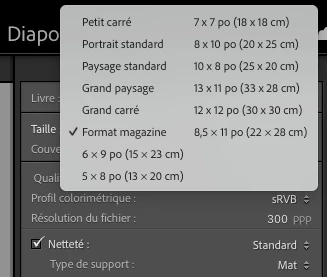
 

dans l'attente de votre avis ou de votre éclairage

This topic has been closed for replies.

1 reply

Rob_Cullen
Community Expert
Community Expert
October 17, 2024

If you go to the Blurb site you will find that they do not offer an A4 page size for 'Photo Books'  https://www.blurb.com/photo-books

The business (licence) contract between Adobe and Blurb might be to only offer those paper sizes shown in the link for specifically 'Photo Books'. So maybe it is a Blurb limitation, and not Adobe's.  Adobe may not offer other page sizes so as not to offend or break a contract with Blurb.

The Book Module (if memory is correct) was added about Version 4 of (old) Lightroom, and I suspect it was a promotional move to gain more Lr users, never to be a major component of Lr.

Book Module has had improvments, occasionally, but for those with different requirements, alternatives and work-arounds are needed. And I am sure Adobe would like us to use Adobe In Design.

Print Book to JPG or PDF are the only options when wanting an A4 page or another Printing service. Be ever hopeful!


Regards. My System: Windows-11, Lightroom-Classic 15.1.1, Photoshop 27.3.1, ACR 18.1.1, Lightroom 9.0, Lr-iOS 10.4.0, Bridge 16.0.2 .
Benjeee64Author
Participant
October 17, 2024

Thank you for your answer. But even when you choose to print in jpg or pdf, it is impossible to print in A4!