
Known Participant
October 11, 2023
Resuelto

comment Retoucher une partie d’une image à l’aide d’un paramètre prédéfini dans Lightroom classic ?

  • October 11, 2023
  • 1 respuesta
  • 489 visualizaciones

Bonjour,

Est-ce que quelqu'un peut m'expliquer comment retoucher une partie d’une image à l’aide d’un paramètre prédéfini dans Lightroom classic svp ?

Quand je sélectionne le ciel (par exemple) et que je clique sur un paramètre défini c'est toute l'image qui change, comment faire pour n'appliquer ce paramètre qu'au ciel svp ?

Merci d'avance 😉

Dany
Este tema ha sido cerrado para respuestas.
Mejor respuesta de Rob_Cullen

Presets in the panels on the left-hand side of the screen are always 'Global' presets. ie. They will affect the total image. (Even if you are masking.)

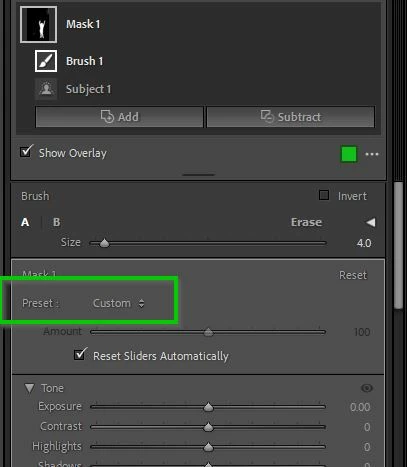
Presets that affect only a "part of an image" are known as 'Local Adjustment Presets' and are available from the [Preset] menu in the Masking panel-


1 respuesta

Rob_Cullen
Community Expert
Community Expert
October 11, 2023

You are possibly making adjustments with the Basic Panel sliders.

Scroll the right-hand panels up to the top until you see the Masking sliders.

If you do not see all the sliders you may need to click on the 'disclosure' triangles to expand all the adjustments.


Regards. My System: Windows-11, Lightroom-Classic 15.1.1, Photoshop 27.3.1, ACR 18.1.1, Lightroom 9.0, Lr-iOS 10.4.0, Bridge 16.0.2 .
Known Participant
October 11, 2023

merci, j'ai les memes panneaux que vous mais mon problème est que je 'narrive pas à appliquer un parametre défini sur une partie de l'image...

Dany

Rob_Cullen
Community Expert
Rob_CullenCommunity ExpertRespuesta
Community Expert
October 11, 2023

Presets in the panels on the left-hand side of the screen are always 'Global' presets. ie. They will affect the total image. (Even if you are masking.)

Presets that affect only a "part of an image" are known as 'Local Adjustment Presets' and are available from the [Preset] menu in the Masking panel-


Regards. My System: Windows-11, Lightroom-Classic 15.1.1, Photoshop 27.3.1, ACR 18.1.1, Lightroom 9.0, Lr-iOS 10.4.0, Bridge 16.0.2 .