


Participating Frequently
November 29, 2022
Question

Confused about Lost Images

  • November 29, 2022
  • 2 replies
  • 1552 views

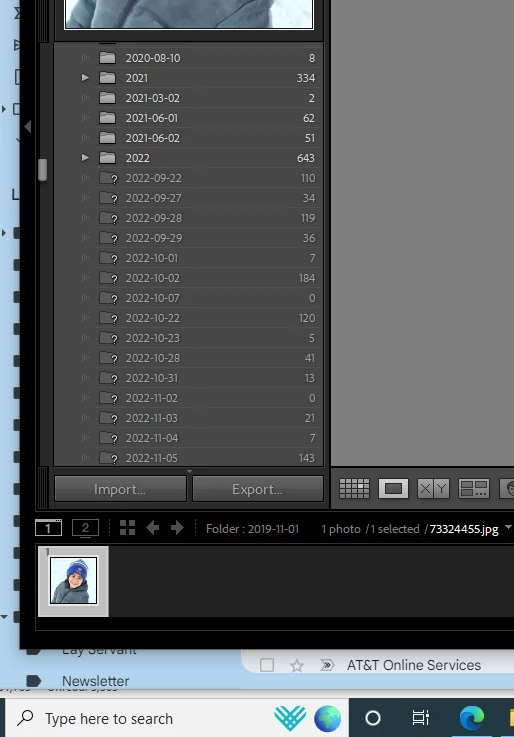
I moved these folders to go under the 2022 folder. For some reason now I'm left with these question marks in front of each folder. When I go to the folder, the images show but when I try to reconnect each image to it's new 2022 folder it tells me that the image isn't there and cannot be found.
This topic has been closed for replies.

2 replies

TheDigitalDog
Inspiring
November 30, 2022

On the folders missing the images, use the contextual menu (control click), select update folder location: and navigate to the folders to relink the contents:

LR doesn't know where the actual folders and content are on your drive, this will update that so it does know. 

Author “Color Management for Photographers" & "Photoshop CC Color Management/pluralsight"
Participating Frequently
November 30, 2022

Please see the screenshots with error messages below the original post?

TheDigitalDog
Inspiring
November 30, 2022
quote

Please see the screenshots with error messages below the original post?


By @Nshowalter

You can accept that name change which likely was made outside of LR (or LR would know the correct name). 

Any and everything you can do in File Explorer or the Finder (name, delete, move etc) should always be done IN Lightroom Classic! If you do any of these functions outside LR, the database has no idea you happened behind its back. 

Author “Color Management for Photographers" & "Photoshop CC Color Management/pluralsight"
Participating Frequently
November 29, 2022

Participating Frequently
November 29, 2022

Legend
November 30, 2022

Right click on the folder with the question mark, select "Find Missing Folder" and then select the new location of the folder.