Participating Frequently
October 27, 2024
Answered

Connections are gone

  • October 27, 2024
  • 1 reply
  • 685 views

A few days ago, I updated Lightroom Classic on my PC. Today when I logged in, all my Lightroom connections are gone. When I reinstalled the previous version, it made no difference. Everything is a big fat 0.

This topic has been closed for replies.
Correct answer Rob_Cullen

Hello, Rob.
I think I need to find an expert LRC user to help me with this problem. At this point, I'm unable to open Lightroom to reinstall the catalog that was working before the upgrade. Does Adobe offer online help? Where do I go for help?
Thanks in advance,
Lisa Rose


@lisajanrose Did you search your computer for .LRCAT catalog files with Windows File Explorer? What did the search find?

Post us a list of the .LRCAT files you have found.


(In FIle Explorer you need to have file extensions visible-  Look in your Folder Options>View. Uncheck "Hide Extensions......")
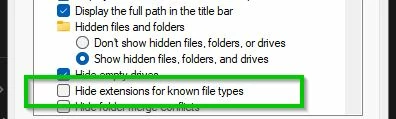
 

"Catalogs" do not need to be "re-installed"  Catalogs are a database type file that you 'open' with Lightroom-Classic, just as you would 'Open' a word document with MS-Word editor. Re-installing the Lr-Classic App does not affect Catalog files, but an empty Catalog ("connections are gone"?) usually suggests a 'new' catalog has been opened (just like a new word document).

You can select a .LRCAT file and [Right-CLick > Open], or [Double-Click] the file to Open in Lr-Classic.


1 reply

KR Seals
Community Expert
Community Expert
October 27, 2024

Please explain what you mean by "Connections". Are no folders visible on the left side of the Library module? No images in those folders.

Please reply with a full screen shot of the entire Lightroom Classic window on your computer. How to do a screen shot in Windows.

These symptoms are the classic signs of being in the wrong catalog or having unintentionally created a new, blank catalog.


Ken Seals - Nikon Z 9, Z 8, 14mm-800mm. Computer Win 11 Pro, I7-14700K, 64GB, RTX3070TI. Travel machine: 2021 MacBook Pro M1 MAX 64GB. All Adobe apps.
Participating Frequently
October 27, 2024
Thank you for taking an interest in my problem. Here's the screen shot:

[image: image.png]
Rob_Cullen
Community Expert
Rob_CullenCommunity ExpertCorrect answer
Community Expert
November 3, 2024

Hello, Rob.
I think I need to find an expert LRC user to help me with this problem. At this point, I'm unable to open Lightroom to reinstall the catalog that was working before the upgrade. Does Adobe offer online help? Where do I go for help?
Thanks in advance,
Lisa Rose


@lisajanrose Did you search your computer for .LRCAT catalog files with Windows File Explorer? What did the search find?

Post us a list of the .LRCAT files you have found.


(In FIle Explorer you need to have file extensions visible-  Look in your Folder Options>View. Uncheck "Hide Extensions......")


"Catalogs" do not need to be "re-installed"  Catalogs are a database type file that you 'open' with Lightroom-Classic, just as you would 'Open' a word document with MS-Word editor. Re-installing the Lr-Classic App does not affect Catalog files, but an empty Catalog ("connections are gone"?) usually suggests a 'new' catalog has been opened (just like a new word document).

You can select a .LRCAT file and [Right-CLick > Open], or [Double-Click] the file to Open in Lr-Classic.


Regards. My System: Windows-11, Lightroom-Classic 15.1.1, Photoshop 27.3.1, ACR 18.1.1, Lightroom 9.0, Lr-iOS 10.4.0, Bridge 16.0.2 .