
Known Participant
May 16, 2018
Answered

Constant Kernel Panic

  • May 16, 2018
  • 2 replies
  • 5356 views

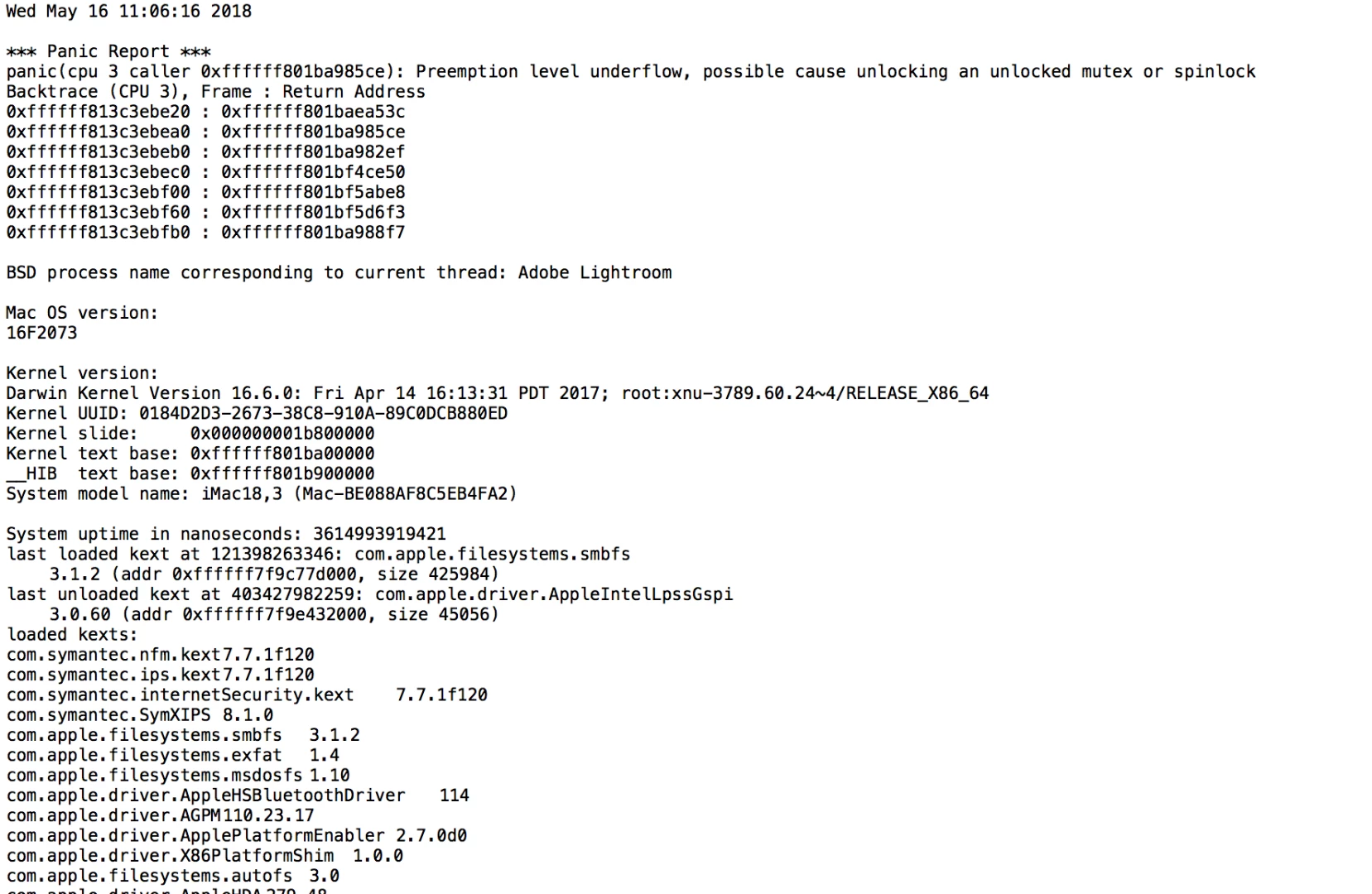
I'm running Lightroom CC and Photoshop CC and it's become a constant problem where when I am saving a photo in Photoshop with Lightroom open as well, the computer will experience a kernel panic and shut down.  The report seems to indicate that it is Lightroom that is causing the problem.  I'm running 10.12.5 on a 2017 iMac. Here is a look at the report.  Thanks in advance for any help.
    This topic has been closed for replies.
    Correct answer Jao vdL

    Turning off the GPU will have no influence on this. On Macs that just isn't an issue and it definitely won't cause kernel panics. Kernel panics like you are seeing here are due to hardware issues or to some really deep lying software problems. From the kernel trace above iI would HIGHLY suspect the Symantec antivirus software you have loaded that is causing your crashes. You might want to get rid of that or make sure it is at the most recent version. Antivirus software in many cases is worse than what it attempts to cure.

    2 replies

    Jao vdLCommunity ExpertCorrect answer
    Community Expert
    May 25, 2018

    Turning off the GPU will have no influence on this. On Macs that just isn't an issue and it definitely won't cause kernel panics. Kernel panics like you are seeing here are due to hardware issues or to some really deep lying software problems. From the kernel trace above iI would HIGHLY suspect the Symantec antivirus software you have loaded that is causing your crashes. You might want to get rid of that or make sure it is at the most recent version. Antivirus software in many cases is worse than what it attempts to cure.

    Participant
    November 11, 2020

    Could you possibly help me?!? Im

    javign the same problem as mentioned above and don't know what to do!

    dj_paige
    Legend
    November 11, 2020

    @Leigh-Anne98A4says:

    "Could you possibly help me?!? Im javign the same problem as mentioned above and don't know what to do!"


    My recommendation about what to do is start a brand new thread, describe the problem in detail, and provide all basic information, including:


    Akash Sharma
    Legend
    May 16, 2018

    Hi markophoto2013,

    Sorry about the system shutdown and kernel based error you're getting while exporting/saving images from Lightroom and Photoshop.

    Could you please check if the issue persists if you uncheck "use graphics processor" under Preferences> Performance menu in Lightroom?

    Lightroom GPU troubleshooting

    Also, which exact version of Photoshop and Lightroom are you using?

    Regards,

    Akash

    Known Participant
    May 16, 2018

    I've unchecked the graphics processor box and will see how it does.  Also I'm using PS CC 2017.1.1 and LR CC 2015.12.  I recently updated LR when this problem occurred but it didn't help.