billm58768003
Participant
February 28, 2018
Répondu

Convert to DNG

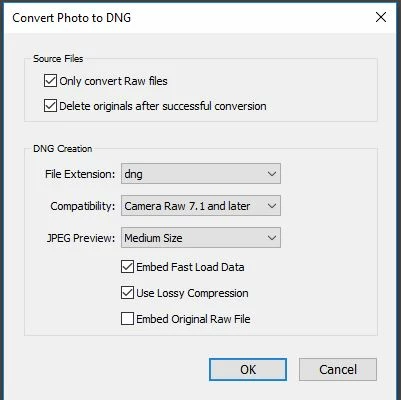
In the "Convert Photo to DNG" dialog if I check the "Delete originals after successful conversion" does this erase the raw original from the catalogue or from the source file as well?

    Ce sujet a été fermé aux réponses.
    Meilleure réponse par JP Hess

    I wasn't referring to the import dialog. I was referring to the library option to convert to DNG. When an option is chosen, there are several choices to be made. You can choose to preserve or delete the original raw files, and you can choose full-sized DNG files or lossy DNG files. These choices aren't available on the import dialog.
    3 commentaires

    Participating Frequently
    March 26, 2018

    Strong word of caution: I converted all my pictures (JPG & RAW) to DNG in 2014 - the worst decision I ever took with my pictures. Now, I cannot view or edit 30.000 of them natively on my Mac (Preview or Photo app). I can view them in Windows and this might an Apple issue (it might also be a bug in Lightroom 3.6) - but the very purpose of converting them was to secure long term access and the result, 4 years afterwards, is the exact opposite.

    Just Shoot Me
    Legend
    February 28, 2018

    Both.

    Is this with the Stand Alone DNG Converter program and the option to Copy as DNG in the LR import dialog?

    IIRC the option you mention doesn't apply to the LR import dialog.

    billm58768003
    Participant
    February 28, 2018

    Thanks

    Just Shoot Me
    Legend
    February 28, 2018

    billm58768003  wrote

    Thanks

    Ok I always forget about the option in the menu system to convert to DNG in LR.

    Yes if you tic the option to remove the originals it will remove them from the catalog and delete them.

    If you don't select the option to Delete the originals that converter will still remove the original RAW files from the catalog. And even if the RAW is left you can re-import it. For some reason LR still sees the original as being in the catalog. And maybe it is and LR is hiding it.

    If I'm going to convert to DNG I do it with the stand alone DNG Converter program outside of LR.

    JP Hess
    Inspiring
    February 28, 2018

    The original file is erased from the drive. You can find them in the trash or the recycle bin.