
jeanm45530256
Participant
May 20, 2022
Answered

Copier coller des paramètres ne fonctionne plus

  • May 20, 2022
  • 1 reply
  • 1236 views

Bonjour,

Dans Lightroom classic V11.3.1 , depuis quelques jours, il m'est impossible de copier/coller les paramètres d'une photo vers une autre ce que faisait couramment.
Lorsque je clique copier, rien ne se passe et je n'ai pas la fenêtre destinée à cocher les paramètres à copier.
Tout est bloqué et je dois faire ESC pour reprendre la main.
J'ai réinstallé Lightroom et c'est toujours la même chose!
Que faire?
Merci de vos réponses,
Jean
This topic has been closed for replies.
Correct answer F. McLion

Try if it helps to reset preferences:

Open Preferences from the Edit menu. While in General tab, hold down the Alt key, and you will see the following:

Reset all preferences ...

1 reply

F. McLion
Community Expert
F. McLionCommunity ExpertCorrect answer
Community Expert
May 20, 2022

Try if it helps to reset preferences:

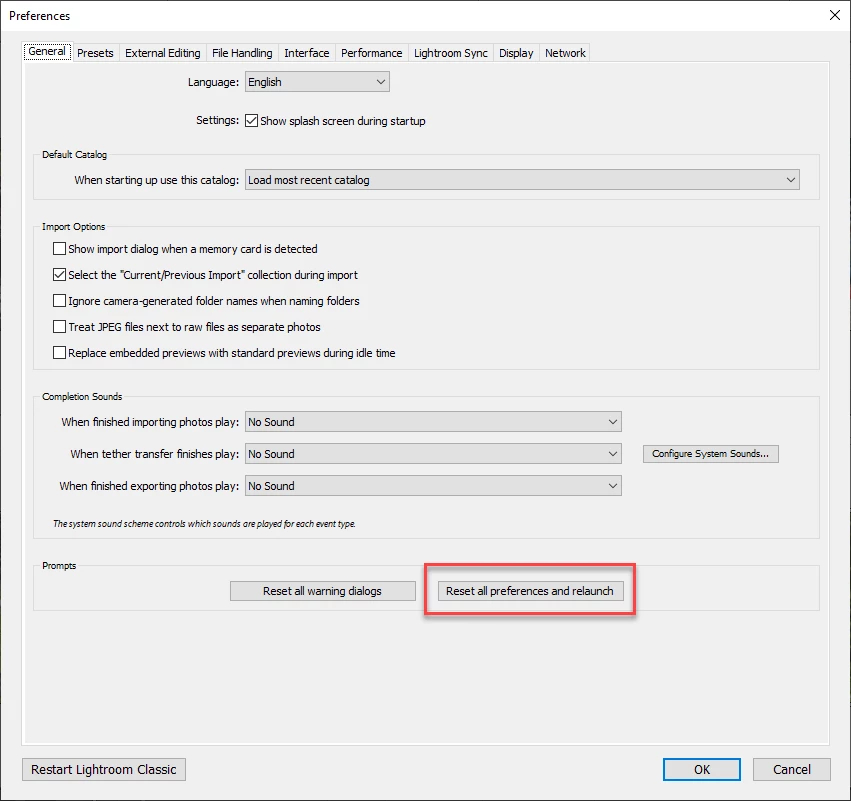
Open Preferences from the Edit menu. While in General tab, hold down the Alt key, and you will see the following:

Reset all preferences ...

--- Got your issue resolved? Please label the response as 'Correct Answer' to help your fellow community members find a solution to similar problems. ---
jeanm45530256
Participant
May 20, 2022

MsLion, thanks a lot for the solution, it's solved.

jean