


jeanm45530256
Participant
May 20, 2022
해결됨

Copier coller des paramètres ne fonctionne plus

  • May 20, 2022
  • 2 답변들
  • 1277 조회

Bonjour,

Dans Lightroom classic V11.3.1 , depuis quelques jours, il m'est impossible de copier/coller les paramètres d'une photo vers une autre ce que faisait couramment.
Lorsque je clique copier, rien ne se passe et je n'ai pas la fenêtre destinée à cocher les paramètres à copier.
Tout est bloqué et je dois faire ESC pour reprendre la main.
J'ai réinstallé Lightroom et c'est toujours la même chose!
Que faire?
Merci de vos réponses,
Jean

이 주제는 답변이 닫혔습니다.
최고의 답변: F. McLion

Try if it helps to reset preferences:

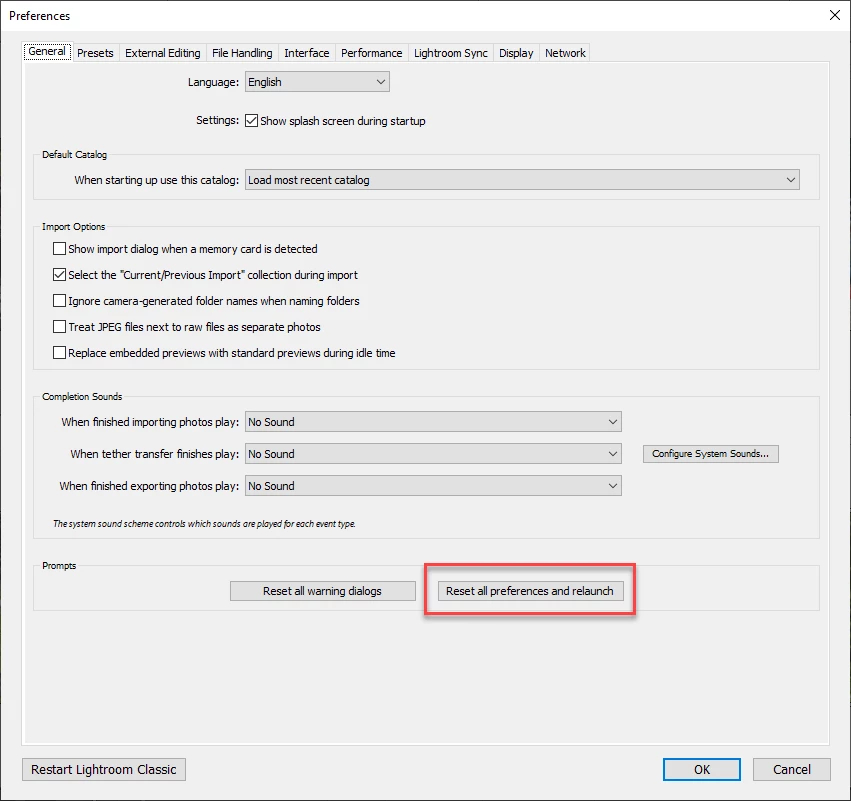
Open Preferences from the Edit menu. While in General tab, hold down the Alt key, and you will see the following:

Reset all preferences ...

2 답변

F. McLion
Community Expert
F. McLionCommunity Expert답변
Community Expert
May 20, 2022

Try if it helps to reset preferences:

Open Preferences from the Edit menu. While in General tab, hold down the Alt key, and you will see the following:

Reset all preferences ...

--- Got your issue resolved? Please label the response as 'Correct Answer' to help your fellow community members find a solution to similar problems. ---
jeanm45530256
jeanm45530256작성자
Participant
May 20, 2022

MsLion, thanks a lot for the solution, it's solved.

jean