
New Participant
September 11, 2020
Answered

copy exif data to caption field

  • September 11, 2020
  • 2 replies
  • 677 views

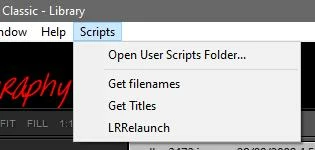
There's the scripts menu in Lightroom Classic 9 (in the menu bar next to the Help menu). So far I've found out that these scripts have the ending .lua. For a long time I have wanted a script that copies selected metadata (e.g. from the fields date, camera model, dimensions, GPS, etc.) into the field “Caption”. My system is macOS 10.15.
This topic has been closed for replies.
Correct answer Rob_Cullen

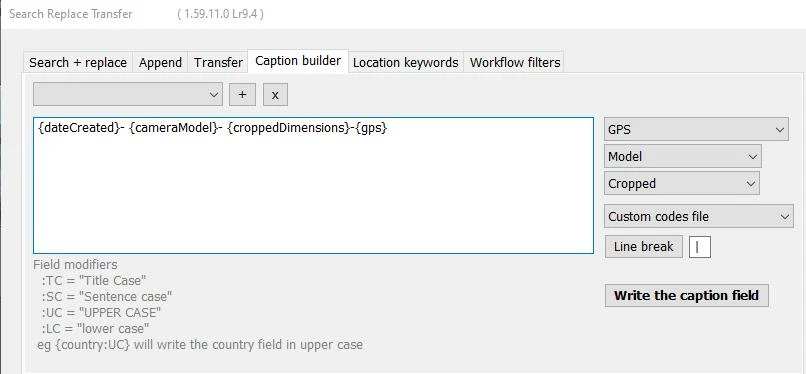
A Plugin would suit your purpose!  See the 'Caption Builder' tab -

https://www.photographers-toolbox.com/products/jbeardsworth/findreplace/

And, yes, a "Scripts" menu is possible in Windows Lightroom-Classic-

2 replies

Rob_Cullen
Rob_CullenCorrect answer
Adobe Expert
September 12, 2020

A Plugin would suit your purpose!  See the 'Caption Builder' tab -

https://www.photographers-toolbox.com/products/jbeardsworth/findreplace/

And, yes, a "Scripts" menu is possible in Windows Lightroom-Classic-

Regards. My System: Windows-11, Lightroom-Classic 15.0, Photoshop 27.0, ACR 18.0, Lightroom 9.0, Lr-iOS 10.4.0, Bridge 16.0 .
wolferl Author
New Participant
September 12, 2020

Hi WobertC,

thank you very very much.

This is the one I'm looking for. And everything works absolutely fantastic...!

Because I'm working 75% on the lightroom image management, I was looking for this tool! Caption builder, also Search and Replace, Add etc. are all helpful.

regards

Just Shoot Me
Brainiac
September 11, 2020

AFAIK there is no Scripts menu on Windows in LrC 9.x.

So this must be a Mac thing and a Mac scripts thing, Not LrC.


Show us a screen shot of what you are asking about.


wolferl Author
New Participant
September 11, 2020

...you can also use it on Windows...  you have to create a script folder, if not!

(see Adobe help site for another script...)

https://helpx.adobe.com/de/lightroom-classic/kb/extract-previews-for-lost-images-lightroom.html