
Participating Frequently
May 10, 2018
Question

CPU jumps to 100% upon exporting from LR C

  • May 10, 2018
  • 1 reply
  • 811 views

I've been having huge trouble with Lightroom Classic of late and I simply cannot figure out what the problem is, my PC is m ore than capable of running the software and has done without any issues until fairly recently.

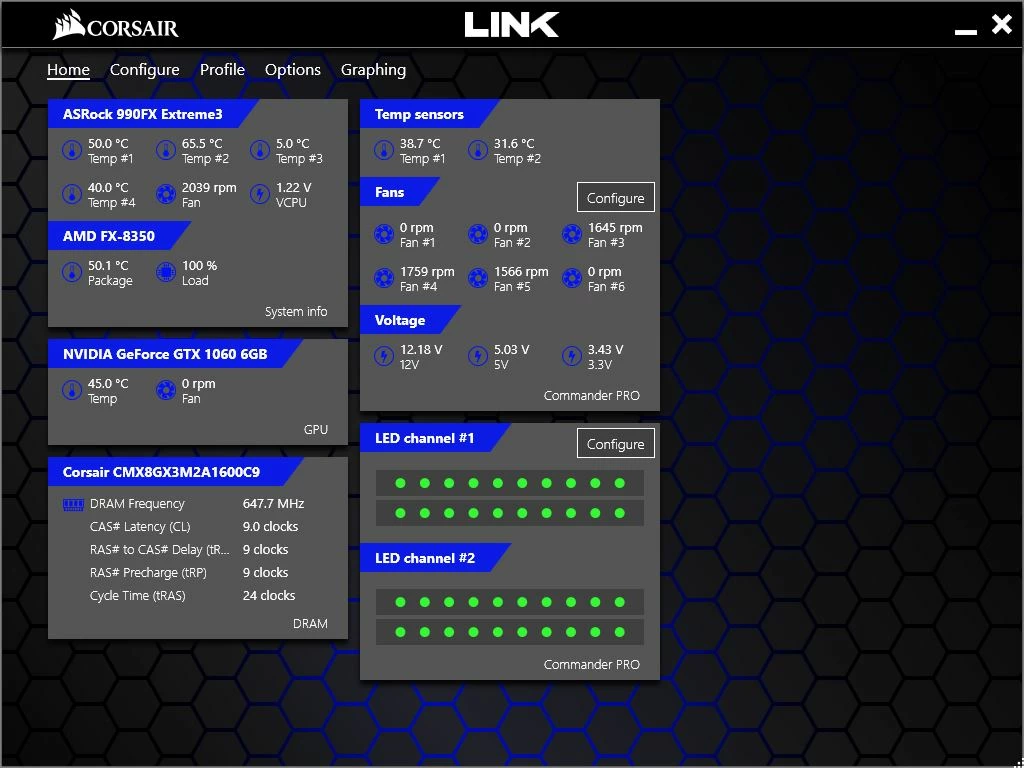
I had been experiencing extremely slow performance whilst editing so asked in a local photography group for some advice, someone recommended turning off the GPU acceleration which did help when I was applying edits etc however when it came to export them it takes forever to do and the CPU usage jumps to 100% whether I am using the GPU or not.

Really stuck here, I am not the most technically gifted when it comes to software etc, so any replies keep to 'noob' level explanations please!!

My system specs are as follows - screenshot taken whilst exporting...
This topic has been closed for replies.

1 reply

dj_paige
Legend
May 10, 2018

So, you need to give us some information, like all of these things

  • The hardware on your computer: CPU (exact make and model), amount of memory
  • Operating system version NUMBER
  • Lightroom version NUMBER (not words like "latest")
  • How big are the photos you are exporting, in pixels or megapixels (do not tell me megabytes)
  • How many photos are you exporting when this happens
Participating Frequently
May 10, 2018

CPU AMD FX(tm)-8350 Eight Core Processor with 16GB DDR3 RAM (this is all in the screenshot I attached to my original comment)

OS Windows 10 Home Edition

Lightroom Classic version: 7.3.1 [ 1167660 ]

I have been exporting images at variety of different sizes depending on what I am doing with them next such as long side at 2048px for just for one example. These can be anything from an album of 100-150+ (never had any issues exporting albums of this size or indeed larger ones like this before) images to a handful or even just one image. As I have said these are at different sizes depending on what I am using them for - sending to clients, uploading to my website/social media etc...and it is doing this for all files whether I am exporting small/large JPEG/TIFF and so on.