
Inspiring
November 18, 2021
Question

Crop not correctly applied on HDR image og a stack of bracketed images

  • November 18, 2021
  • 3 replies
  • 1971 views

Hello,

End of the message you can find a video of the problem.
3 similar issues that I will detailled.

Context:
I scan with my camera my 6x6 (120) negatives. For each image I shot with backeting. 5 images with 1EV difference (-2EV to +2EV). then I do a HDR merge with Lightroom Classic.


1) Issue 1 (1 min 26 to 4 min 00)

First I select my 5 bracketed images of my first negative (0:17 to 0:27)

Then I go to develop module

Sync with all settings checked is active (sorry I displayed the wimndow of settings but it was not captured by screen recording)
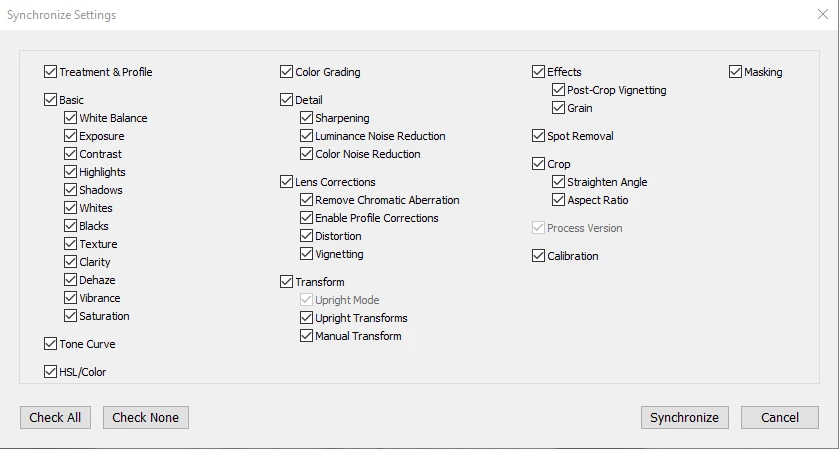
 

I crop the images (1:17 to 2:35)

I create stacking for all my images (2:35 to 2:50)

I select all stacks and I launch an HDR merge (3:05)

when the HDR merge is done for the first stack, we can notice that the HDR image has no cropping.


Conclusion HDR merge is not taking in account the cropping of source images.
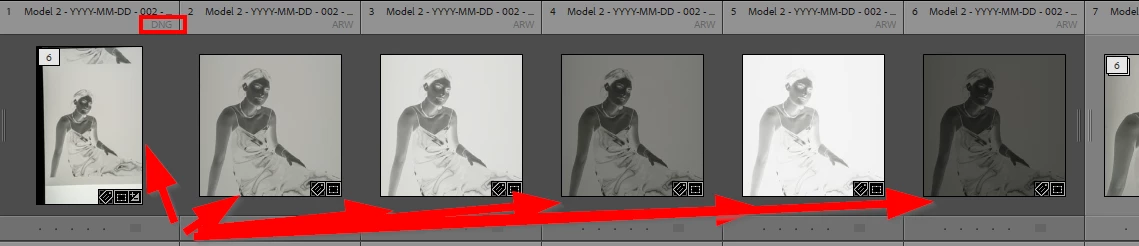


2) Issue 2 (4 min 05 to 6:08)

In the second stack of 6 images (HDR included)

I select the 6 images

Then I go to develop module

Sync all settings is activated

I crop the HDR image

A cropping is applied to the 6 images but it's not the same between the HDR image and the 5 bracketed images member of the same stack.
There is like a zoom effect on the images that should be synchronized.

Conclusion when we crop a stack of images including an HDR merge of the others, the crop is not apply identicaly to all images (sync).



3) Issue 3 (6:10 to end)

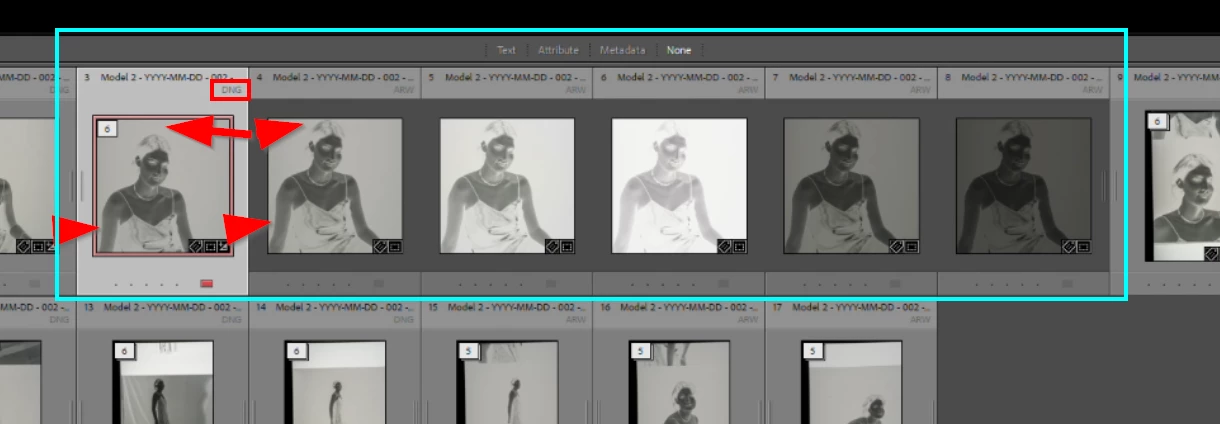
Now I will crop the 5 bracketed images and copy past the develop settings to the HDR merge image.


So I select the third stack.

I expand the stack

I color label the HDR mege image.

I select the 5 other images of the stack.

I go to develop module

I crop the 5 images with Sync all settings activated.

I go back to Library module

I select the first image of the five (so the second of the stack)

I coppy the develop settings (sorry, popup and settings windows were not captured by the scree recording) [7:28 to 7:40]

Now I select the HDR image (the first of the stack) and I paste the settings [7:42 to 7:55]

We can see that a crop is applied to the HDR image but it's not the same than the original image from where I copy the develop settings.
The crop resizing seems good (no zooming, no proportion difference), but it looks like the HDR image is framed differently, it's like the image is shifted down, so there is more place up to the head.

Conclusion, Copy paste settings from an image to the HDR merge of this image is not applying correctly the cropping.
 

The full video, but start to be interesting at 1 min 26

This topic has been closed for replies.

3 replies

Todd Shaner
Legend
November 21, 2021

I watched your video, but without audio I found it confusing as to what you were doing at the various steps. Regardless, I agree with the comments from the other people who replied. LrC Photo Merge HDR does not apply any settings to the image files during the HDR merge processing. This includes cropping applied to the bracketed image files. What will appear in the HDR DNG file are the settings applied to the most selected image file. So it's a futile effort to crop the individual bracketed image files before the HDR merge process.


Unfortunately, you have a bigger issue. In looking at the screen shots and video there are large film areas outside the actual picture frame that are pure white or black. Since LrC HDR merge uses the whole image frame when making its calculations the resulting HDR DNG output file will be less than optimal. The only workaround for the negatives already captured is to crop them inside LrC and export to TIFF file format. Then use the cropped TIFFs to recompute the bracketed image files in LrC Merge to HDR. Going forward I suggest during shooting crop the negative in-camera such that there are no areas (or very minimal area) visible outside the picture frame. Also level the image in-camera so it is oriented as you would like in the final HDR output file. If shooting with the camera on a tripod and the film holder well secured the bracket set image files should be well aligned to each other.


I do have considerable experience in the area of scannerless film capture. Glad to assist you further if needed.

https://luminous-landscape.com/scannerless-digital-capture-and-processing-of-negative-film-photographs/


Inspiring
November 22, 2021

Hello Todd,
Thank you for your constructive message.

I should do 3 videos, but I tried to compensate by give the timecode.
I used the screen recording of windows and it was not the best, maybe I didn't know how to use it correctly.


What will appear in the HDR DNG file are the settings applied to the most selected image file. So it's a futile effort to crop the individual bracketed image files before the HDR merge process.


By @Todd Shaner


What do you mean by "most selected image file"?

In my case it's applied identically on all the selected images.


Unfortunately, you have a bigger issue. In looking at the screen shots and video there are large film areas outside the actual picture frame that are pure white or black. Since LrC HDR merge uses the whole image frame when making its calculations the resulting HDR DNG output file will be less than optimal.


By @Todd Shaner

So, this is a good argument to promote the fact that HDR Merge should take in account the crop. It will respect the user choice and also it will save time in calculation 😉


The only workaround for the negatives already captured is to crop them inside LrC and export to TIFF file format. Then use the cropped TIFFs to recompute the bracketed image files in LrC Merge to HDR.


By @Todd Shaner


Thank you for the workaround 🙂 I will definitively try it.

(negative point, it will increase again the size of data to store 😞 )


Going forward I suggest during shooting crop the negative in-camera such that there are no areas (or very minimal area) visible outside the picture frame. Also level the image in-camera so it is oriented as you would like in the final HDR output file. If shooting with the camera on a tripod and the film holder well secured the bracket set image files should be well aligned to each other.


By @Todd Shaner


I will take a look at crop in Camera. I don't know how to do it in my Sony A7RIV. when I scan a 24x36, I try to use the full captor, but when it's a 6x6, yes, I have a lot not used, but starting with 61M pixels it was not a big deal for me.

Regarding my film holder, sometimes he moves a bit between 2 negatives and I have to readjust. But for a same negative, there is no move. I use a copy stand and Essential Film Holder. I can ensure that the Holder will not move, between 2 negative, but when I slide the negative inside to the next one, it's difficult to place it exactly like the preceent one, so cropping in the camera can be a problem where I will lose lot of time


Todd Shaner
Legend
November 22, 2021

"What do you mean by "most selected image file"? In my case it's applied identically on all the selected images."


When multiple image files are selected there is always one in the filmstrip that is brighter (white). When syncing edits the settings in the most selected file are applied to the other (lesser selected) files.


"So, this is a good argument to promote the fact that HDR Merge should take in account the crop. It will respect the user choice and also it will save time in calculation."


As already mentioned by numerous people LrC HDR Merge does not apply any Develop settings to the bracketed image files during the merge process. It's very unlikley Adobe will change this behavior. As mentione what does happen is that the Develop settings in the most selected image file are applied to the HDR Merge DNG ouput file.


"Regarding my film holder, sometimes he moves a bit between 2 negatives and I have to readjust. But for a same negative, there is no move."


A small amount of alignment difference between negative frames shoould not be a problem when 'Auto Align' is checked in the HDR Merge control settings. You just want to keep the area visible in-camera that is outside the picture frame as small as possible. You can test the imapct this may have on the HDR output DNG file by comparing a current HDR DNG file created with the ARW file set that has a large area outside the picture frame. Compare it to an HDR DNG file created using cropped TIFF files that have the area outside the picture frame removed. There may not be much difference, but this is a good test to confirm if that is the case.


Participant
November 21, 2021

I have exactly the same anoying issue with the transform tools and bracketing, that totally spoil my workflow as real estate photographer. 
/Peter

GoldingD
Legend
November 18, 2021

I did not read the entire thing. Your beginning brings up one issue. For Merge Photo, do not accomplish any modifications before the merge. Most mods will be ignored, some can damage the merge attempt. At best, you are wasting effort.


A point about HDR merge, when taking the bracket, change shutter, not aperture. No, I have no idea if you did this or not.

Inspiring
November 18, 2021

Hello,
Thanl you for your reply.

You should read all ;-), because the issue 2) and 3) are the result of searching another solution than what you were saying to not do.

But first, to reply to the question, aperture is fixed, shutter speed is changing to bracket.


Let say that I should not crop before doing hdr merge as you advice me.

Then we arrive to my 2 next issues discribed.


Because it was not working to have a correct cropped HDR merge from cropped sources, then I try do do differently.

My issue 2), I generate first the HDR merge and then I select the 6 images I crop them and the HDR image is not cropped like the other images


So I tried differently, I cropped the sources images, copy the settings and apply to the HDR merge image and again, the image is not cropped like for the sources.


Participant
November 21, 2021

There is no bug here. Lightroom works as designed. The reason is that people often shoot handheld when taking brackets for HDR. That means that Lightroom must slightly crop the auto-aligned merged result, because the alignment of the brackets was not 100% perfect. And so it makes perfect sense to ignore any crop setting of the brackets.


There is definitely a bug with LR regarding transform tools with bracketing photos. Of cause the bracketing photos are exactly identically and used with a tripod. But LR do not transform them exactly with same result, and the HDR will then be blurred.  
The workaround and make the HDR file first and then the transform tools, do not fit in my workflow. 
thank you for understanding that we are aware of bracketing photos need to be taken with tripod, and photos are exactly the same before the transform tools, and accept there is a bug in LR