
Participant
December 4, 2024
Question

Customizing Lightroom Classic->Export->Post Processing to include Photoshop 2025

  • December 4, 2024
  • 2 replies
  • 382 views

I'm hoping someone might provide some tips. If there is a simple fix, I can't find it.

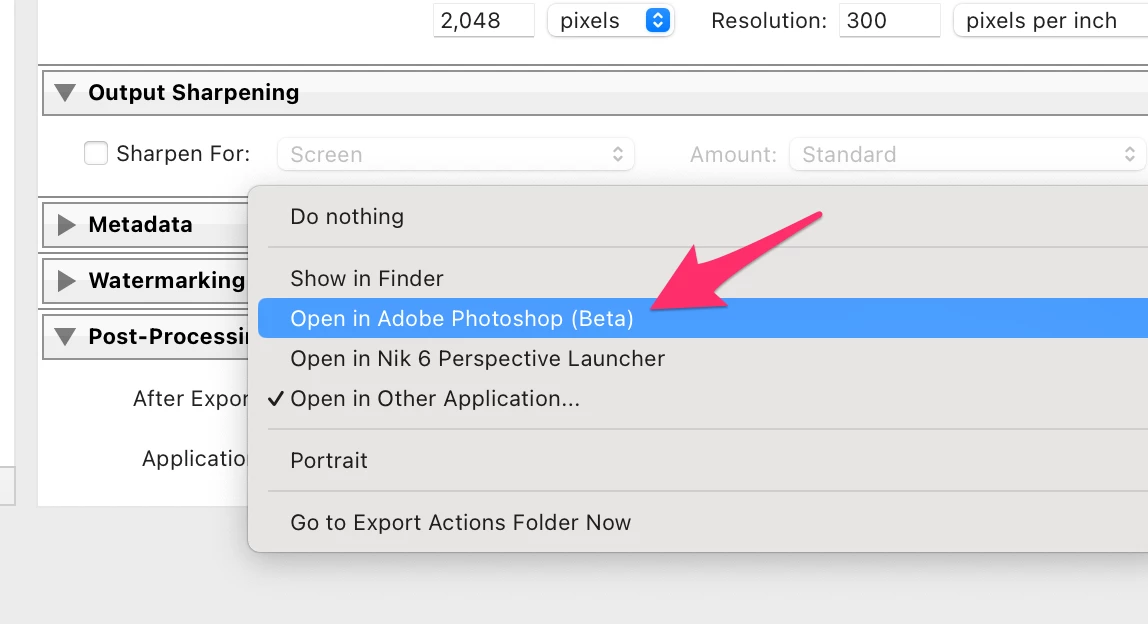
In Lightroom Classic under Export->Post-Processing->After Export, there are default actions to Open in...

Mine shows an option for Adobe Photoshop (Beta) but I'd like to change or add Adobe Photoshop 2025 installed on my system.

The workaround is Open in Other Application and then select Adobe Photoshop 2025. It works but it would be nice to have it as one of the defaults.
 

This topic has been closed for replies.

2 replies

Conrad_C
Community Expert
Community Expert
December 4, 2024

The option you’re looking for is as shown in the picture below:


GoldingD
Legend
December 4, 2024

Have you brought up /Preferences/External Editing/ and in the Edit in Adobe Photoshop.. Panel, for Photoshop Version, changed that from Beta, to the proper one?


Oh, and probably a restart LrC after that. (not sure)


Followup, an oddity on my rig, went in to look at that closer, and my Edit in Photoshop was set to PS 2024, but the External Edit post process offered was PS 2025. Changed the Edit in while I was looking at that. Point is the Edit in PS might not change anything, you will just have to test.

del_4500Author
Participant
December 4, 2024

That was the first thing I've tried but no success. That's what makes this problem frustrating. Photoshop (Beta) continues to be the default in Export->Post Processing. It's not a big deal but it's the little things that drive you crazy. 🙂 Thanks.


GoldingD
Legend
December 4, 2024

Should ask, do you actually still need PS Beta?