
Participating Frequently
December 13, 2017
Answered

Dehaze tool is missing

  • December 13, 2017
  • 5 replies
  • 3386 views

I'm using LR classic CC. Dehaze tool is missing since a couple of weeks.

Here is system information :
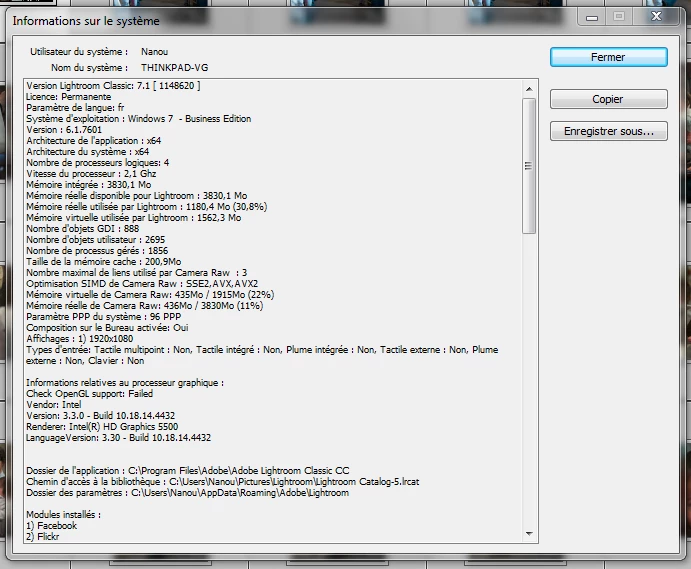
Note that when LR is launched, it disconnects from CC. I tried several manipulations (reinstall CC & LR) but it doesn't solve anything.

This topic has been closed for replies.
Correct answer dj_paige

I would rename or delete the Preference file and see if that fixes the problem

Preference file and other file locations | Lightroom Classic CC and Lightroom 6

5 replies

loutreaAuthor
Participating Frequently
December 18, 2017

Any help ?

F. McLion
Community Expert
Community Expert
December 18, 2017

Your LR is in a state that is not existent according to Adobe.

You have version 7 - which is available as subscription only - but your license state says 'Permanent' and it also behaves like a non-subscription version and is not showing you the added features.

I wonder if the reset dj_paige is suggesting helps, otherwise let us know and we can ping Adobe to help out of this.

--- Got your issue resolved? Please label the response as 'Correct Answer' to help your fellow community members find a solution to similar problems. ---
loutreaAuthor
Participating Frequently
December 19, 2017

Thank you for your help.

So I tried to reset my preferences. I restarted LR using the Alt+Shift combo keys. I dialog box appeared, and I click on "reset" button. But my problem was still there.

Then I manually rename the preference folder, My problem is still there.....

Please can you ping Adobe ?

loutreaAuthor
Participating Frequently
December 14, 2017

I took some pictures :

Dehaze is missing in Effect panel :

I am using Process version V4 :

...and french language is not a bug...

Thanks for your help

Edit:

I just realized that a lot of new features are missing, as if a old version of LR was running : guided upright tool, latest options on radial filter, etc. But I'm sure the software is up to date, and that what the "About" popup suggests.

dj_paige
Legend
December 14, 2017

The photos must be edited in the Process Version 3 or 4, earlier process versions will not show dehaze.

loutreaAuthor
Participating Frequently
December 14, 2017

I am in version 4, the latest.

Just Shoot Me
Legend
December 14, 2017

The Dehaze tool is in the Effects section. Is that where you are looking.

loutreaAuthor
Participating Frequently
December 14, 2017

Yes this is what I am looking for.

Just Shoot Me
Legend
December 13, 2017

What exactly do you mean by "When LR is launched it disconnects from CC"?

Is this with new, recently imported, RAW images.

What Process are you using?

loutreaAuthor
Participating Frequently
December 14, 2017

Thanks for your help.

I mean that when I launch LR (by double-clicking on its icon in Creative Cloud), Creative Cloud disconnects from my Adobe account. It asks me to log in again.