
Participant
August 22, 2024
Question

Denoise AI causes dark box artifacts throughout the image

  • August 22, 2024
  • 3 replies
  • 995 views

I'm using the AI Denoise feature in Lightroom Classic on an M1 Macbook Air with 16GB RAM. The resulting image has dark squares spread throughout the image. Here's a screenshot of what I'm seeing - I raised the exposure a few stops to make the boxes more obvious: 
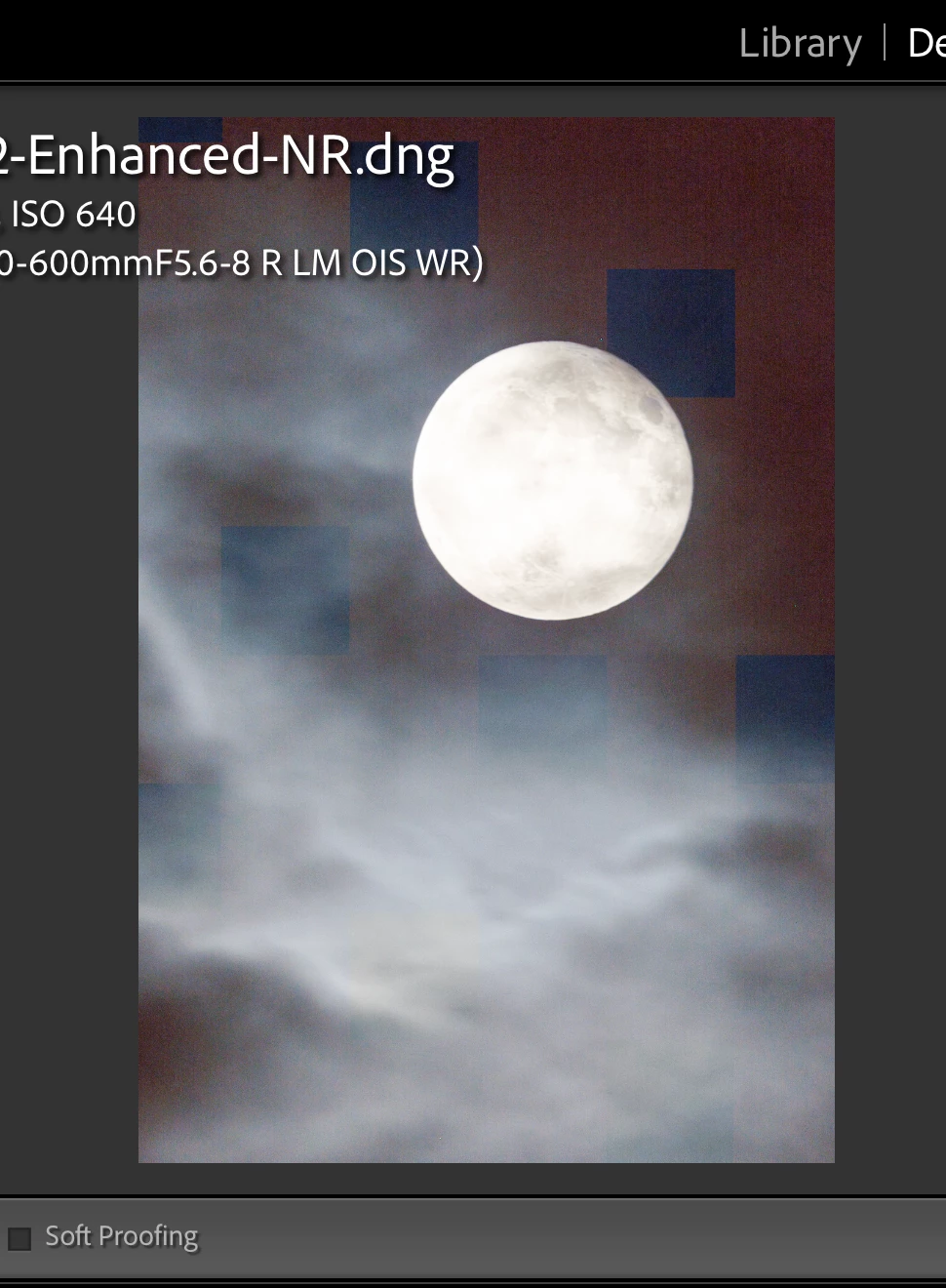
 

Things I've tried so far: 

- Rebooted system

- Tried all possible permutations of graphics acceleration, from fully disabled to fully enabled

- Downgraded Lightroom Classic to n-1 and n-2 versions

- Tried using Lightroom Cloud instead

At this point, I'm at a loss, and can't process these photos. 

This topic has been closed for replies.

3 replies

Participant
October 30, 2024

Heyo- I get the same issues with some of my imagery. Shot on Canon R5. My guess is that it's the graphics card and doesn't have to do with the camera itself. I'm on a iMac 2019 Intel. 

johnrellis
Legend
October 30, 2024

@defaultw87cbydvuz6a: "Canon R5 ... a iMac 2019 Intel."


This could be caused by the version of Mac OS and the particular graphics chip in your computer. Do the LR menu command Help > System Info and copy/paste the entire contents here so we can see exactly which versions of hardware and software LR thinks you're running and important LR options that are set.

johnrellis
Legend
October 30, 2024

Lightroom Classic version: 14.0.1 [ 202410161356-30922cfc ]
License: Creative Cloud
Language setting: en-US
Operating system: Mac OS 14
Version: 14.7.0 [23H124]
Application architecture: x64
Logical processor count: 20
Processor speed: 3.6GHz
SqLite Version: 3.36.0
Built-in memory: 32,768.0 MB
Dedicated GPU memory used by Lightroom: 8,408.7MB / 8,176.0MB (102%)
Real memory available to Lightroom: 32,768.0 MB
Real memory used by Lightroom: 6,366.9 MB (19.4%)
Virtual memory used by Lightroom: 57,570.8 MB
Memory cache size: 2,358.3MB
Internal Camera Raw version: 17.0 [ 2043 ]
Maximum thread count used by Camera Raw: 5
Camera Raw SIMD optimization: SSE2,AVX,AVX2
Camera Raw virtual memory: 1193MB / 16383MB (7%)
Camera Raw real memory: 1282MB / 32768MB (3%)

Cache1:
Final1- RAM:189.0MB, VRAM:0.0MB, 0C2A1424.CR3
Final2- RAM:200.0MB, VRAM:266.0MB, 0C2A1324.CR3
Final3- RAM:188.0MB, VRAM:0.0MB, 0C2A1338.CR3
Final4- RAM:189.0MB, VRAM:0.0MB, 0C2A1400.CR3
Final5- RAM:189.0MB, VRAM:0.0MB, 0C2A1248.CR3
NT- RAM:955.0MB, VRAM:266.0MB, Combined:1,221.0MB

Cache2:
m:2,358.3MB, n:1,204.5MB

U-main: 136.0MB

Standard Preview Size: 5120 pixels
Displays: 1) 5120x2880

Graphics Processor Info:
Metal: AMD Radeon Pro 5500 XT
Init State: GPU for Export supported by default
User Preference: Auto
Enable HDR in Library: OFF

Application folder: /Applications/Adobe Lightroom Classic
Library Path: /Users/mattwhalen/Pictures/Lightroom/Lightroom Catalog-v13-3.lrcat
Settings Folder: /Users/mattwhalen/Library/Application Support/Adobe/Lightroom

Installed Plugins:
1) AdobeStock
2) Aperture/iPhoto Importer Plug-in
3) Flickr

Config.lua flags:


@defaultw87cbydvuz6a

"Version: 14.7.0 [23H124]

Metal: AMD Radeon Pro 5500 XT"


Mac OS 14.4.1 introduced a buggy graphics driver for Intel Macs with AMD Radeon 5000-series graphics processors.  There were many people affected by this, most with artifacts in the display of images in Develop but some with problems with AI commands like masking and denoise. There have been some reports that upgrading to Mac OS 15 (Sequoia) fixes their symptoms, and couple that it doesn't:
https://community.adobe.com/t5/lightroom-classic-bugs/p-gpu-develop-edit-view-amp-export-artifacts-after-14-4-1-update-amd-only-affects-cr-lrc-amp-lrd/idi-p/14563606

Community Expert
August 24, 2024

What camera is this? The denoise feature has longstanding problems with certain pentax and Fuji files. It doesn't cause these blocks that I can remember but causes it to simply not do any denoising at all.

Participant
August 25, 2024

This is on a Fujifilm X-T5. I've used this denoise feature quite a few times before with the files from this camera, so I'm not sure what changed. 

No recent firmware updates either. 

johnrellis
Legend
August 25, 2024

Upload a problem Fujifilm raw to Dropbox, Google Drive, or similar, and post the sharing link here. We can see if the issue is inherent in the photo or specific to your LR installation.

johnrellis
Legend
August 23, 2024

Please do the LR menu command Help > System Info and copy/paste the entire contents here so we can see exactly which versions of hardware and software LR thinks you're running and important LR options that are set.   

Participant
August 24, 2024

Here is the system info: 


Lightroom Classic version: 13.5 [ 202408062022-6258095b ]
License: Creative Cloud
Language setting: en-US
Operating system: Mac OS 14
Version: 14.6.1 [23G93]
Application architecture: arm64
Logical processor count: 8
Processor speed: NA
SqLite Version: 3.36.0
Power Source: Battery, 94%
Built-in memory: 16,384.0 MB
Dedicated GPU memory used by Lightroom: 1,391.2MB / 10,922.6MB (12%)
Real memory available to Lightroom: 16,384.0 MB
Real memory used by Lightroom: 1,591.2 MB (9.7%)
Virtual memory used by Lightroom: 405,855.7 MB
Memory cache size: 33.8MB
Internal Camera Raw version: 16.5 [ 1953 ]
Maximum thread count used by Camera Raw: 5
Camera Raw SIMD optimization: SSE2
Camera Raw virtual memory: 540MB / 8191MB (6%)
Camera Raw real memory: 559MB / 16384MB (3%)

Cache1: 
Final1- RAM:266.0MB, VRAM:663.0MB, DSCF4632-Edit.tif
Preview2- RAM:35.0MB, VRAM:0.0MB, DSCF4632.dng
NT- RAM:301.0MB, VRAM:663.0MB, Combined:964.0MB

Cache2: 
m:33.8MB, n:292.6MB

U-main: 80.0MB

Standard Preview Size: 2880 pixels
Displays: 1) 2880x1800

Graphics Processor Info: 
Metal: Apple M1
Init State: GPU for Export supported by default
User Preference: Auto
Enable HDR in Library: OFF

Application folder: /Applications/Adobe Lightroom Classic
Library Path: /Users/j/SynologyDrive/Lightroom Catalog/Summer 2024/Summer 2024.lrcat
Settings Folder: /Users/j/Library/Application Support/Adobe/Lightroom

Installed Plugins: 
1) AdobeStock
2) Aperture/iPhoto Importer Plug-in
3) Flickr
4) Nikon Tether Plugin
5) Topaz Photo AI

Config.lua flags: