Participant
April 23, 2023
Frage

Denoise AI unkown error

  • April 23, 2023
  • 3 Antworten
  • 1339 Ansichten

I'm receiving an unknown error while applying the enhancement.

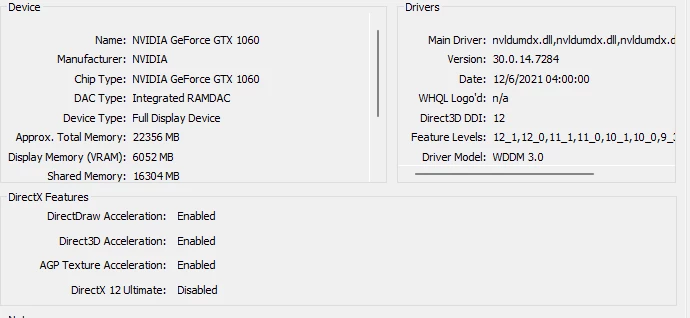
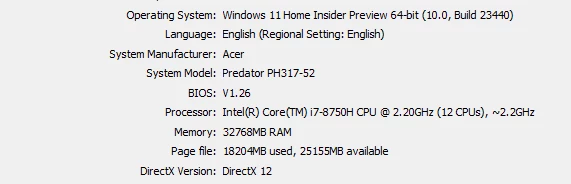
System info as below.
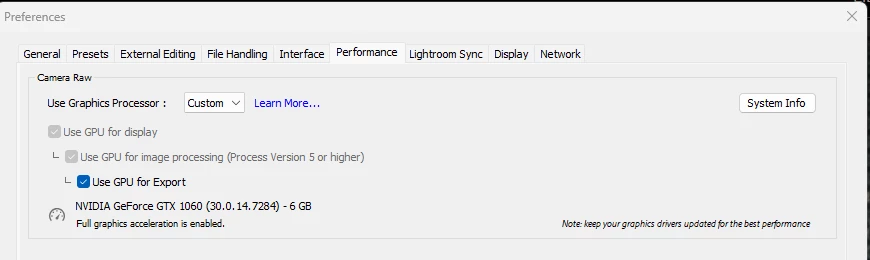
I have set the Lightroom preference to use explicitly the GPU.


Dieses Thema wurde für Antworten geschlossen.

3 Antworten

Adobe Employee
April 26, 2023

@yasserdxb  Can you share the exact error message ?

It would also be very helpful if you can share the logs present in folder "C:\Users\<username>\AppData\Roaming\Adobe\CameraRaw\Logs\" to analyze this issue. Please make sure to close the app if you want to retrieve the correct logs.

GoldingD
Legend
April 23, 2023

Could be an issue with 6 GB VRAM as opposed to 8 GB or 16 GB VRAM "for full GPU Acceleration"as stated in:

https://helpx.adobe.com/lightroom-classic/system-requirements.html


/edit/followup/

Probably not so much a VRAM issue. I can actually accomplish a DeNoise (Enhanced) on a 2015 MACBOOKPro, with just 2 GB VRAM, with source an X-T5 RAF (but not a noisy pic)

Rikk Flohr_Photography
Community Manager
April 23, 2023

Your video driver may be very out of date - judging by the center image. Have you looked on nVidia's site for an update?

Rikk Flohr: Adobe Photography Org
Participant
April 23, 2023

the GPU driver is auto-updated whenever there new update. 


GoldingD
Legend
April 23, 2023

1. Never fully trust auto updates

2. From first posting NVIDIA GTX 1060, driver v472.84. That is way way out of date. Current is v531.68

3. Check your copy of GeForce Experiance for an update.