Exit
  • Global community
    • Language:
      • Deutsch
      • English
      • Español
      • Français
      • Português
  • 日本語コミュニティ
  • 한국 커뮤니티
0

Denoise AI unkown error

Community Beginner ,
Apr 23, 2023 Apr 23, 2023

I'm receiving an unknown error while applying the enhancement.

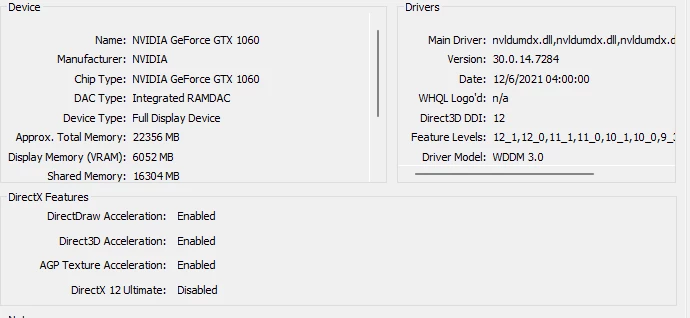
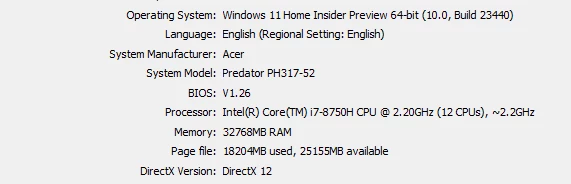
System info as below.
defaulta66mxx8hmuun_0-1682260487942.pngdefaulta66mxx8hmuun_1-1682260542032.png

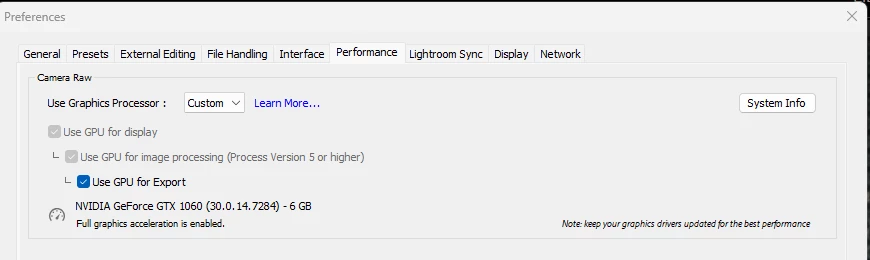
I have set the Lightroom preference to use explicitly the GPU.
defaulta66mxx8hmuun_2-1682260682719.png


TOPICS
Windows
1.4K
Translate
Report
Community guidelines
Be kind and respectful, give credit to the original source of content, and search for duplicates before posting. Learn more
community guidelines
Adobe Employee ,
Apr 23, 2023 Apr 23, 2023

Your video driver may be very out of date - judging by the center image. Have you looked on nVidia's site for an update?

Rikk Flohr: Adobe Photography Org
Translate
Report
Community guidelines
Be kind and respectful, give credit to the original source of content, and search for duplicates before posting. Learn more
community guidelines
Community Beginner ,
Apr 23, 2023 Apr 23, 2023

the GPU driver is auto-updated whenever there new update. 

defaulta66mxx8hmuun_0-1682261785807.png


Translate
Report
Community guidelines
Be kind and respectful, give credit to the original source of content, and search for duplicates before posting. Learn more
community guidelines
LEGEND ,
Apr 23, 2023 Apr 23, 2023

1. Never fully trust auto updates

2. From first posting NVIDIA GTX 1060, driver v472.84. That is way way out of date. Current is v531.68

3. Check your copy of GeForce Experiance for an update.


Translate
Report
Community guidelines
Be kind and respectful, give credit to the original source of content, and search for duplicates before posting. Learn more
community guidelines
Community Beginner ,
Apr 23, 2023 Apr 23, 2023

I downloaded the driver individually and performed a clean installation. I tried again with Lightroom, but no luck.

defaulta66mxx8hmuun_0-1682265671115.png


defaulta66mxx8hmuun_1-1682265786075.png


Translate
Report
Community guidelines
Be kind and respectful, give credit to the original source of content, and search for duplicates before posting. Learn more
community guidelines
LEGEND ,
Apr 23, 2023 Apr 23, 2023
quote

I downloaded the driver individually and performed a clean installation. I tried again with Lightroom, but no luck.


By @yasserdxb

And if you disable GPU in preferences, what happens? 

Author “Color Management for Photographers" & "Photoshop CC Color Management/pluralsight"
Translate
Report
Community guidelines
Be kind and respectful, give credit to the original source of content, and search for duplicates before posting. Learn more
community guidelines
Community Beginner ,
Apr 23, 2023 Apr 23, 2023

I tried with turning off GPU preference and Auto, both are the same error. not getting applied. 

Translate
Report
Community guidelines
Be kind and respectful, give credit to the original source of content, and search for duplicates before posting. Learn more
community guidelines
LEGEND ,
Apr 23, 2023 Apr 23, 2023

Consider tweaking the NVIDIA settings:

https://youtu.be/tELpPlkXlVE


In this video, I will show you Best Nvidia Control Panel Settings for Adobe LightRoom 2022. We will see Nvidia Control Panel BEST Settings for Adobe LightRoom, to maximize the usage of GPU while you are editing and exporting in LightRoom. First of all, we will apply settings in Nvidia GeForce ...
Translate
Report
Community guidelines
Be kind and respectful, give credit to the original source of content, and search for duplicates before posting. Learn more
community guidelines
LEGEND ,
Apr 23, 2023 Apr 23, 2023

Could be an issue with 6 GB VRAM as opposed to 8 GB or 16 GB VRAM "for full GPU Acceleration"as stated in:

https://helpx.adobe.com/lightroom-classic/system-requirements.html


/edit/followup/

Probably not so much a VRAM issue. I can actually accomplish a DeNoise (Enhanced) on a 2015 MACBOOKPro, with just 2 GB VRAM, with source an X-T5 RAF (but not a noisy pic)

Translate
Report
Community guidelines
Be kind and respectful, give credit to the original source of content, and search for duplicates before posting. Learn more
community guidelines
Adobe Employee ,
Apr 25, 2023 Apr 25, 2023
LATEST

@yasserdxb  Can you share the exact error message ?

It would also be very helpful if you can share the logs present in folder "C:\Users\<username>\AppData\Roaming\Adobe\CameraRaw\Logs\" to analyze this issue. Please make sure to close the app if you want to retrieve the correct logs.

Translate
Report
Community guidelines
Be kind and respectful, give credit to the original source of content, and search for duplicates before posting. Learn more
community guidelines