Participant
April 23, 2023
Question

Denoise AI unkown error

  • April 23, 2023
  • 3 replies
  • 1339 views

I'm receiving an unknown error while applying the enhancement.

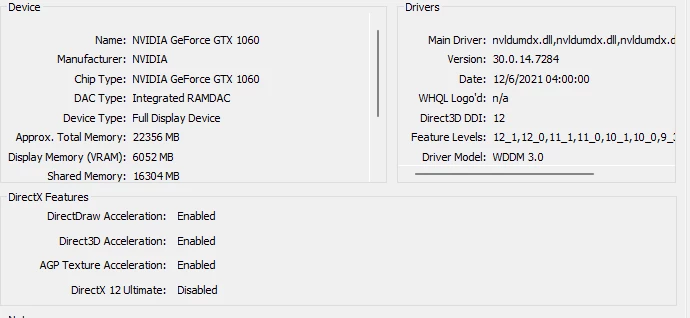
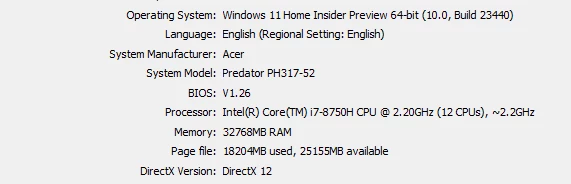
System info as below.
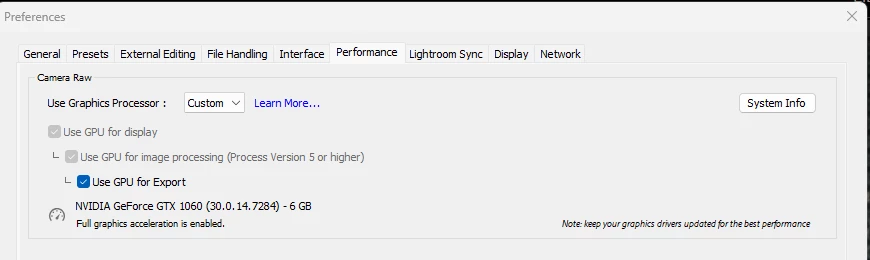
I have set the Lightroom preference to use explicitly the GPU.


This topic has been closed for replies.

3 replies

Adobe Employee
April 26, 2023

@yasserdxb  Can you share the exact error message ?

It would also be very helpful if you can share the logs present in folder "C:\Users\<username>\AppData\Roaming\Adobe\CameraRaw\Logs\" to analyze this issue. Please make sure to close the app if you want to retrieve the correct logs.

GoldingD
Legend
April 23, 2023

Could be an issue with 6 GB VRAM as opposed to 8 GB or 16 GB VRAM "for full GPU Acceleration"as stated in:

https://helpx.adobe.com/lightroom-classic/system-requirements.html


/edit/followup/

Probably not so much a VRAM issue. I can actually accomplish a DeNoise (Enhanced) on a 2015 MACBOOKPro, with just 2 GB VRAM, with source an X-T5 RAF (but not a noisy pic)

Rikk Flohr_Photography
Community Manager
April 23, 2023

Your video driver may be very out of date - judging by the center image. Have you looked on nVidia's site for an update?

Rikk Flohr: Adobe Photography Org
yasserdxbAuthor
Participant
April 23, 2023

the GPU driver is auto-updated whenever there new update. 


TheDigitalDog
Inspiring
April 23, 2023

I downloaded the driver individually and performed a clean installation. I tried again with Lightroom, but no luck.


quote

I downloaded the driver individually and performed a clean installation. I tried again with Lightroom, but no luck.


By @yasserdxb

And if you disable GPU in preferences, what happens? 

Author “Color Management for Photographers" &amp; "Photoshop CC Color Management/pluralsight"