

dj_paige
Legend
April 23, 2023
Answered

DeNoise works on Samsung S22 DNGs, but not on Samsung S23 DNGs

  • April 23, 2023
  • 6 replies
  • 7140 views

Lightroom Classic 12.3

Windows 11

NVidia GeForce GTX 1650 (driver version 531.61) (Also doesn't work with driver 528.49)


I have a number of DNGs shot on my Samsung Galaxy S23, and others DNGs shot on my Samsung Galaxy S22. The DeNoise feature works on the S22 DNGs, but I can't use it on the S23 DNGs as the DeNoise button never becomes active. I am thinking there may be a camera setting that may influence this, or somehow this is a bug in Adobe DeNoise, or somehow Samsung has changed their DNGs with the S23. I don't really have a clue how to figure this out. Any explanation or suggestions?


DeNoise works properly on NEF files from my Nikon cameras


I have placed two sample DNGs on Dropbox.

S22: https://www.dropbox.com/s/1uxg6d93if5gav0/S22_20220705_184931%20%281%29.dng?dl=0

S23: https://www.dropbox.com/s/a5rcdt13jz8s4gv/S23_0230423_174343.dng?dl=0


This topic has been closed for replies.
Correct answer johnrellis

I wonder if a DNG can be converted again to DNG? The standalone didn't accept it but maybe LR can? I didn't try and trashed it, maybe you can?


Did you take that sample with Samsung's Expert Raw app or LR Mobile's camera?  


I can't download your samples (they've been deleted), but this Samsung article says that Expert Raw app saves "raw" photos in linear DNG format (i.e. demosaiced):

https://www.samsung.com/latin_en/support/mobile-devices/professional-photography-with-galaxy-expert-raw-app/


Denoise can't handle linear-DNG photos (but maybe well in the future).


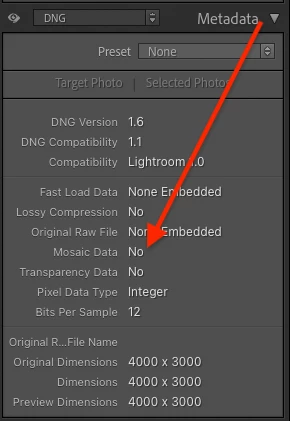
You can easily see if your DNGs are linear: In Library, select a DNG and look at the Metadata > DNG panel's Mosaic Data field:


If Mosaic Data is No, then the DNG is linear. 


I assume that LR Mobile's camera saves raw DNGs (with mosaic data), as it does on iPhones, but I don't know for sure.


6 replies

dj_paige
dj_paigeAuthor
Legend
October 15, 2024

I can confirm that with my Samsung S23 Expert Raw DNGs, the new Lightroom 14.0 can indeed use AI Denoise on these photos. It allows you to use any of the camera modes (Telephoto, Ultra-Wide or Wide) and you still can run AI Denoise. I can also confirm that the linear DNG from Samsung's Pro mode (which is not Expert RAW) will run through LrC 14.0 AI Denoise.


My problem continues to be that I simply don't like the photos created by Expert RAW. I find the pixels are "smeared" and the colors are just awful in low light (which is where I need AI Denoise). At least in direct comparisons with the Lightroom Mobile app, using only the Wide mode in Expert Raw, the LR Mobile app produces sharper photos with better colors.


The RAW (DNG) photos from Pro Mode aren't as good as the LR Mobile app either, even after AI DeNoise, but IMHO better than Expert RAW. The 50 MP RAW is just awful in low light.


Wurstkrapfen
Inspiring
October 15, 2024

Just because Adobe found an Ai De-noise algorithm for jpg does not mean Samsung does not have to fix their Pro Mode raw. 

I suppose raw based de-noise might look better? 

dj_paige
dj_paigeAuthor
Legend
October 15, 2024
quote

Just because Adobe found an Ai De-noise algorithm for jpg does not mean Samsung does not have to fix their Pro Mode raw. 


By @Wurstkrapfen


Adobe does not yet have the capability to run AI DeNoise on JPGs. These are DNGs from Expert RAW that I am referring to.


quote

I suppose raw based de-noise might look better? 


By @Wurstkrapfen


I still don't like the low light DNGs from Samsung's Pro Mode or Expert RAW. I updated my post from a few minutes ago.

May 5, 2024

RAW files generated using Google Camera Port (gcam)
work with denoise (all lenses, s24u):
1. install app: "AGC9.2.14_V8.0_samsung.apk"

2. load configs "MAZAR AGC9.2 X6 S24u"

3. enable RAW+jpg saving
...disappointed with samsung. my RAW files from s21FE used to work with denoise

Wurstkrapfen
Inspiring
May 5, 2024

Most of us know that, yet third party apps with all their limitations are no solution, Samsung needs to fix their stock app. Btw. I prefer ProShot. 

Wurstkrapfen
Inspiring
April 18, 2024

By now they also don't work with the S22, at least if you don't have a firmware before 02/2023.

Wurstkrapfen
Inspiring
March 5, 2024

Participant
August 6, 2023

Can you still shoot uncompressed RAW with S22 Ultra, that works with LR Denoise AI?

I also have some files from December last year that can be denoised, bur all the files I recently shot in Pro mode, are linear DNG using JPG compression, the same as the files shot with Expert RAW.

Except that Expert RAW file have more bits per sample, due to HDR. Unless I'm missing something, it looks that we lost the ability to have truly uncompressed RAW in Pro mode.


BTW, LR mobile can still shoot 8ncompressed RAW, but unfortunately it can only control the main camer.


Inspiring
January 1, 2024

@UltimaGaina  Thanks for your post. I recently made some DNGs with my Galaxy S22 (before update to One UI 6.0) and they are of RAW-type linear which LrC 13.1 is unable to process via AI denoise, what a pity! Do you have an option to get DNG files of mosaic RAW-type?

dj_paige
dj_paigeAuthor
Legend
January 1, 2024

As stated previously in this thread, use the Lightroom Mobile app to take DNG photos.

TheDigitalDog
Inspiring
April 23, 2023

Yes, I can confirm the S23 can't be processed. 


This DNG came from the camera directly right? 

Since it is a DNG that can be opened in Adobe Camera Raw/LR, my first guess is it wasn't properly following DNG spec. But we need an Adobe engineer to download it and look it over. 

I'm on a Mac FWIW. 

Author “Color Management for Photographers" & "Photoshop CC Color Management/pluralsight"
dj_paige
dj_paigeAuthor
Legend
April 23, 2023

Thanks, @TheDigitalDog 


Yes, straight from the camera.

Participant
April 18, 2024

Did you take that sample with Samsung's Expert Raw app or LR Mobile's camera?  


I can't download your samples (they've been deleted), but this Samsung article says that Expert Raw app saves "raw" photos in linear DNG format (i.e. demosaiced):

https://www.samsung.com/latin_en/support/mobile-devices/professional-photography-with-galaxy-expert-raw-app/


Denoise can't handle linear-DNG photos (but maybe well in the future).


You can easily see if your DNGs are linear: In Library, select a DNG and look at the Metadata > DNG panel's Mosaic Data field:


If Mosaic Data is No, then the DNG is linear. 


I assume that LR Mobile's camera saves raw DNGs (with mosaic data), as it does on iPhones, but I don't know for sure.


Currently AI Denoise does not work on "raw" dng files captured by the S24 Ultra's ExpertRaw camera app.

From my understanding, this is could be due to the way Samsung have decided to encode the .dng files, so it might not be on Adobe to fix, however current information on forum posts is not detailed enough to clearly explain why, and what is required to solve the problem.


So before I start, to be clear, ExpertRAW and PRO mode inside the stock camera app produce very different files. For this topic, lets forget PRO mode exists.. and only focus on ExpertRAW files.


Extracting the full metadata from both an ExpertRAW image and Lightroom Camera imagewe can clearly see that ExpertRAW is encoding images in JPEG XL & Photometric Interpretation of Linear RAW.

While Adobe Lightroom Mobile Camera captures in true uncompressed and Color Filter Array.


From my understanding, the reason the AI Denoiser cannot work with Samsung ExpertRaw images is because of the Photometric Interpretation used? However a tech from Adobe would need to confirm this as the cause.


Ive attached the full metadata from my two exmaple images to show exactly whats going on under the hood, so theres 100% no asumptions on formats / compression etc.

*Ive <removed> some details in the metadata for my own privacy such as GPS location.

Metadata from ExpertRAW - 24MP


ExifTool Version Number         : 12.81
File Name                       : 20240418_101137.dng
Directory                       : <removed>
File Size                       : 52 MB
File Modification Date/Time     : 2024:04:18 10:23:07+09:30
File Access Date/Time           : 2024:04:18 11:06:47+09:30
File Creation Date/Time         : 2024:04:18 10:27:49+09:30
File Permissions                : -rw-rw-rw-
File Type                       : DNG
File Type Extension             : dng
MIME Type                       : image/x-adobe-dng
Exif Byte Order                 : Little-endian (Intel, II)
Image Width                     : 5712
Image Height                    : 4284
Bits Per Sample                 : 16 16 16
Compression                     : JPEG XL
Photometric Interpretation      : Linear Raw
Image Description               :
Make                            : samsung
Camera Model Name               : Galaxy S24 Ultra
Preview JXL Start               : 8627920
Orientation                     : Horizontal (normal)
Samples Per Pixel               : 3
Rows Per Strip                  : 4284
Preview JXL Length              : 43532517
X Resolution                    : 72
Y Resolution                    : 72
Planar Configuration            : Chunky
Resolution Unit                 : inches
Software                        : S928BXXU1AXCA
Modify Date                     : 2024:04:18 10:11:38
Subfile Type                    : Reduced-resolution image
Preview Image Start             : 113408
Preview Image Length            : 8514512
Copyright                       :
Exposure Time                   : 1/100
F Number                        : 1.7
ISO                             : 16
Exif Version                    : 0221
Date/Time Original              : 2024:04:18 10:11:38
Offset Time                     : +09:30
Offset Time Original            : +09:30
Exposure Compensation           : 0
Focal Length                    : 6.3 mm
Sub Sec Time                    : 323
Sub Sec Time Original           : 323
Focal Length In 35mm Format     : 23 mm
GPS Version ID                  : 2.2.0.0
GPS Latitude Ref                : <removed>
GPS Longitude Ref               : <removed>
GPS Altitude Ref                : <removed>
TIFF-EP Standard ID             : 1.0.0.0
DNG Version                     : 1.7.0.0
DNG Backward Version            : 1.1.0.0
Unique Camera Model             : Galaxy S24 Ultra
Black Level Repeat Dim          : 2 2
Black Level                     : 0 0 0 0 0 0 0 0 0 0 0 0
White Level                     : 65535 65535 65535
Default Scale                   : 1 1
Default Crop Origin             : 0 0
Default Crop Size               : 5712 4284
Color Matrix 1                  : 0.697265625 -0.1767578125 -0.0751953125 -0.353515625 1.202148438 0.123046875 -0.1064453125 0.2998046875 0.494140625
Color Matrix 2                  : 1.611328125 -1.025390625 -0.02734375 0.0166015625 0.9423828125 0.1103515625 0.0791015625 0.126953125 0.52734375
Camera Calibration 1            : 1.010742188 0 0 0 1 0 0 0 1.024414063
Camera Calibration 2            : 1.010742188 0 0 0 1 0 0 0 1.024414063
As Shot Neutral                 : 0.498046875 1 0.650390625
Baseline Exposure               : 3
Baseline Sharpness              : 1
DNG Private Data                : (Binary data 21 bytes, use -b option to extract)
Calibration Illuminant 1        : D65
Calibration Illuminant 2        : Standard Light A
Active Area                     : 0 0 4284 5712
Profile Name                    : Embedded Galaxy RAW
Forward Matrix 1                : 0.66015625 0.2373046875 0.06640625 0.1982421875 0.9443359375 -0.142578125 0.015625 -0.38671875 1.196289063
Forward Matrix 2                : 0.3818359375 0.4111328125 0.1708984375 -0.056640625 1.084960938 -0.0283203125 -0.1396484375 -0.935546875 1.901367188
Opcode List 2                   : GainMap, GainMap, GainMap, GainMap
Noise Profile                   : 0.0001 1e-008 0.0001 1e-008 0.0001 1e-008
Profile Gain Table Map          : (Binary data 111088 bytes, use -b option to extract)
Time Stamp                      : 2024:04:18 10:11:38.322+09:30
MCC Data                        : Australia (505)
Aperture                        : 1.7
Image Size                      : 5712x4284
Megapixels                      : 24.5
Preview Image                   : (Binary data 8514512 bytes, use -b option to extract)
Preview JXL                     : (Binary data 43532517 bytes, use -b option to extract)
Scale Factor To 35 mm Equivalent: 3.7
Shutter Speed                   : 1/100
Date/Time Original              : 2024:04:18 10:11:38.323+09:30
Modify Date                     : 2024:04:18 10:11:38.323+09:30
GPS Altitude                    : <removed>
GPS Latitude                    : <removed>
GPS Longitude                   : <removed>
Circle Of Confusion             : 0.008 mm
Field Of View                   : 76.1 deg
Focal Length                    : 6.3 mm (35 mm equivalent: 23.0 mm)
GPS Position                    : 34 deg 53' 56.40" S, 138 deg 39' 27.40" E
Hyperfocal Distance             : 2.84 m
Light Value                     : 10.8


Metadata from Lightroom Mobile Camera


ExifTool Version Number         : 12.81
File Name                       : LRM_20240418_101159.dng
Directory                       : <removed>
File Size                       : 25 MB
File Modification Date/Time     : 2024:04:18 10:25:51+09:30
File Access Date/Time           : 2024:04:18 11:08:32+09:30
File Creation Date/Time         : 2024:04:18 10:27:51+09:30
File Permissions                : -rw-rw-rw-
File Type                       : DNG
File Type Extension             : dng
MIME Type                       : image/x-adobe-dng
Exif Byte Order                 : Little-endian (Intel, II)
Subfile Type                    : Full-resolution image
Image Width                     : 4080
Image Height                    : 3060
Bits Per Sample                 : 16
Compression                     : Uncompressed
Photometric Interpretation      : Color Filter Array
Make                            : samsung
Camera Model Name               : SM-S928B
Strip Offsets                   : (Binary data 26189 bytes, use -b option to extract)
Orientation                     : Horizontal (normal)
Samples Per Pixel               : 1
Rows Per Strip                  : 1
Strip Byte Counts               : (Binary data 15299 bytes, use -b option to extract)
X Resolution                    : 72
Y Resolution                    : 72
Planar Configuration            : Chunky
Resolution Unit                 : inches
Software                        : Adobe Lightroom 9.2.2 (Android)
Modify Date                     : 2024:04:18 10:11:59
XMP Toolkit                     : Adobe XMP Core 7.0-c000 1.000000, 0000/00/00-00:00:00
Creator Tool                    : Adobe Lightroom 9.2.2 (Android)
Metadata Date                   : 2024:04:18 10:12+09:30
Lens                            : Samsung Galaxy S24 Ultra Rear Wide Camera
Is Lr Camera Capture            : True
Date Created                    : 2024:04:18 10:11:59
Format                          : image/dng
Instance ID                     : <removed>
Document ID                     : <removed>
Original Document ID            : <removed>
History Action                  : saved
History Instance ID             : <removed>
History When                    : 2024:04:18 10:12+09:30
History Software Agent          : Adobe Lightroom 9.2.2 (Android)
History Changed                 : /metadata
CFA Repeat Pattern Dim          : 2 2
CFA Pattern 2                   : 1 2 0 1
Exposure Time                   : 1/114
F Number                        : 1.7
ISO                             : 12
Exif Version                    : 0231
Date/Time Original              : 2024:04:18 10:11:59
Create Date                     : 2024:04:18 10:11:59
Offset Time Original            : +09:30
Offset Time Digitized           : +09:30
Focal Length                    : 6.3 mm
Sub Sec Time Original           : 664
Sub Sec Time Digitized          : 664
Lens Model                      : Samsung Galaxy S24 Ultra Rear Wide Camera
GPS Version ID                  : 2.3.0.0
GPS Latitude Ref                : <removed>
GPS Longitude Ref               : <removed>
GPS Time Stamp                  : 00:41:59
GPS Date Stamp                  : 2024:04:18
TIFF-EP Standard ID             : 1.0.0.0
DNG Version                     : 1.4.0.0
DNG Backward Version            : 1.1.0.0
Unique Camera Model             : SM-S928B-samsung-samsung
CFA Plane Color                 : Red,Green,Blue
CFA Layout                      : Rectangular
Black Level Repeat Dim          : 2 2
Black Level                     : 64 64 64 64
White Level                     : 1023
Default Scale                   : 1 1
Default Crop Origin             : 8 8
Default Crop Size               : 4064 3044
Color Matrix 1                  : 0.697265625 -0.1767578125 -0.0751953125 -0.353515625 1.202148438 0.123046875 -0.1064453125 0.2998046875 0.494140625
Color Matrix 2                  : 1.611328125 -1.025390625 -0.02734375 0.0166015625 0.9423828125 0.1103515625 0.0791015625 0.126953125 0.52734375
Camera Calibration 1            : 1.010742188 0 0 0 1 0 0 0 1.024414063
Camera Calibration 2            : 1.010742188 0 0 0 1 0 0 0 1.024414063
As Shot Neutral                 : 0.501953125 1 0.662109375
Baseline Exposure               : 0
Calibration Illuminant 1        : D65
Calibration Illuminant 2        : Standard Light A
Active Area                     : 0 0 3060 4080
Forward Matrix 1                : 0.66015625 0.2373046875 0.06640625 0.1982421875 0.9443359375 -0.142578125 0.015625 -0.38671875 1.196289063
Forward Matrix 2                : 0.3818359375 0.4111328125 0.1708984375 -0.056640625 1.084960938 -0.0283203125 -0.1396484375 -0.935546875 1.901367188
Opcode List 2                   : GainMap, GainMap, GainMap, GainMap
Opcode List 3                   : WarpRectilinear
Noise Profile                   : 0.000176124696016 0 0.000176124696016 0 0.000176124696016 0
Aperture                        : 1.7
CFA Pattern                     : [Green,Blue][Red,Green]
Image Size                      : 4080x3060
Megapixels                      : 12.5
Shutter Speed                   : 1/114
Create Date                     : 2024:04:18 10:11:59.664+09:30
Date/Time Original              : 2024:04:18 10:11:59.664+09:30
GPS Date/Time                   : 2024:04:18 00:41:59Z
GPS Latitude                    : <removed>
GPS Longitude                   : <removed>
Focal Length                    : 6.3 mm
GPS Position                    : <removed>
Light Value                     : 11.4


[moved from bugs to discussions according to the community rules - Mod.]