

DeNoise works on Samsung S22 DNGs, but not on Samsung S23 DNGs
Lightroom Classic 12.3
Windows 11
NVidia GeForce GTX 1650 (driver version 531.61) (Also doesn't work with driver 528.49)
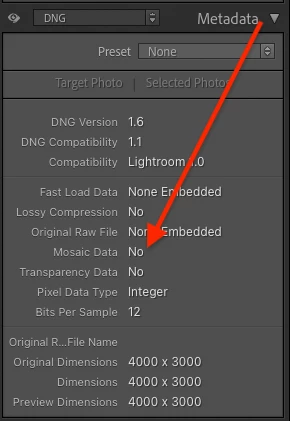
I have a number of DNGs shot on my Samsung Galaxy S23, and others DNGs shot on my Samsung Galaxy S22. The DeNoise feature works on the S22 DNGs, but I can't use it on the S23 DNGs as the DeNoise button never becomes active. I am thinking there may be a camera setting that may influence this, or somehow this is a bug in Adobe DeNoise, or somehow Samsung has changed their DNGs with the S23. I don't really have a clue how to figure this out. Any explanation or suggestions?
DeNoise works properly on NEF files from my Nikon cameras
I have placed two sample DNGs on Dropbox.
S22: https://www.dropbox.com/s/1uxg6d93if5gav0/S22_20220705_184931%20%281%29.dng?dl=0
S23: https://www.dropbox.com/s/a5rcdt13jz8s4gv/S23_0230423_174343.dng?dl=0
 AdChoices