
Inspiring
March 16, 2022
Answered

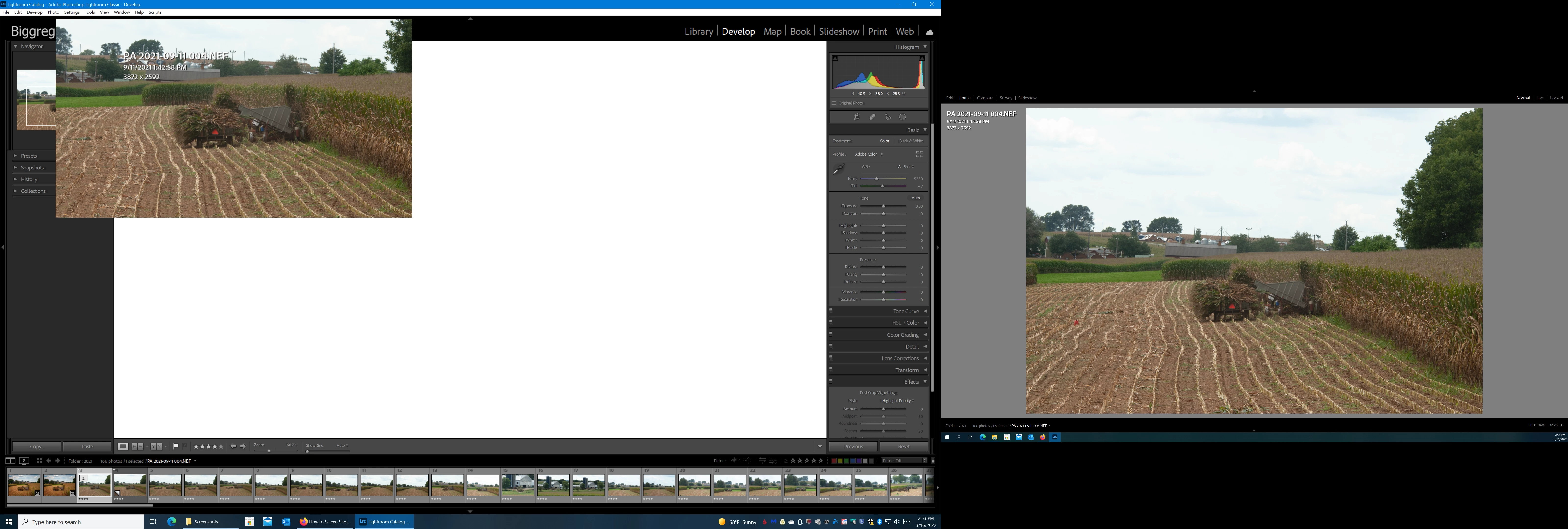
Develop module photo is not full screen

  • March 16, 2022
  • 3 replies
  • 1069 views

When I go into the develop module the photo is only about 25% of full screen and floating. Any adjustment works on it but I can't get it to full screen. I use 2 monitors it only started today. I tried everything I can think of, no luck. I uninstalled and reinstalled. Any ideas?
This topic has been closed for replies.
Correct answer Greg Kelton

Right on, Thank You


3 replies

Participating Frequently
December 29, 2022

Thank you, that works,  I was tearing my hair out on this problem.

Todd Shaner
Legend
March 17, 2022

Try updating your graphics drivers as outlined at the below link. This may allow using your graphics processor to speed up LrC.


https://helpx.adobe.com/x-productkb/multi/update-graphics-driver.html


Todd Shaner
Legend
March 16, 2022

Go to Edit> Preferences> Performance, set 'Use Graphics Processor' to Off, and then close and restart LrC. Please let us know if that fixes the issue.

Greg KeltonAuthorCorrect answer
Inspiring
March 17, 2022

Right on, Thank You