
Participating Frequently
April 11, 2020
Question

Develop Module problem

  • April 11, 2020
  • 5 replies
  • 581 views

Bonjour,


à chaque fois que je change d'image dans le developpement les panneaux du modules se désactivent et je dois les réactiver manuellement un par un... 


merci pour votre aide 


Hello,


each time I change image in the development the module panels are deactivated and I have to reactivate them manually one by one... 


thk's for the support 
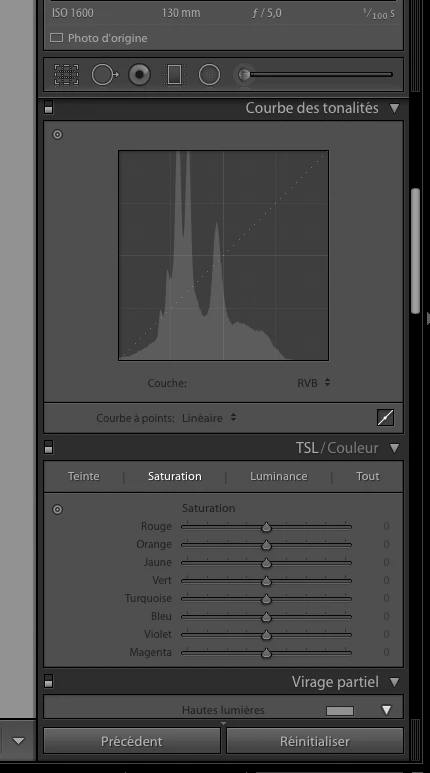


(Attached image was placed in line with the text and attachment deleted. done by Moderator)

This topic has been closed for replies.

5 replies

Bob Somrak
Legend
April 18, 2020

You probably need to reset your preference file.

M4 Pro Mac Mini. 48GB
Bob Somrak
Legend
April 18, 2020

What process do you have to do to "activate" the panels?  The answer might help others solve the issue.


Sorry, I see the little switch is off.

M4 Pro Mac Mini. 48GB
Participating Frequently
April 19, 2020

hello BOB, that's it. The all the little swtich are always desactivated when I change of image. And I must reactivate them one by one...


i deleted the pref file : the problmen remains.


Thank's to all for trying to help me.


Jorge

Participating Frequently
April 18, 2020

Hello I face exactly the same problem + othres (another post). Deleting pref did not solve the problem !


Just Shoot Me
Legend
April 18, 2020

So you say you are having the Exact Same Problem as the Original Poster? That when you do local adjustments, Call Up one of the Local Adjustment Tools, Click Left Mouse button to Set the starting point, Pin/whatever, of the adjustment, Do the local adjustment then Let Go of the left mouse button that adjustment you just did disappears. But it only happens on the original RAW file and if you convert the original RAW to a DNG file this does NOT happen????


If ALL of what I just typed into this reply does NOT happen to you then you do NOT have the same Exact problem as the Original Poster. 

In that case I suggest you start your own Conversation and give as much detail as possible to the Exact Problem you are having.

That way someone, even me, might be able to help you fix whatever problem you are having.


If it is exactly as the OP and explained exactly as I have described then what steps have you taken to try to solve the problem?

GoldingD
Legend
April 11, 2020

Please verify one bit of info. In Lightroom Classic, click on Help, click on System Information. Second line down, License, does it say Creative Cloud?


If not, problem with acredidation of your license?


Participating Frequently
April 20, 2020

Yes my Licence is ok.


here the extract of the system : 


Version Lightroom Classic: 9.2.1 [ 202004070813-7699d98a ]
Licence: Creative Cloud
Paramètre de langue: fr-FR
Système d'exploitation : Mac OS 10
Version : 10.15.4 [19E287]
Architecture de l'application : x64
Nombre de processeurs logiques: 12
Vitesse du processeur : 3,2 Ghz
Version SQLite: 3.30.1
Mémoire intégrée : 16 384,0 Mo
Mémoire réelle disponible pour Lightroom : 16 384,0 Mo
Mémoire réelle utilisée par Lightroom : 2 464,3 Mo (15,0%)
Mémoire virtuelle utilisée par Lightroom : 8 513,9 Mo
Taille de la mémoire cache : 51,2Mo
Version interne de Camera Raw: 12.2.1 [ 415 ]
Nombre maximal de liens utilisé par Camera Raw : 5
Optimisation SIMD de Camera Raw : SSE2,AVX,AVX2
Mémoire virtuelle de Camera Raw: 772Mo / 8191Mo (9%)
Mémoire réelle de Camera Raw: 778Mo / 16384Mo (4%)
Affichages : 1) 1920x1200

Informations relatives au processeur graphique :
Metal: Intel(R) UHD Graphics 630


Dossier de l'application : /Applications/Adobe Lightroom Classic
Chemin d'accès à la bibliothèque : /Volumes/My Disk Mini/Pictures/New Collection/New Collection-2-2-2.lrcat
Dossier des paramètres : /Users/jorgepereira/Library/Application Support/Adobe/Lightroom

Modules installés :
1) Adobe Stock
2) Aurora HDR Pro
3) ColorChecker Camera Calibration
4) DxO PhotoLab 2
5) DxO PhotoLab 2 Importer
6) DxO PhotoLab 3
7) DxO PhotoLab 3 Importer
😎 Excire Search
9) Facebook
10) Flickr
11) Focus CK
12) FX Photo Studio CK
13) HDR Efex Pro 2
14) Intensify CK
15) Module externe d'importateur Aperture/iPhoto
16) Module externe de prise de vue en mode connecté Nikon
17) Noiseless CK
18) ON1 Photo RAW 2019
19) ON1 Photo RAW 2020
20) ON1 Resize 2019
21) ON1 Resize 2020
22) Snapheal CK
23) Tonality CK

Marqueurs Config.lua: None

AudioDeviceIOBlockSize: 512
AudioDeviceName: Haut-parleurs Mac mini
AudioDeviceNumberOfChannels: 2
AudioDeviceSampleRate: 48000
Build: 12.1x4
CoreImage: true
GL_ACCUM_ALPHA_BITS: 0
GL_ACCUM_BLUE_BITS: 0
GL_ACCUM_GREEN_BITS: 0
GL_ACCUM_RED_BITS: 0
GL_ALPHA_BITS: 8
GL_BLUE_BITS: 8
GL_DEPTH_BITS: 24
GL_GREEN_BITS: 8
GL_MAX_3D_TEXTURE_SIZE: 2048
GL_MAX_TEXTURE_SIZE: 16384
GL_MAX_TEXTURE_UNITS: 8
GL_MAX_VIEWPORT_DIMS: 16384,16384
GL_RED_BITS: 8
GL_RENDERER: Intel(R) UHD Graphics 630
GL_SHADING_LANGUAGE_VERSION: 1.20
GL_STENCIL_BITS: 8
GL_VENDOR: Intel Inc.
GL_VERSION: 2.1 INTEL-14.5.22
OGLEnabled: true
GL_EXTENSIONS: GL_ARB_color_buffer_float GL_ARB_depth_buffer_float GL_ARB_depth_clamp GL_ARB_depth_texture GL_ARB_draw_buffers GL_ARB_draw_elements_base_vertex GL_ARB_draw_instanced GL_ARB_fragment_program GL_ARB_fragment_program_shadow GL_ARB_fragment_shader GL_ARB_framebuffer_object GL_ARB_framebuffer_sRGB GL_ARB_half_float_pixel GL_ARB_half_float_vertex GL_ARB_instanced_arrays GL_ARB_multisample GL_ARB_multitexture GL_ARB_occlusion_query GL_ARB_pixel_buffer_object GL_ARB_point_parameters GL_ARB_point_sprite GL_ARB_provoking_vertex GL_ARB_seamless_cube_map GL_ARB_shader_objects GL_ARB_shader_texture_lod GL_ARB_shading_language_100 GL_ARB_shadow GL_ARB_sync GL_ARB_texture_border_clamp GL_ARB_texture_compression GL_ARB_texture_compression_rgtc GL_ARB_texture_cube_map GL_ARB_texture_env_add GL_ARB_texture_env_combine GL_ARB_texture_env_crossbar GL_ARB_texture_env_dot3 GL_ARB_texture_float GL_ARB_texture_mirrored_repeat GL_ARB_texture_non_power_of_two GL_ARB_texture_rectangle GL_ARB_texture_rg GL_ARB_transpose_matrix GL_ARB_vertex_array_bgra GL_ARB_vertex_blend GL_ARB_vertex_buffer_object GL_ARB_vertex_program GL_ARB_vertex_shader GL_ARB_window_pos GL_EXT_abgr GL_EXT_bgra GL_EXT_blend_color GL_EXT_blend_equation_separate GL_EXT_blend_func_separate GL_EXT_blend_minmax GL_EXT_blend_subtract GL_EXT_clip_volume_hint GL_EXT_debug_label GL_EXT_debug_marker GL_EXT_draw_buffers2 GL_EXT_draw_range_elements GL_EXT_fog_coord GL_EXT_framebuffer_blit GL_EXT_framebuffer_multisample GL_EXT_framebuffer_multisample_blit_scaled GL_EXT_framebuffer_object GL_EXT_framebuffer_sRGB GL_EXT_geometry_shader4 GL_EXT_gpu_program_parameters GL_EXT_gpu_shader4 GL_EXT_multi_draw_arrays GL_EXT_packed_depth_stencil GL_EXT_packed_float GL_EXT_provoking_vertex GL_EXT_rescale_normal GL_EXT_secondary_color GL_EXT_separate_specular_color GL_EXT_shadow_funcs GL_EXT_stencil_two_side GL_EXT_stencil_wrap GL_EXT_texture_array GL_EXT_texture_compression_dxt1 GL_EXT_texture_compression_s3tc GL_EXT_texture_env_add GL_EXT_texture_filter_anisotropic GL_EXT_texture_integer GL_EXT_texture_lod_bias GL_EXT_texture_rectangle GL_EXT_texture_shared_exponent GL_EXT_texture_sRGB GL_EXT_texture_sRGB_decode GL_EXT_timer_query GL_EXT_transform_feedback GL_EXT_vertex_array_bgra GL_APPLE_aux_depth_stencil GL_APPLE_client_storage GL_APPLE_element_array GL_APPLE_fence GL_APPLE_float_pixels GL_APPLE_flush_buffer_range GL_APPLE_flush_render GL_APPLE_object_purgeable GL_APPLE_packed_pixels GL_APPLE_pixel_buffer GL_APPLE_rgb_422 GL_APPLE_row_bytes GL_APPLE_specular_vector GL_APPLE_texture_range GL_APPLE_transform_hint GL_APPLE_vertex_array_object GL_APPLE_vertex_array_range GL_APPLE_vertex_point_size GL_APPLE_vertex_program_evaluators GL_APPLE_ycbcr_422 GL_ATI_separate_stencil GL_ATI_texture_env_combine3 GL_ATI_texture_float GL_ATI_texture_mirror_once GL_IBM_rasterpos_clip GL_NV_blend_square GL_NV_conditional_render GL_NV_depth_clamp GL_NV_fog_distance GL_NV_light_max_exponent GL_NV_texgen_reflection GL_NV_texture_barrier GL_SGIS_generate_mipmap GL_SGIS_texture_edge_clamp GL_SGIS_texture_lod


Just Shoot Me
Legend
April 11, 2020

Your screen shot ahows the sections expanded. Do you mean if you click on one of them the others Collapse, IE become just the headers?

If so then you are in Solo mode.


Click the Checkmark to remove it.


Participating Frequently
April 11, 2020

No sorry, I think i am not clear. Each time i change of peicture all the changes (panles) ares desable. I need to activat one one by one (curves, TSl, effects) etc...


Thx 

Just Shoot Me
Legend
April 12, 2020

What do you mean by Disabled and also Activate each one? Do you mean the Headers/Titles of each section is not shown?

Right Click on one of the headers/titles and select Customize Develop panel. You should get this dialog box.


Is there a checkmark in each box like what you see in the image I included above.


Or do you mean the sections are just Collapsed like this.


If it is the First one, the sections are really Deactivated and do not show at all, then I suspect you have a corrupted Preference file. you may need to delete the LR Classic preference file and then start LR for it to be recreated.