


- Home
- Lightroom Classic
- Discussions
- Re: display problem in library/grid view
- Re: display problem in library/grid view

Copy link to clipboard
Copied
Since updating to LR Classic CC I experience a very strange library/ Grid view display behaviour/ Error.
I seems like the grid is somehow "stuck" while scrolling, there is an issue with the update of the thumbnails/ background.
Also when switching to "loupe view" the background is not a solid color, but shows fragments of the grid or previous images.
This image should make clear what I mean:
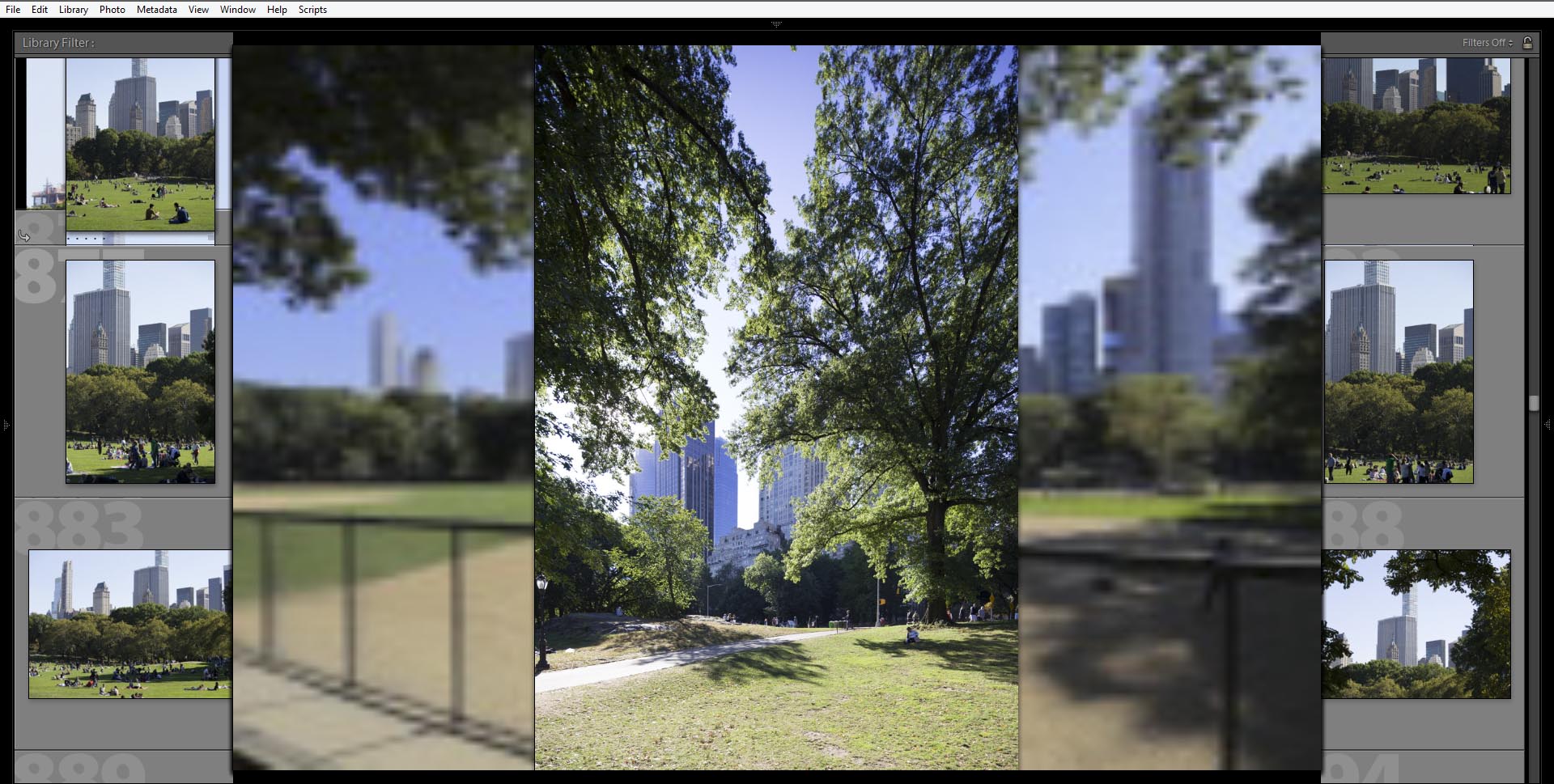
I'm using Windows 8.1 all updates installed, NVidia Quadro 2000M.
No other issues with LR or Photoshop.
would be nice if this would be fixable...


 1 Correct answer

This problem has been resolved by a workaround provided by Adobe.
I followed these instructions:
Could you please try the following and report back if it solves the issue.
==
Try this workaround to see if it works for you. If not, delete the config.lua file afterwards.
- Choose Edit > Preferences.
- In the Preferences dialog, go the Presets tab.
- In the Presets tab, click the Show Lightroom Presets Folder button. The root preset folder opens in the File Explorer.
- In the File Explorer, navigate into the Ligh

 37
Replies
37
37
Replies
37


Copy link to clipboard
Copied
Since getting the new Lightroom Classic CC I have NO grid view. Will this fix also work on my Macbook Pro?
Thanks! Jamie

Copy link to clipboard
Copied
This worked for me! Thanks!
Copy link to clipboard
Copied
Thank you so much! I was having the same issue and it worked!

Copy link to clipboard
Copied
Thanks!

Copy link to clipboard
Copied
I had the same problem in library/grid view. I have downloaded the file mentioned by lucg3962859 and this worked fine for me.

Copy link to clipboard
Copied
This patched worked on the previous update. However, it does not work on this latest (7.1) After upgrading, the problem is back.

Copy link to clipboard
Copied
Same here. Just updated my laptop to 7.1. The config.lua fix does not work for me in 7.1. Disabling the GPU does work, but I would rather not have to do that.

Copy link to clipboard
Copied
And for me - the problem was solved by this new config file, but has returned in the latest update. I have now worked around it by turning off using the graphics processor but would rather a proper fix that allows me to turn it back on
Copy link to clipboard
Copied
I have the same problem after the last update. The old workaround does not work this time.
Any suggestion you can provide?
Thanks,
Lory

Copy link to clipboard
Copied
According to Adobe employee Simon Chen, the "config.lua" workaround doesn't apply to the latest release (LR 7.1). The option Preferences > Performance > Use Graphics Process is now a "master switch" for all of LR's use of the graphics processor (GPU). If your LR doesn't display properly with that option enabled, make sure you have the most recent graphics driver by going directly to the manufacturer's Web site (Windows) or updating to the latest MacOS (10.13.2) -- many older drivers have bugs that are triggered by LR. See here for details: Adobe Lightroom GPU Troubleshooting and FAQ .
Note that most users only see significant benefit to enabling the GPU on 4K or 5K displays -- it can sometimes slow down LR on lower-resolution displays. Of course, some users on lower-resolution displays do benefit.
Copy link to clipboard
Copied
I have updated the graphics driver but the problem persists, regardless of enabling or disabling the GPU.
I have NVIDIA GeForce GT 540M (10.0.16299.192).
Copy link to clipboard
Copied
I have updated the graphics driver but the problem persists, regardless of enabling or disabling the GPU.
I have NVIDIA GeForce GT 540M (10.0.16299.192).
I recommend posting a new bug report in the official Adobe feedback forum: Lightroom Classic CC | Photoshop Family Customer Community . Please include a screenshot and the complete copy/paste from Help > System Info. I think the only known workaround is to roll back to LR 7.0.1 and use the posted "config.lua".
Copy link to clipboard
Copied
I'll do, thanks!

-
- 1
- 2

Get ready! An upgraded Adobe Community experience is coming in January.
Learn more
 AdChoices