Participating Frequently
April 1, 2021
Answered

DJI Mavic Pro blur pano when Stitching

  • April 1, 2021
  • 7 replies
  • 1193 views

When I try to stitch a photo using Lightroom Classic 10.2 on mac, the result is always blurry, does someone knows how to fix it?
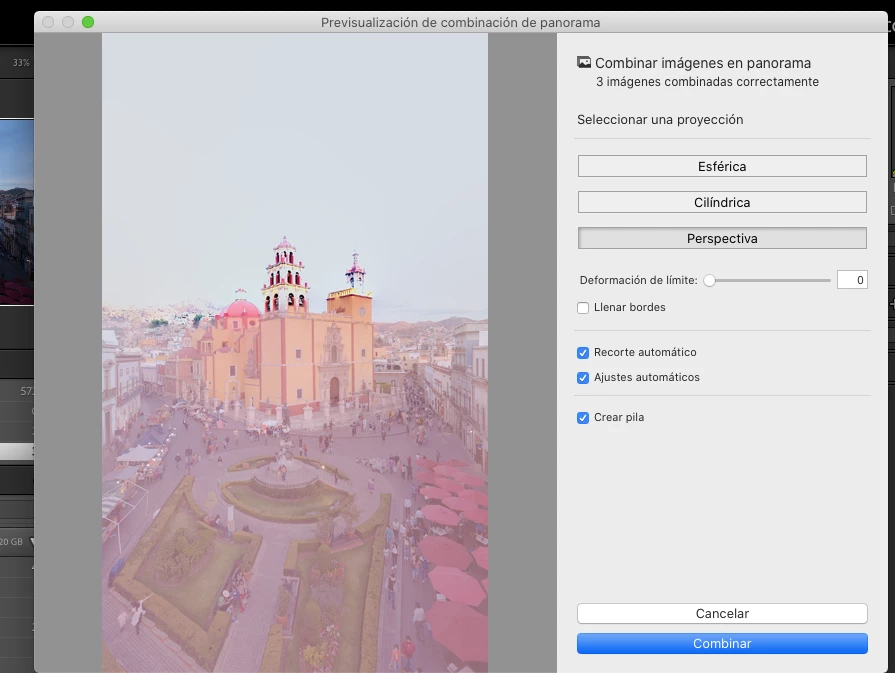
This topic has been closed for replies.
Correct answer johnrellis

[This post contains formatting and embedded images that don't appear in email. View the post in your Web browser.]


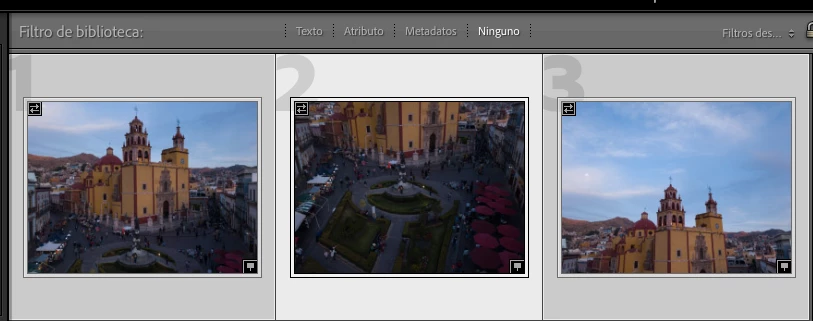
The problem is caused by the camera recording an incorrect shutterspeed for PANO0003.DNG:


PANO0001.DNG: 1/100,  f/2.2, ISO 100

PANO0002.DNG: 1/50, f/2.2, ISO 187

PANO0003.DNG: 1/4000, f/2.2, ISO 100


The exposure for 3.DNG is close to that of 1.DNG, but it's shutterspeed (1/4000) is obviously wrong. You might consider reporting this to DJI.


Two workarounds:


1. Do the merge in Photoshop using Photo > Edit In > Merge To Panorama In Photoshop.  PS doesn't appear to look at the exposure metadata.


2. Use Exiftool to change the shutter speed of 3.DNG to the same as 1.DNG:


exiftool -exposuretime=1/104 PANO0003.DNG


That allows LR's Photo Merge  > Panorama to work:
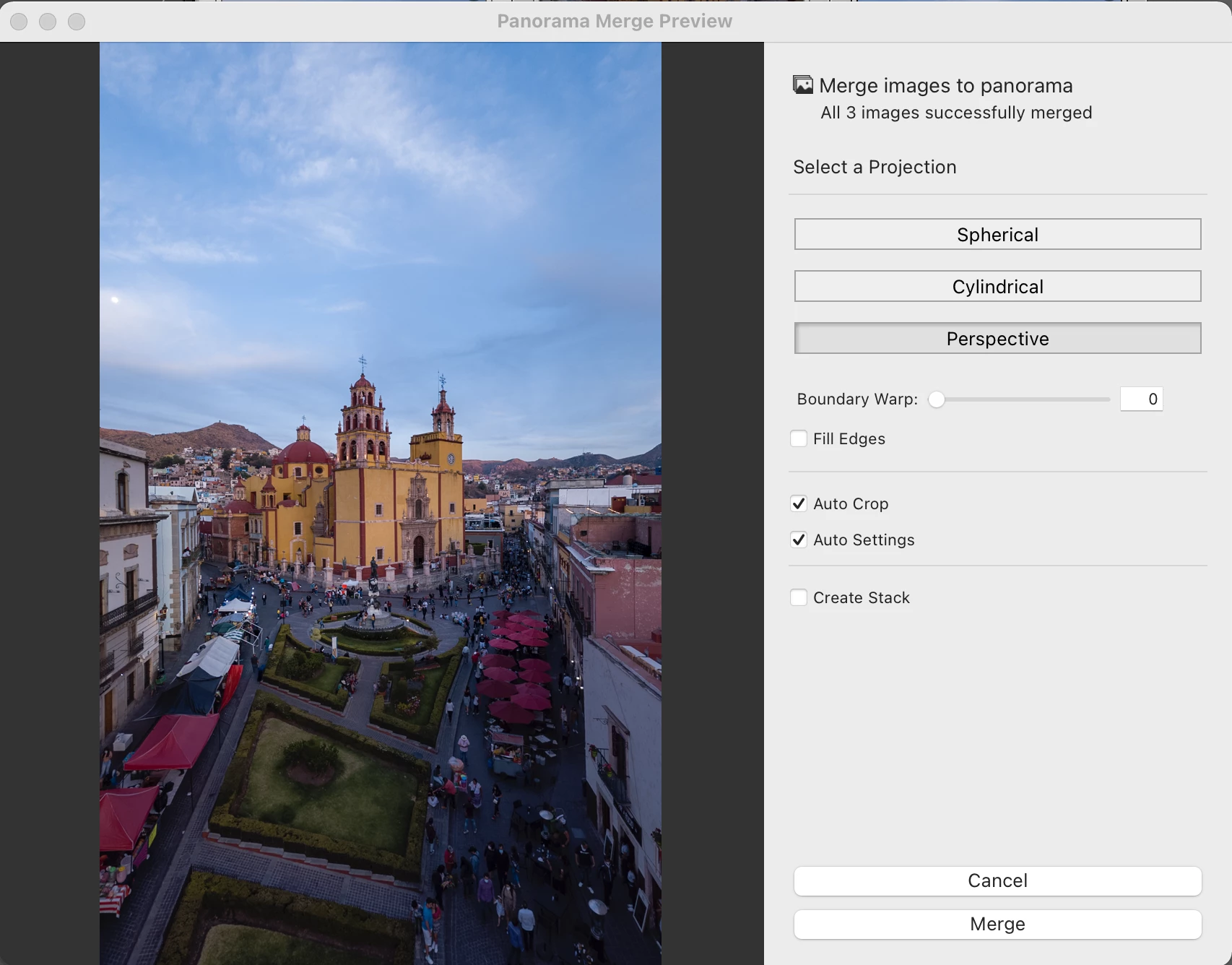


7 replies

Todd Shaner
Legend
April 5, 2021

John, I can confirm the panorama ND filter issue appears to be fixed in LrC 10.2 with the Sony RX100M5 ARW files. However, my Canon G9X MKII files still exhibit the issue. Rikk claims they are only investigating a fix for the Canon files so it's a mystery as to what was changed.

johnrellis
Legend
April 5, 2021

"There was some talk about adding that in a future up date, but if many of the camers with ND filters don't record it then I doubt they will add support."


At the time of the bug report, Adobe employee Rikk Flohr said, "We have a fix in process for an upcoming release for CR and LrD, LrClassic." But the bug post was never changed to "Solved" and no fix appeared in any release notes.


However, I retested in LR 10.2, and I see a significant improvement for the two Sony examples but no improvement for the Canon example:

https://feedback.photoshop.com/conversations/camera-raw-and-dng/lightroomcamera-raw-bad-blending-from-photo-merge-panorama-while-photoshop-does-fine/5f5f460d4b561a3d42709754?commentId=606a934b3e58760105f1cb2c 


johnrellis
Legend
April 5, 2021

"The PANO003.dng image file with the 1/4000 shutter speed can't be due to a ND filter. The PANO0003.dng file has the same exposure as the PANO0003.dng as measured on the wall of the church so their shutter speeds should be the same. With a ND filter the actual and recorded shutter speed should be lower."


If 1.DNG had an ND filter of 5-6 stops applied, and 3.DNG had no filter, that would account for the difference in shutterspeeds.


However, an outdoor scene at 6:52 pm would be highly underexposed with 3.DNG's settings (1/4000, f/2.2, ISO 100).  So I agree it's a camera bug.

Todd Shaner
Legend
April 4, 2021

"Interestingly, I can't find any EXIF or Makernotes metadata in the Sony RX100 V raws that record when an ND filter is applied, so I'm not sure how LR/ACR determines that."


My Canon G9X MKII has an 'ND Filter' ON/OFF MakerNotes field, but LrC and ACR don't currently read that field. There was some talk about adding that in a future up date, but if many of the camers with ND filters don't record it then I doubt they will add support.


Todd Shaner
Legend
April 4, 2021

After thinking about this the PANO003.dng image file with the 1/4000 shutter speed can't be due to a ND filter. The PANO0003.dng file has the same exposure as the PANO0003.dng as measured on the wall of the church so their shutter speeds should be the same. With a ND filter the actual and recorded shutter speed should be lower. This appears to be a hardware malfunction in the DJI FC220.

Todd Shaner
Legend
April 4, 2021

There is a similar post at the below link created by a different OP. Here's my solution using LensTagger with more information.


https://community.adobe.com/t5/lightroom-classic/dji-mavic-pro-panos-blurry-after-stitching/m-p/11946784#M228162


johnrellis
Legend
April 4, 2021

I had forgotten entirely that I had reported the panorama bug with neutral density filters:

https://feedback.photoshop.com/conversations/camera-raw-and-dng/lightroomcamera-raw-bad-blending-from-photo-merge-panorama-while-photoshop-does-fine/5f5f460d4b561a3d42709754


Are you sure the DJI doesn't have an ND filter?   If it did, it would have to be at least a 5-stop filter (to account for 1/100 to 1/4000 difference). Your Canon and/AC my Sony have 3-stop filters.


Interestingly, I can't find any EXIF or Makernotes metadata in the Sony RX100 V raws that record when an ND filter is applied, so I'm not sure how LR/ACR determines that.

johnrellis
Legend
April 3, 2021

If you upload the three originals to Dropbox or similar and post the sharing link here, we can see what might be going wrong and perhaps suggests alternatives.

geckozo6Author
Participating Frequently
April 3, 2021
johnrellis
johnrellisCorrect answer
Legend
April 4, 2021

[This post contains formatting and embedded images that don't appear in email. View the post in your Web browser.]


The problem is caused by the camera recording an incorrect shutterspeed for PANO0003.DNG:


PANO0001.DNG: 1/100,  f/2.2, ISO 100

PANO0002.DNG: 1/50, f/2.2, ISO 187

PANO0003.DNG: 1/4000, f/2.2, ISO 100


The exposure for 3.DNG is close to that of 1.DNG, but it's shutterspeed (1/4000) is obviously wrong. You might consider reporting this to DJI.


Two workarounds:


1. Do the merge in Photoshop using Photo > Edit In > Merge To Panorama In Photoshop.  PS doesn't appear to look at the exposure metadata.


2. Use Exiftool to change the shutter speed of 3.DNG to the same as 1.DNG:


exiftool -exposuretime=1/104 PANO0003.DNG


That allows LR's Photo Merge  > Panorama to work:
