
Inspiring
January 31, 2024
質問

DNG thumbnails not showing in W10 folders

  • January 31, 2024
  • 返信数 1.
  • 5093 ビュー
Not specifically LR, but as my DNG photo are all for LR, there may be someone here who knows how to resolve the problem.
Windows 10 and LR Lightroom version: 6.14 [ 1149743 ] 

If I go to a Windows 10 folder - all of the jpeg files with have a thumbnail  (as do png, tiff etc)
Very few DNG files will have a thumbnail (usually none)

I have installed Microsoft raw image Extension .... v3 no difference
Have followed the steps to kill thumbnail cache, delete it, and restart explorer ... all jpeg thumbnails rebuild (slowly) but not DNG.
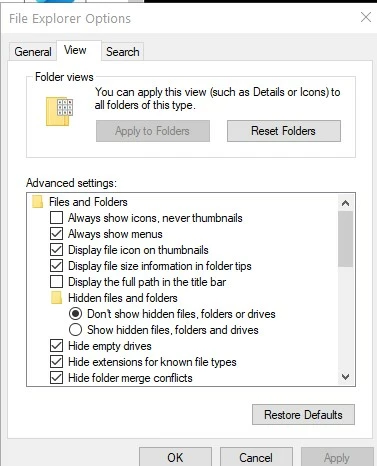
Have also followed the tip to uncheck 'always shows icons, never thumbnails'The advice is to click on teh top button 'apply to folders'  but I can't do that as that is greyed out.  (pic attached)


このトピックへの返信は締め切られました。

返信数 1

johnrellis
Legend
January 31, 2024

Which app or exact camera model produced the DNGs?  If LR created the DNGs, which command (Convert Photo To DNG, Enhance, Photo Merge)?

Tafflad作成者
Inspiring
February 1, 2024

My phone creates DNG files directly  ..  my camera has to have the raw files converted and I use ADOBE DNG converter to do that.

Just did a test and showed something I had not realised before.

File saved to Desktop ..... and it has the correct thumbnail.

When I move file to a sub-folder  of My_Pictures  is arrives there without a thumbnail.


LR identifies the RAW file whether on desktop or in a my_pictures folder

Noticed another anomaly .... on my phone the selection is simply to output 'RAW' files.

They arrive on PC as filename.DNG

I just opened file with Mediainfo and it reports it as an invalid tiff ?  (see attached)


Tafflad作成者
Inspiring
February 1, 2024

So here's my understanding so far:


1. You have two sets of DNGs, one set produced by the camera app on your Samsung Galaxy S21 phone and one produced by applying Adobe DNG Converter 11.2 (five years old) to .rw2 raws coming from from a Panasonic Lumix DC-GX9.


2. With both sets of DNGs, Windows 10 File Explorer has problems displaying their thumbnails.


3. With the Lumix DNGs, File Explorer initially displays the thumbnails when you save the DNG to Desktop, but when you move it to another folder, the thumbnails don't display. 


4. The Media Info utility thinks that the Samsung DNGs are in invalid TIFF format.  I can't find the authoritative documentation for that utility, but all the download sites indicate it's focused on video and audio files. The DNG file format is based on TIFF, so it's not surprising that a utility not specifically focused on raw formats gets confused by them. Ignore Media Info.


5. With the sample Lumix DNG you provided, I don't observe the symptoms you do with Windows 11 File Explorer -- it always displays the DNG's thumbnail, regardless of which folder I move or copy it to.


6. You didn't provide a sample problem Samsung DNG.  Please upload one to Dropbox.


7. I observe that DNGs produced by LR's Merge and Enhance commands don't display their thumbnails in Windows 11 File Explorer.  While it's possible that those DNGs don't strictly obey the DNG standard, given that Adobe invented the DNG format and that Mac Finder and other apps can display the thumbnails, I think it's much more likely that Windows 11 File Explorer is buggy with respect to them.


8. Your Adobe DNG converter is version 11.2, five years old.  The latest version is 16.1:

https://helpx.adobe.com/camera-raw/digital-negative.html#downloads


I suggest installing that version. It's capable of generating all the different versions of DNG, so if the latest DNG versions are choking Windows 10 (also five years old), you can experiment generating older versions of DNG with the converter.


9. Windows, like Mac OS, isn't very fussy about fully supporting all the common file formats out there. I think it's likely that if you continue to experience issues with DNGs after updating to Adobe DNG Converter 16.1, you're tripping over Windows 10 File Explorer bugs that may not be present in Windows 11. 


>6. You didn't provide a sample problem Samsung DNG.  Please upload one to Dropbox.


https://www.dropbox.com/scl/fi/uo7ny3y11jw91slc3n6lm/20240101_122721.dng?rlkey=wp9ad4kcwmwndj8nbdcehlem5&dl=0