
Inspiring
January 31, 2024
Question

DNG thumbnails not showing in W10 folders

  • January 31, 2024
  • 1 reply
  • 5157 views
Not specifically LR, but as my DNG photo are all for LR, there may be someone here who knows how to resolve the problem.
Windows 10 and LR Lightroom version: 6.14 [ 1149743 ] 

If I go to a Windows 10 folder - all of the jpeg files with have a thumbnail  (as do png, tiff etc)
Very few DNG files will have a thumbnail (usually none)

I have installed Microsoft raw image Extension .... v3 no difference
Have followed the steps to kill thumbnail cache, delete it, and restart explorer ... all jpeg thumbnails rebuild (slowly) but not DNG.
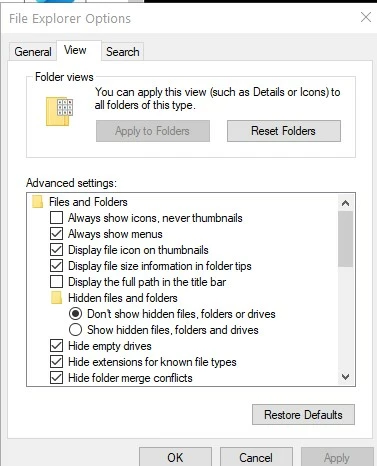
Have also followed the tip to uncheck 'always shows icons, never thumbnails'The advice is to click on teh top button 'apply to folders'  but I can't do that as that is greyed out.  (pic attached)


This topic has been closed for replies.

1 reply

johnrellis
Legend
January 31, 2024

Which app or exact camera model produced the DNGs?  If LR created the DNGs, which command (Convert Photo To DNG, Enhance, Photo Merge)?

TaffladAuthor
Inspiring
February 1, 2024

My phone creates DNG files directly  ..  my camera has to have the raw files converted and I use ADOBE DNG converter to do that.

Just did a test and showed something I had not realised before.

File saved to Desktop ..... and it has the correct thumbnail.

When I move file to a sub-folder  of My_Pictures  is arrives there without a thumbnail.


LR identifies the RAW file whether on desktop or in a my_pictures folder

Noticed another anomaly .... on my phone the selection is simply to output 'RAW' files.

They arrive on PC as filename.DNG

I just opened file with Mediainfo and it reports it as an invalid tiff ?  (see attached)


TaffladAuthor
Inspiring
February 5, 2024

Following advice to avoid going to W11 currently.
It's not a W10 issue anyway, as I have tested it on my W10 laptop and DNG files display thumbnails.

Looks like I have some W10 spefic problem on my PC ....  I did ask the same Q on Microsoft support, they answered that this is not a standard MS file format and I should log a fault with Adobe.    They did add that as there are a significant number of people reporting the same problem, to complete a MS feedback form - which I did.


As part of a test - I copied 2 x DNG with thumbnail and 2 x DNG without thumbnails to a USB stick  .... the ones without Thumbnails still had no Thumbnail on another W10 machines.

LightRoom on my PC does see the files as DNG and imports them happily into Library


Interesting observation ....

When I copy files to USB stick I get following for each file without a Thumbnail: