
Participating Frequently
January 3, 2023
Answered

Dual monitors and LrC Develop module

  • January 3, 2023
  • 4 replies
  • 664 views

Monitor 1:  Dell 23.8" U2414H 1920 X 1080

Monitor 2:  Dell 27" Ultrasharp UP2720Q  3840 X 2160

Graphics Card NVIDIA GeForce GTX 1650 Max-Q 4GB

Lightroom Classic version: 12.1 [ 202212072312-d7ab524b ]

Operating System Windows 10 - Business Edition (Version 10.0.19044)

Application architecture: x64
System architecture: x64

Processor speed: 2.5GHz

Standard Preview Size: 2560 pixels
Displays: 1) 1920x1080, 2) 2560x1440

Graphics Processor Info:
DirectX: NVIDIA GeForce GTX 1650 with Max-Q Design (30.0.14.7234)
Init State: GPU for Image Processing supported by default
User Preference: Auto

Installed Plugins:
1) AdobeStock
2) Flickr
3) Nikon Tether Plugin
4) Topaz Photo AI


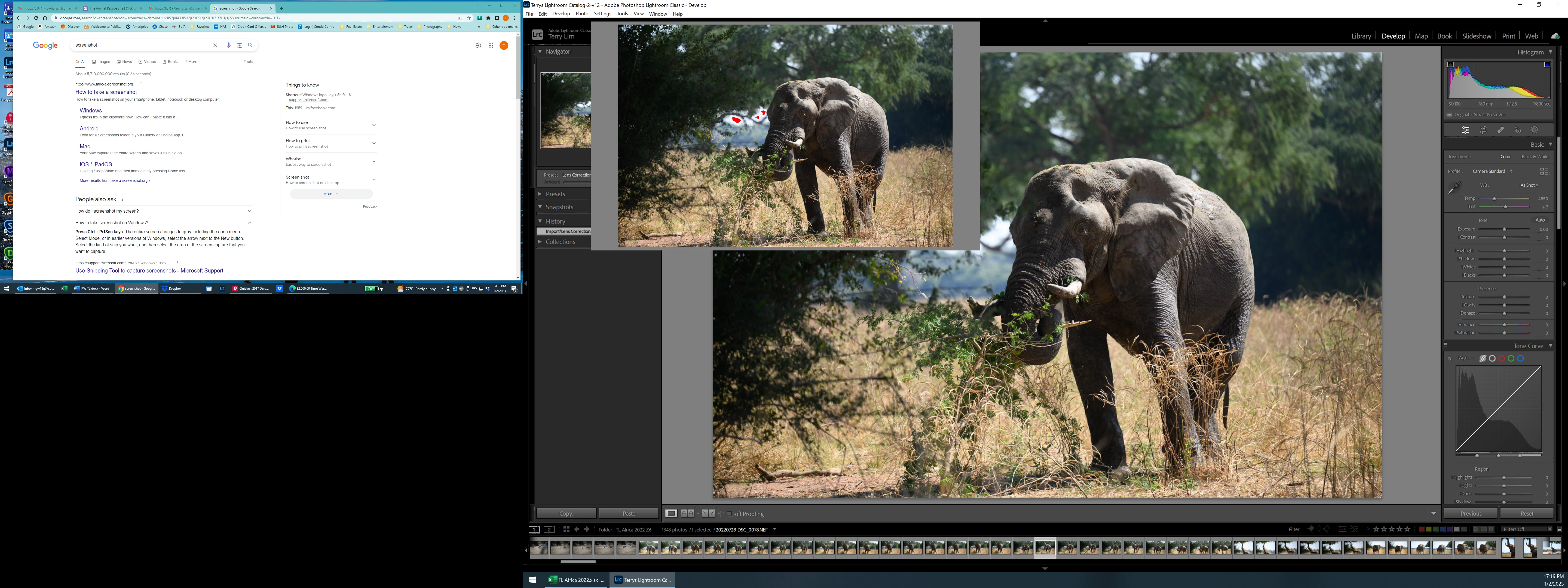
The Library module displays crrectly on both monitors but this is what happens when I switch to the Develop module on the 3840 X 2160 monitor.  Sometimes the photo appears in both the main display and the inset, sometimes it just appears in the inset.  I cannot get rid of the inset image.  The Develop module displays correctly on the 1920 X 1080 monitor.
This topic has been closed for replies.
Correct answer GoldingD

First most obvious issue, but may have nothing to do with your problem


Graphics Processor Info:
DirectX: NVIDIA GeForce GTX 1650 with Max-Q Design (30.0.14.7234)


That is a old driver, about a year old. You should have a NVIDIA utility called GeFoce Experience, use it (oh and I suspect, update it) to look for and install a newer driver. Out of date GPU drivers is a huge issue in LrC.


(30.0.14.7234) indicates v472.34, current release may be v527.56.


hmm, that particular GPU, is this on a laptop or a desktop?


4 replies

GoldingD
Legend
January 4, 2023

I have a suspicion that this may be caused by a corrupt preference file. I am not referring to your current preference settings, but a file created by Lightroom Classic that stores all sorts of info, including preference settings. This file can get corrupted, leading to all sorts of odd behavior. This file does not get deleted or re-written during an update or upgrade, nor is it normally deleted during a simple uninstall. User action is required to remedy this.


Problem is, I cannot find another posting to back up this hunch. Perhaps another member can reply.


see: 

https://helpx.adobe.com/lightroom-classic/help/setting-preferences-lightroom.html


be carefull to read that link. Be aware that settings in your preferences will likely revert to defaults (work around in link)


GoldingD
Legend
January 4, 2023

Another observation, but this one has nothing to do with your problem


Operating System Windows 10 - Business Edition (Version 10.0.19044)


A update exists. Last October. 


P.S. a nice app for screenshots on Windows is:

https://picpick.app/en/

A free copy is available, and works nicely.

'Looks like you were searching the web on the how.

GoldingD
GoldingDCorrect answer
Legend
January 4, 2023

First most obvious issue, but may have nothing to do with your problem


Graphics Processor Info:
DirectX: NVIDIA GeForce GTX 1650 with Max-Q Design (30.0.14.7234)


That is a old driver, about a year old. You should have a NVIDIA utility called GeFoce Experience, use it (oh and I suspect, update it) to look for and install a newer driver. Out of date GPU drivers is a huge issue in LrC.


(30.0.14.7234) indicates v472.34, current release may be v527.56.


hmm, that particular GPU, is this on a laptop or a desktop?


Participating Frequently
January 6, 2023

Yes.  We updated the NVIDIA driver (current release is v528.02) but we also had to override the high DPI scaling behavior to "Scaling performed by System."  The Windows update that was available was optional and we downloaded it anyway but it did not affect LrC.  Everything seems to be working properly now.


And FYI this is a laptop.


Thanks for your help!


P.S. And thanks for the screenshot hint.


Participating Frequently
January 3, 2023

Monitor 1:  Dell 23.8" U2414H 1920 X 1080

Monitor 2:  Dell 27" Ultrasharp UP2720Q  3840 X 2160

Graphics Card NVIDIA GeForce GTX 1650 Max-Q 4GB

Lightroom Classic version: 12.1 [ 202212072312-d7ab524b ]

Operating System Windows 10 - Business Edition (Version 10.0.19044)

Application architecture: x64
System architecture: x64

Processor speed: 2.5GHz

Standard Preview Size: 2560 pixels
Displays: 1) 1920x1080, 2) 2560x1440

Graphics Processor Info:
DirectX: NVIDIA GeForce GTX 1650 with Max-Q Design (30.0.14.7234)
Init State: GPU for Image Processing supported by default
User Preference: Auto

Installed Plugins:
1) AdobeStock
2) Flickr
3) Nikon Tether Plugin
4) Topaz Photo AI


The Library module displays crrectly on both monitors but this is what happens when I switch to the Develop module on the 3840 X 2160 monitor.  Sometimes the photo appears in both the main display and the inset, sometimes it just appears in the inset.  The Develop module displays correctly on the 1920 X 1080 monitor.


GoldingD
Legend
January 4, 2023

Admin

extra posting, please mitigate.

Participating Frequently
January 4, 2023

I'd be happy to but don't know how.