
Exit
  • Global community
    • Language:
      • Deutsch
      • English
      • Español
      • Français
      • Português
  • 日本語コミュニティ
  • 한국 커뮤니티
0

Duplicate folders

New Here ,
Nov 22, 2024 Nov 22, 2024

Every time I create a panorama or HDR, the photo is created in a folder, with the same name and path, but in the explorer they appear duplicated. I don't know what to do anymore. I've tried everything and it's hopeless. The cap fix does not work.
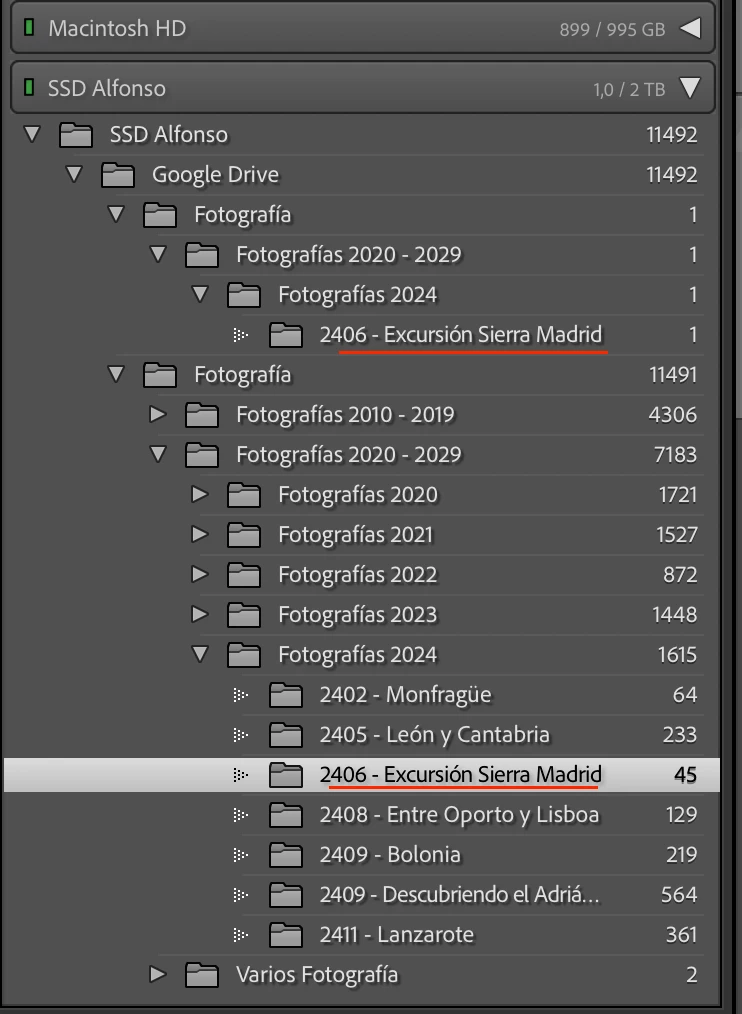
 

Captura de pantalla 2024-11-22 a las 11.41.57.png

TOPICS
macOS
472
Translate
Report
Community guidelines
Be kind and respectful, give credit to the original source of content, and search for duplicates before posting. Learn more
community guidelines
Community Expert ,
Nov 22, 2024 Nov 22, 2024

@alfonsomrtinez Do you have tried to reset the preferences to the default settings?

What else have you tried to solve the problem?

The double folder seems to create as a subfolder of "Google Drive". Do you're using the Synchronisation function. If yes take a look to your Sync settings.


My System: Intel i7-8700K - 64GB RAM - NVidia Geforce RTX 3060 - Windows 11 Pro 25H2 -- LR-Classic 15 - Photoshop 27 - Nik Collection 8 - PureRAW 5 - Topaz Photo
Translate
Report
Community guidelines
Be kind and respectful, give credit to the original source of content, and search for duplicates before posting. Learn more
community guidelines
New Here ,
Nov 22, 2024 Nov 22, 2024

Hello, thank you for your reply.


I have tried everything. I tried duplicating the catalog. I have also tried creating a new one and importing the folders. I have tried deleting Lightroom and installing it again. I have tried deleting all the preferences. I have tried uninstalling google Drive. I have tried formatting the hard drive where it is.


Whatever I do it ALWAYS creates a new folder with the same name.


If I create a catalog from 0, add only 1 folder and do an HDR, I don't have that problem. But of course, I can't waste that many hours of work on the Catalog. I need it to be that catalog.


Thanks

Translate
Report
Community guidelines
Be kind and respectful, give credit to the original source of content, and search for duplicates before posting. Learn more
community guidelines
New Here ,
Nov 22, 2024 Nov 22, 2024
Translate
Report
Community guidelines
Be kind and respectful, give credit to the original source of content, and search for duplicates before posting. Learn more
community guidelines
Community Expert ,
Nov 22, 2024 Nov 22, 2024

This is almost certainly a well-known problem, called the 'Capitalisation problem'. Basically, what happens is that you have two different folders, one called ‘XXXX’ (or a combination of upper- and lower cast) and the other one called ‘xxxx’. In other words, the names are the same, except for the capitalisation of at least one letter. Because MacOS and Windows are case-insensitive, your OS sees those two folders as one and the same folder and so it deals with this without you even being aware of it. You will only see one single folder in the Mac Finder or Windows Explorer!!! But Lightroom is case-sensitive, so Lightroom does see two different folders. Here's how to fix the problem. https://www.lightroomqueen.com/capitalization-catalog-error/


-- Johan W. Elzenga
Translate
Report
Community guidelines
Be kind and respectful, give credit to the original source of content, and search for duplicates before posting. Learn more
community guidelines
New Here ,
Nov 22, 2024 Nov 22, 2024

Hello, thank you for your reply.

I had already read about the capitalization problem. But I have tried all the solutions they say in that thread, applying it to all folder levels and it didn't work.

Unless it is a problem in a “hidden” part of the path, I don't know where it can be. Can you think of any other solution to try?

Thanks

Translate
Report
Community guidelines
Be kind and respectful, give credit to the original source of content, and search for duplicates before posting. Learn more
community guidelines
Community Expert ,
Nov 23, 2024 Nov 23, 2024
LATEST

Most likely your problem folder is Google Drive, or even your Home folder. You could try this: Move all the images (outside Lightroom Classic) of this duplicate folder to another folder and then delete the current empty folder. Start Lightroom Classic. Both folders in Lightroom should now show as 'missing'. Reconnect both to the same new folder (https://www.lightroomqueen.com/lightroom-photos-missing-fix/). You will get a question about merging the folders when you reconnect the second one, just click 'Merge'.


-- Johan W. Elzenga
Translate
Report
Community guidelines
Be kind and respectful, give credit to the original source of content, and search for duplicates before posting. Learn more
community guidelines