
Known Participant
March 16, 2023
Question

DXO plugin screwed up my Lightroom Catalog!

  • March 16, 2023
  • 2 replies
  • 1986 views

Trying the DXO PureRaw3 plugin trial app I chose to export the DXO processed image to my main external drive where my catalog is. The results was that DXO moved my Lightroom folders around and screwed up all my catalog hierachy!

 Attached image:
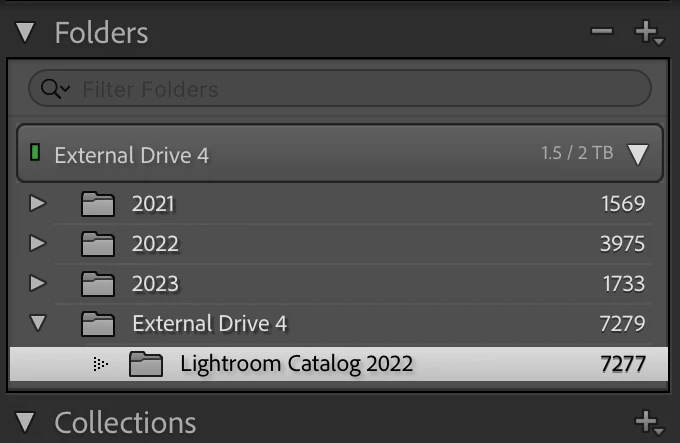
 

All my image folders : 2021, 2022, 2023 are inside the Lightroom Catalog 2022 folder, But DXO moved things around now the Lightroom Catalog 2022 folder appears empty (even though the number of image listed is correct) Only the DXO generated images are visible in the External Drive 4 folder. Nothing else. If I try to move the 2021 folder back into the Lightroom catalog folder I get the message that a folder already exists there (with no option to replace it).


How do I fix this mess with the minimum amount of difficulty?


Thanks for any help!

This topic has been closed for replies.

2 replies

JohanElzenga
Community Expert
Community Expert
March 16, 2023

It's unlikely that the plugin moved all those folders around. It looks more like the plugin created the 'capitalization error'. Here's the explanation and how to fix it, but do check first in the MacOS Finder what the folder hierarchy really looks like.

https://www.lightroomqueen.com/capitalization-catalog-error/


-- Johan W. Elzenga
TC5Author
Known Participant
March 16, 2023

Thanks Johan for your reply.


There is no duplicate named folder that I can see. Not sure what process lead to the result I got but I'm hoping for a simple fix like creating a new External Drive 4 folder in the right position and deleting the current empty Drive 4 Folder. The fix in the link you sent got me really confused.


I'm also hoping not to have to resort to using a catalog backup to restore as my latest backup is not very recent.

JohanElzenga
Community Expert
Community Expert
March 23, 2023

The path to the two folders looks identical with no capitalization error.


H'm, the odd thing here is that the path shown for the first folder is actually not correct. The correct path would have to show 'External Drive 4' twice. The first time as the drive name, and the second time as the folder with the same name. That makes this one more complicated than usual. Does that 'External Drive 4' folder exist on the hard drive? Try restarting Lightroom to see if that makes the CapsFix folder show up. Also have a look at this variant of the capitalization error as well. That may explain this path difference: 

https://helpx.adobe.com/lightroom-classic/kb/lightroom-displays-same-hard-drive-twice.html


-- Johan W. Elzenga
TC5Author
Known Participant
March 16, 2023

Clicking the image folders everything appears empty.