
Participant
January 14, 2023
Answered

Each Preset is displayed in individual groups instead of nested

  • January 14, 2023
  • 2 replies
  • 530 views

I have over 1500 presets but after update to LRC v12 (Windows 11) all presets appear in individual groups instead of nested.


I deleted all the presets to identify the problem, imported them and they are still the same.


I deleted them again, and created new presets, even though I use the same group when I create them, LRC generates a new group with the same name. So in the presets panel they are shown in separate groups.


And this is the same for the Premium presets that are installed by default with LRC.
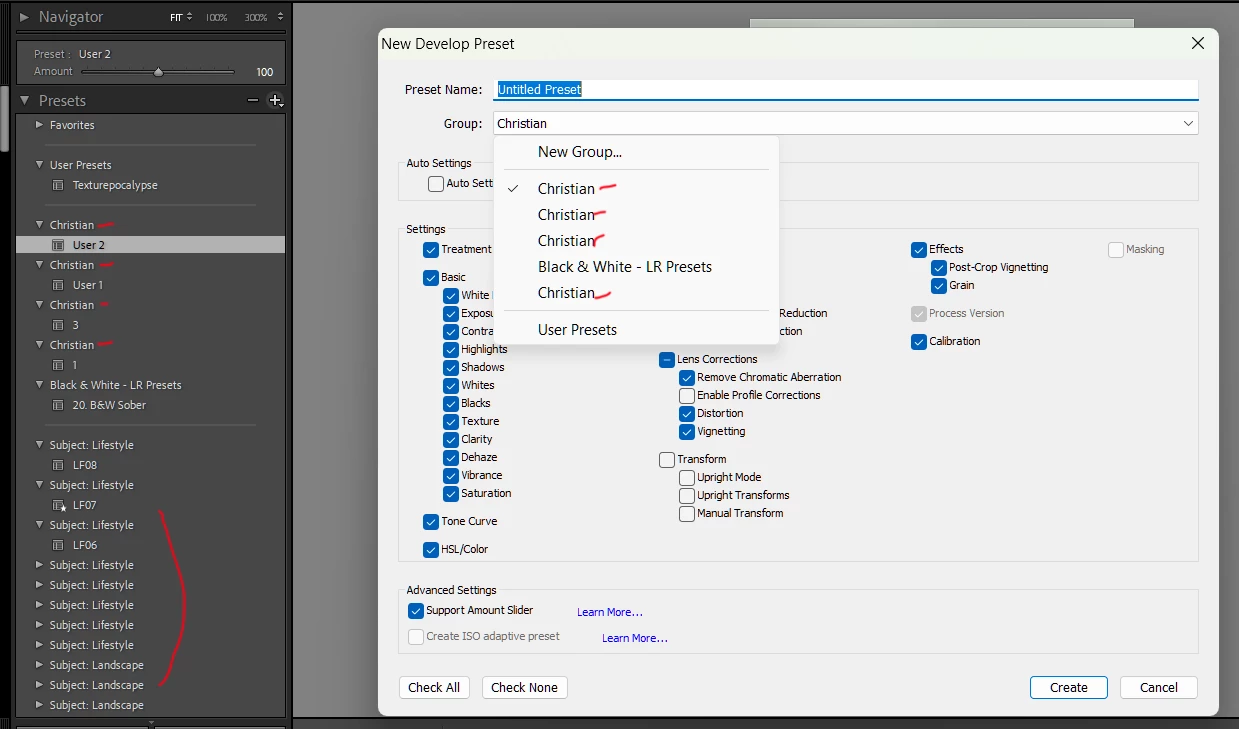
 

I spent all day looking for a solution and found nothing (by the way the solution editing the XMP file crs:Cluster="XX name" does not work in this case).


Any help is much appreciated, Thanks a lot!


This topic has been closed for replies.
Correct answer JohanElzenga

Start by resetting the preferences: https://www.lightroomqueen.com/how-do-i-reset-lightrooms-preferences/

I think it's unlikely that all of a sudden all your presets have been changed somehow.


2 replies

JohanElzenga
Community Expert
JohanElzengaCommunity ExpertCorrect answer
Community Expert
January 15, 2023

Start by resetting the preferences: https://www.lightroomqueen.com/how-do-i-reset-lightrooms-preferences/

I think it's unlikely that all of a sudden all your presets have been changed somehow.


-- Johan W. Elzenga
Participant
January 16, 2023

Problem solved

You are right Johan, the XMP files of the presets never changed, only the way they were displayed and grouped in the Presets Panel.


I tried the solution of resetting from the LrC menu: Edit>Preferences> Presets Tab: Resetting all.
And then restart LrC


It didn't work, not even changing the language.


So I had no choice but to do what I call a "Hard Reset" (This is at your own risk and if you are going to do this be sure to make a backup of all your data before😞

Manually search all the folders related to LrC, for example:
C:\Users\[your username]\AppData\Roaming\Adobe\Lightroom
C:\Users\[your username]\AppData\Roaming\Adobe\CameraRaw\Settings
 C:\Users\[your username]\AppData\Local\Adobe\Lightroom
C:\Users\[your username]\AppData\Roaming\Adobe\CameraRaw\GPU
C:\Program Files\Adobe\Adobe Lightroom Classic\Resources\Settings\Premium
C:\Program Files\Adobe\Adobe Lightroom Classic\Resources\Settings\Classic


I deleted everything related to LrC and its preferences, on the Drive C: but, to be sure that no settings or preferences were left on the system, I started the Registry Editor (Regedit.exe), using the menu Edit>Search and using the word Lightroom, I deleted everything related to LrC.


After doing this, I restarted the computer, reinstalled Adobe Lightroom Classic v12 from scratch and it worked! .... all the presets appeared organized by groups the right way.


Maybe just deleting the files from Drive C: would have been enough, but I didn't want to take any chance!


I think the root of the problem might have been some corrupted LrC preferences file after the update.


Thank you all for your help and support!


Regards

johnrellis
Legend
January 16, 2023

Glad you got it resolved finally.  


For future reference, in case this happens again to someone else, had you previously switched LR to a language other than English?

johnrellis
Legend
January 15, 2023

Attach here the .xmp files for the presets User 1 and User 2 in the "Christian" groups. I can see if there's anything unusual in their contents and whether the problem occurs when I import them into my LR.


Also, is the setting Preferences > Presets > Store Presets With This Catalog checked or unchecked?

Participant
January 15, 2023

Hi John

Thank you for your support. Please find attached the  XMP files.


The option "Store Presets With This Catalog" is unchecked.


By the way, today I tried Camera Raw in Adobe Photoshop (to see if the same problem happened, but no), all the LrC presets are organized perfectly by groups.