
Participant
September 21, 2017
Answered

Effects Panel is missing on Lightroom CC 2015.12 version

  • September 21, 2017
  • 2 replies
  • 1640 views

I upgraded from Lightroom 6 to CC last week but I haven't got the Effects Panel.  I am not working on a photo that was from LR6 - no lightning bolt under the histogram.  How do I get the Effects Panel. 

Info from my System Info

Lightroom version: CC 2015.12 [ 1125239 ]

License: Creative Cloud

Operating system: Windows 10

Version: 10.0

Application architecture: x64

System architecture: x64
This topic has been closed for replies.
Correct answer Rob_Cullen

The Effects Panel also has the post-vignetting and other selections as well.


There is no panel header for Effect to click the arrow to make it visible

johnrellis- has given a correct answer,  but did you read my post carefully that said- "Right-click...on any one of the other panel headers"

This is the 'mouse' way to selectively view all panels besides the 'Menu' way.

2 replies

Participant
September 22, 2017

yes - thank you.  I have it now!   Thank you so very much!

Rob_Cullen
Community Expert
Community Expert
September 21, 2017

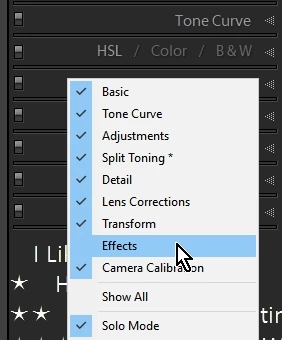
You can Right-click the mouse cursor on any one of the other panel headers (Basic, Tone Curve, etc) then place a check mark against a panel name to make visible.

Regards. My System: Windows-11, Lightroom-Classic 15.1.1, Photoshop 27.3.1, ACR 18.1.1, Lightroom 9.0, Lr-iOS 10.4.0, Bridge 16.0.2 .
Participant
September 21, 2017

There is no panel header for Effect to click the arrow to make it visible - but I did find the Dehaze in Effects with the Adjustment Brush selections.  Has it changed or am I still missing the Panel Header with Effect?

Rob_Cullen
Community Expert
Rob_CullenCommunity ExpertCorrect answer
Community Expert
September 22, 2017

The Effects Panel also has the post-vignetting and other selections as well.


There is no panel header for Effect to click the arrow to make it visible

johnrellis- has given a correct answer,  but did you read my post carefully that said- "Right-click...on any one of the other panel headers"

This is the 'mouse' way to selectively view all panels besides the 'Menu' way.

Regards. My System: Windows-11, Lightroom-Classic 15.1.1, Photoshop 27.3.1, ACR 18.1.1, Lightroom 9.0, Lr-iOS 10.4.0, Bridge 16.0.2 .