
Known Participant
February 20, 2023
Question

EHD crashed. Adding new EHD with photos already on it.

  • February 20, 2023
  • 2 replies
  • 687 views

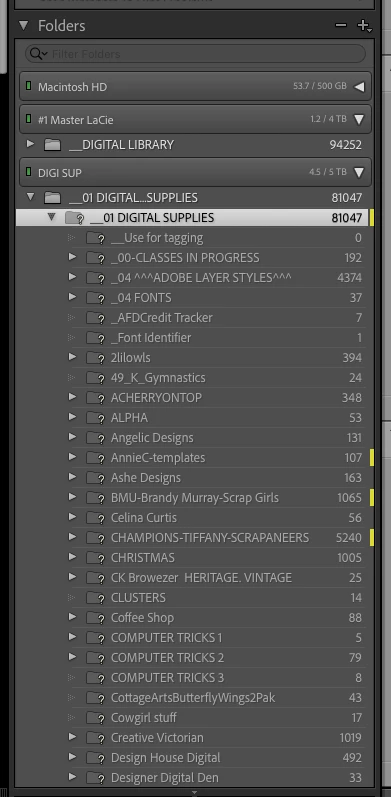
Lightroom has question marks on each folder on my new EHD.  I have tried to "Find Missing Folder" and point to where it is on the new EHD,but it doesn't go anywhere or let that process start.  New Files are identical to the crashed files, but just on new EHD.  I read where I need to add a "Folder" but I already have many folders on the new EHD.  How do I make this work?  I have over 8,000 files so would like a fairly easy solution.  Thanks so much.
This topic has been closed for replies.

2 replies

Sean McCormack
Community Expert
Community Expert
February 20, 2023

Once caveat on the rename; The folder structure has to be identical to the old drive for automatica connection. 

Sean McCormack. Author of 'Essential Development 3'. Magazine Writer. Former Official Fuji X-Photographer.
kareloweAuthor
Known Participant
February 20, 2023

I do get the message: The Selected folder or one of its subfolders is already in Lightroom.  Do you want to combine these folders?  My options are Cancel or Merge?  I am leary to select Merge beause I don't know what that will do.  Don't want all my folders to Shuffle.  Thanks again.

Per Berntsen
Community Expert
Community Expert
February 20, 2023

My guess is that your new EHD has a different name than the old EHD.

Lightroom only knows about the old EHD, so if Find missing folder doesn't work, you'll have to rename the new EHD, and give it the same name as the old EHD. I'm not a Mac user, so I don't know if that's possible to do.


Whatever you do, do not reimport. Lightroom will consider all these photos new, and all your previous edits will be missing.

JohanElzenga
Community Expert
Community Expert
February 20, 2023

Renaming a disk is easy. You have to do it in the Macintosh Finder. If you give the new disk the exact same name as the old disk had, then Lightroom will not see the difference, so it should not show missing folders anymore.


-- Johan W. Elzenga