Participant
February 17, 2022
Answered

eigenes Format für Bennung Unterordner beim Import

  • February 17, 2022
  • 4 replies
  • 529 views

Liebe Community,

kann mir jemand sagen, ob und wie es möglich ist die Vorgaben für die Benennung der Unterordner beim Import anzupassen, ich möchte gerne folgendes Format verwenden:

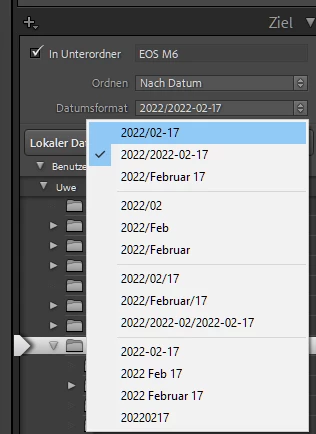
Jahr/Jahr-Monat Bsp. 2022/2022-02 - die Vorgabe 2022/2022-02-17 kommt meinem Wunsch ja schon sehr nahe, ich möchte jedoch nicht für jeden Tag einen Unterordner, sondern alle Bilder eines Monats in einem Ordner haben, der Ordnername soll dabei das Jahr und den Monat enthalten. Es würde auch reichen nur einen mit Jahr und Monat benannten Unterordner zu erstellen, es muss also nicht zwingend ein übergeordneter Ordner, benannt nach dem Jahr erstellt werde.

Ich freue mich sehr auf eure Ideen und Lösungsansätze.
 

This topic has been closed for replies.
Correct answer Rob_Cullen

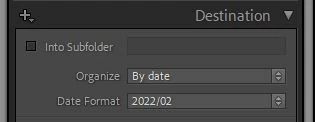
So use this Import format- (No manually typing folder names!)

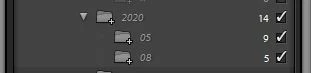
This 2022/02 format will import files as 'Month' sub-folders (no days)-

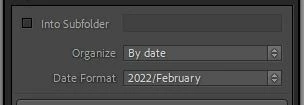
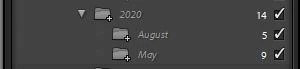
Or this one-

A disadvantage with this one is that it sorts the 'Months' alphabetically-  August before May, etc. Whereas 2022/02 will sort the months numerically.


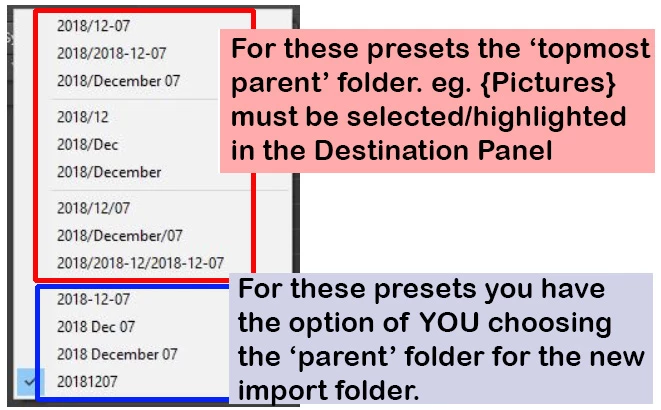
One point to understand is that with any Preset that includes a forward slash [/] you must highlight a 'Parent' folder above the 'Year' sub-folders that may exist.


Compare the Presets above with this one that DOES create 'Day' sub-folders- (Not what you want!)

4 replies

Rob_Cullen
Community Expert
Community Expert
February 17, 2022

The steps are-   (Using the [Copy] from a camera card, or [Move] from a Hard-drive)


In the Library view-

1) If it does not exist- Create a Folder '2022'

You can do this in the Folder panel by a [Right-Click] on the parent folder (eg. My Pictures Robert)

A new folder {2022} will then show in the Folder panel as empty-


2) In the IMPORT dialog-

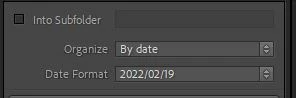
Set these options in the Destination panel and YOU type in the NAME of the sub-folder you want-

eg. {2022-02}  {2022-February}  {2022-Feb}


3) You Select (highlight) the new {2022} parent folder.

This is a preview in the Destination panel showing you where your imported photos will go-


For future Imports to the {2022} folder you only need to do Steps  2) and 3).


Regards. My System: Windows-11, Lightroom-Classic 15.1.1, Photoshop 27.3.1, ACR 18.1.1, Lightroom 9.0, Lr-iOS 10.4.0, Bridge 16.0.2 .
Participant
February 18, 2022

Thank you Rob,

I know that I can enter the folder names manually, but I wanted to use the date function for larger photo quantities to create the folders automatically - there is a scheme in LR for this, but there is also a new folder created for each day. For example, I want to have all the pictures from February 2021 placed in a folder called 2021-February

the second line of the Lightroom presets corresponds to my wish, except that the tag is included

I was already in contact with Adobe, there is an entry in the configuration file "Lightroom Classic CC 7 Preferences.agprefs" which could describe this: AgImport_shootNameFormat = "%Y/%Y-%m-%d",  but even if I remove %d this unfortunately has no effect.

It could be the right line, but I don't know how to get this setting active


Rob_Cullen
Community Expert
Rob_CullenCommunity ExpertCorrect answer
Community Expert
February 18, 2022

So use this Import format- (No manually typing folder names!)

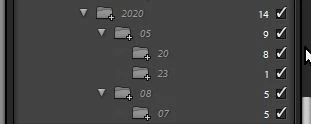
This 2022/02 format will import files as 'Month' sub-folders (no days)-

Or this one-

A disadvantage with this one is that it sorts the 'Months' alphabetically-  August before May, etc. Whereas 2022/02 will sort the months numerically.


One point to understand is that with any Preset that includes a forward slash [/] you must highlight a 'Parent' folder above the 'Year' sub-folders that may exist.


Compare the Presets above with this one that DOES create 'Day' sub-folders- (Not what you want!)

Regards. My System: Windows-11, Lightroom-Classic 15.1.1, Photoshop 27.3.1, ACR 18.1.1, Lightroom 9.0, Lr-iOS 10.4.0, Bridge 16.0.2 .
GoldingD
Legend
February 17, 2022

Does not the 4th option down, 2022/02 accomplish that?


https://www.lightroomqueen.com/import-create-dated-folders/


Participant
February 18, 2022

the second option would be suitable if it did not also contain the day - I would also like to have the year in the folder name - otherwise it can be difficult if the folder named by month is no longer in the folder named by year, in addition, you would have the possibility to do without the year folders completely and still have a chronological structure

GoldingD
Legend
February 17, 2022

Can I assume that you have tried creating the desired folder, before importing, and then importing to the desired folder?

GoldingD
Legend
February 17, 2022

In both MACOS and Windows OS, / is not a proper character to use in file or folder naming. Do not use it.

Participant
February 17, 2022

Thanks for your answer,

i know that i should´nt use / in a file name - that is not what i mean

i would like to create a folder named by year : 2022

an in this folder subfolders named by month and year : 2022-02 or 2022-Februar

in Lightroom is only a preset with year-month-day for the subfolder name - but i dont like the day in the name


GoldingD
Legend
February 17, 2022

I see that  I misunderstood what the LrC destination by date screen was displaying.


I am not a fan of filing by date structure, I avoid it like the plague, and I made a mistake in understanding that info, my bad.