Participating Frequently
April 10, 2024
Answered

embedded dng profile disappeared

  • April 10, 2024
  • 5 replies
  • 743 views

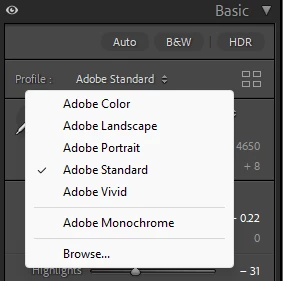
I imported my previous catalog to Lightroom 13.2. The DNG files came with Embedded profile, which was displayed in Profile selector:


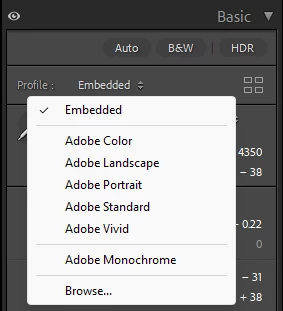
After trying another profile I can no longer select Embedded profile anymore. It disappered from the menu:


How can I get the Embedded profile back?

This topic has been closed for replies.
Correct answer johnrellis

Linear DNG is a standard DNG and was always supported by Lightroom, I've used DXO for several years and that's how I got embedded profiles in the first place. Apparently current Lightroom also supports them, but somehow forgets at some point. If that's the case it's a bug.

Camera matching profiles are irrelevant, they are just everything defined by Nikon, it's always the same set.


[This post contains formatting and embedded images that don't appear in email. View the post in your Web browser.]


I see the same behavior with sample dpreview.com mosaic DNGs taken from the Hasselblad L20D-20c, which contain embedded profiles. 


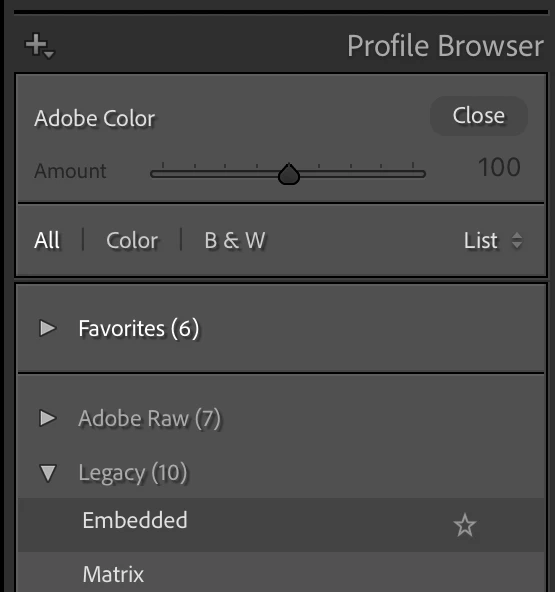
When you switched the profile from Embedded to Adobe Standard and then browsed the list of profiles, you didn't see Embedded because it is in the Legacy profile group, which is hidden by default. To unhide it, right-click the profile group Adobe Raw and do Manage Profiles; then check Legacy. The Embedded profile will now be visible:


(This would have been a lot easier to diagnose if you had provided a sample DNG.)

 

5 replies

Participating Frequently
April 10, 2024

One more thing I noticed. Now when importing a DNG file there is no longer a choice of Embedded profile at all. These are linear DNGs created by DXO PR3.

JohanElzenga
Community Expert
Community Expert
April 10, 2024

The drop down menu that you show here is your favorite profiles (plus the currently selected profile). If you have changed the embedded profile to one of your favorites, then selecting the favorite profiles menu again will not show the embedded profile, because it is not a favorite profile. Click on the icon with the four rectangles, or choose 'Browse...' at the bottom of this menu to get the profile browser that will show you all profiles. You will find the 'Embedded' profile in the 'Legacy' group.


-- Johan W. Elzenga
Participating Frequently
April 10, 2024

It's not in Favorites or any other profile list


johnrellis
johnrellisCorrect answer
Legend
April 10, 2024

Linear DNG is a standard DNG and was always supported by Lightroom, I've used DXO for several years and that's how I got embedded profiles in the first place. Apparently current Lightroom also supports them, but somehow forgets at some point. If that's the case it's a bug.

Camera matching profiles are irrelevant, they are just everything defined by Nikon, it's always the same set.


[This post contains formatting and embedded images that don't appear in email. View the post in your Web browser.]


I see the same behavior with sample dpreview.com mosaic DNGs taken from the Hasselblad L20D-20c, which contain embedded profiles. 


When you switched the profile from Embedded to Adobe Standard and then browsed the list of profiles, you didn't see Embedded because it is in the Legacy profile group, which is hidden by default. To unhide it, right-click the profile group Adobe Raw and do Manage Profiles; then check Legacy. The Embedded profile will now be visible:


(This would have been a lot easier to diagnose if you had provided a sample DNG.)
 

GoldingD
Legend
April 10, 2024
I imported my previous catalog to Lightroom 13.2. 

Can you expand on that?


Participating Frequently
April 10, 2024

File/Import From another Catalog

johnrellis
Legend
April 10, 2024

Please upload a DNG showing that problem to Dropbox, Google Drive, or similar and post the sharing link here. We can see if the symptoms occur on other LR installations or are limited to yours.

Participating Frequently
April 10, 2024
Participating Frequently
April 10, 2024

In adition to the profile problem, white balance also misteriously changed, though saying "As Shot" in both cases.

Was:


became: