Participant
December 23, 2021
Question

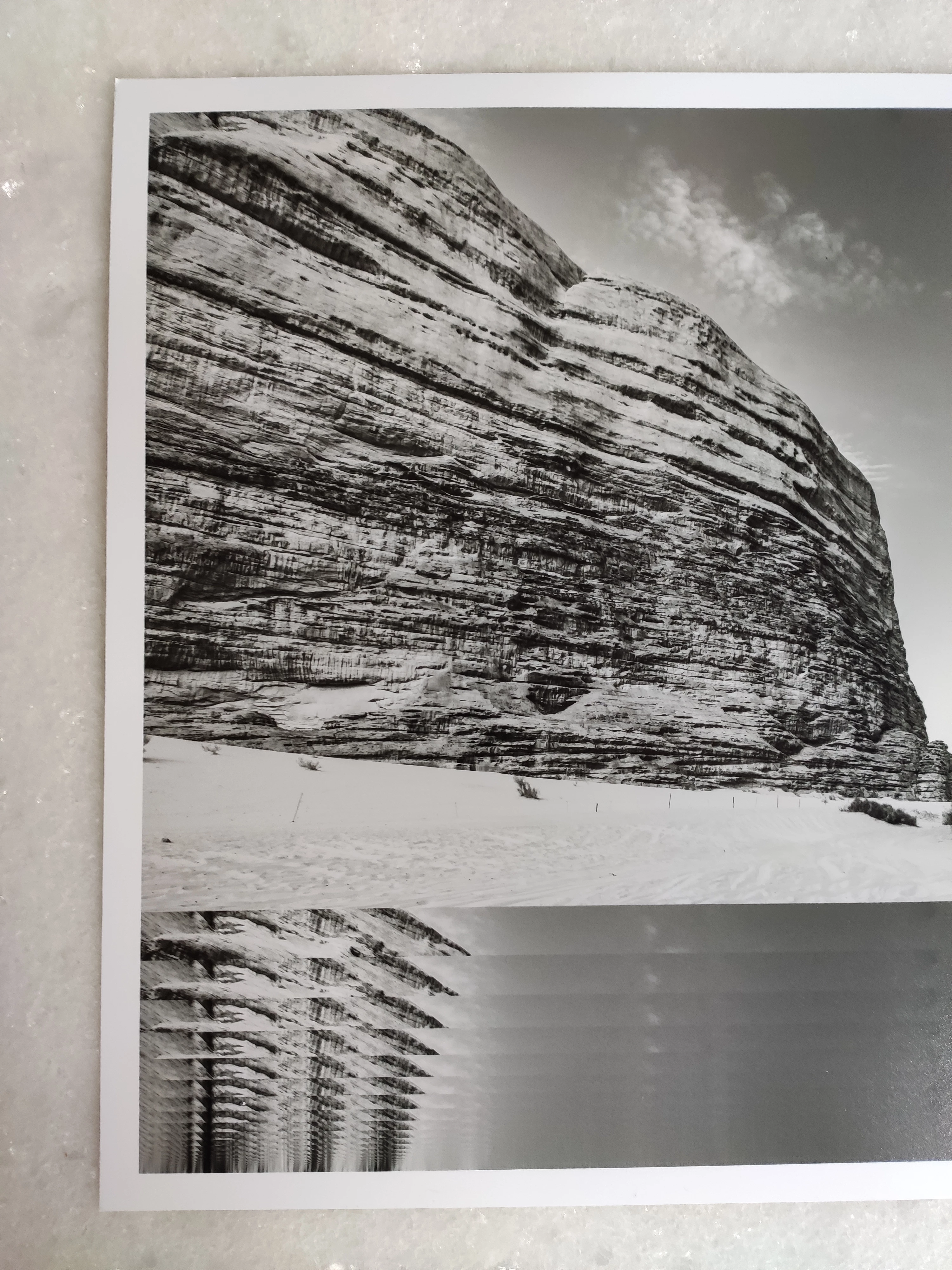
EPSON Stylus Photo R3000 print bug when printing on A3 papers through Lightroom Classic on macOS

  • December 23, 2021
  • 2 replies
  • 718 views

Hello, this is a part of a buggy print made in A3 format with an EPSON Stylus Photo R3000.

The Printer firmware and ALc are up to date.

Bug only appears in A3 (Color or B&W) and in Lightroom Classic on MacOS Monterey.

Thanks in advance for your suggestions, Marc.


{Thread title edited by moderator}

This topic has been closed for replies.

2 replies

josephlavine
Community Expert
Community Expert
December 24, 2021

Are you running the standard or AirPrint driver? By default, macOS Monterey attempt to load the AirPrint driver, which can cause some interesting issues.

warmly/j

Participant
December 24, 2021
Hello and thanks for your interest in our problem but
1.The bug first appeared when the printer was USB Cable connected.
2.We ONLY face this problem printing A3 w/ Lightroom Classic.

Have a joyful Xmass night, Marc.
TheDigitalDog
Inspiring
December 24, 2021

That you only see this on A3 may indicate you may need to start from scratch, build a new, virgin print template with ALL the settings including those found in the Epson driver for page size, and all other settings. And if you have presets you built in that driver, do not use them! Keep that set to "Default Settings" as seen below. ALL settings in Lightroom Classic and the print driver are stored in a template. Configure and make a new one, then test: any better?

Author “Color Management for Photographers" & "Photoshop CC Color Management/pluralsight"
nikunj.m
Community Manager
Community Manager
December 23, 2021

Hi,


We're sorry about the trouble with Lightroom Classic while printing on A3 papers. Would you mind sharing the exact version of Lightroom Classic you're using along with your computers macOS version? Since when are you experiencing this issue? Are you printing wirelessly or are you connected to the printer via a cable? Have you tried re-installing the printer drivers to check if that helps?


You can try to reset the preferences of Lightroom using the steps mentioned here: https://adobe.ly/2JSym5e

Please backup your presets prior to resetting the preferences.


Let us know how it goes!

Regards,

Nikunj

Participant
December 24, 2021

Hi and thanks for your prompt answer and the provided link !

This is our setup :

MacOS 12 aka Monterey

Lightroom classic: version 11.1
Calibration tool and software/plugin:
Color Checker Studio from Calibrite version 1.0.0
Xrd: vers.: 3.0.132


The bug appeared a priori with no peculiar circumstances/trigger (no hardware or soft update/addon).

The EPSON Stylus Photo R3000 was USB Cable connected but is now WiFi connected and A3 printing is still buggy.


While you try to reproduce if you can, we will to reset the printer Driver and ALc presets and keep you posted.

May you have a wondeful Xmass, Marc.