
Equivalent JPEG Compression Settings w/ PS "Export"
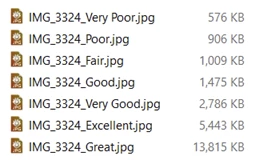
Photoshop has JPEG export settings that provide (at least for my use) good quality compression, including resizing, using the "Good" setting (I think this used to be "70")...
I'm struggling to find an equivalent setting in Lightroom. Even if I take the slider down to "40" in Lightroom, the file is still a larger file than PS is exporting, and Adobe Bridge also seems to generate different file sizes for different settings.
Firstly, I'm really stuggling to understand the rationale for these different behaviours from "the same" company's products. Surely there should be some equivalence between settings here - even if this means introducing "Export for Web" as a qualification to "Export to ..." if there is such a stark difference.
Secondly, has anyone looked into this in some detail and found some ways to have equivalent settings between at least 2 of these 3 programs?
Thanks!
William
 AdChoices