
Participant
December 25, 2020
Question

error lightroom

  • December 25, 2020
  • 3 replies
  • 243 views

hello,


yesterday I updated my Aplle and now I'm using the system : mac OS BIG SUR Version 11.1


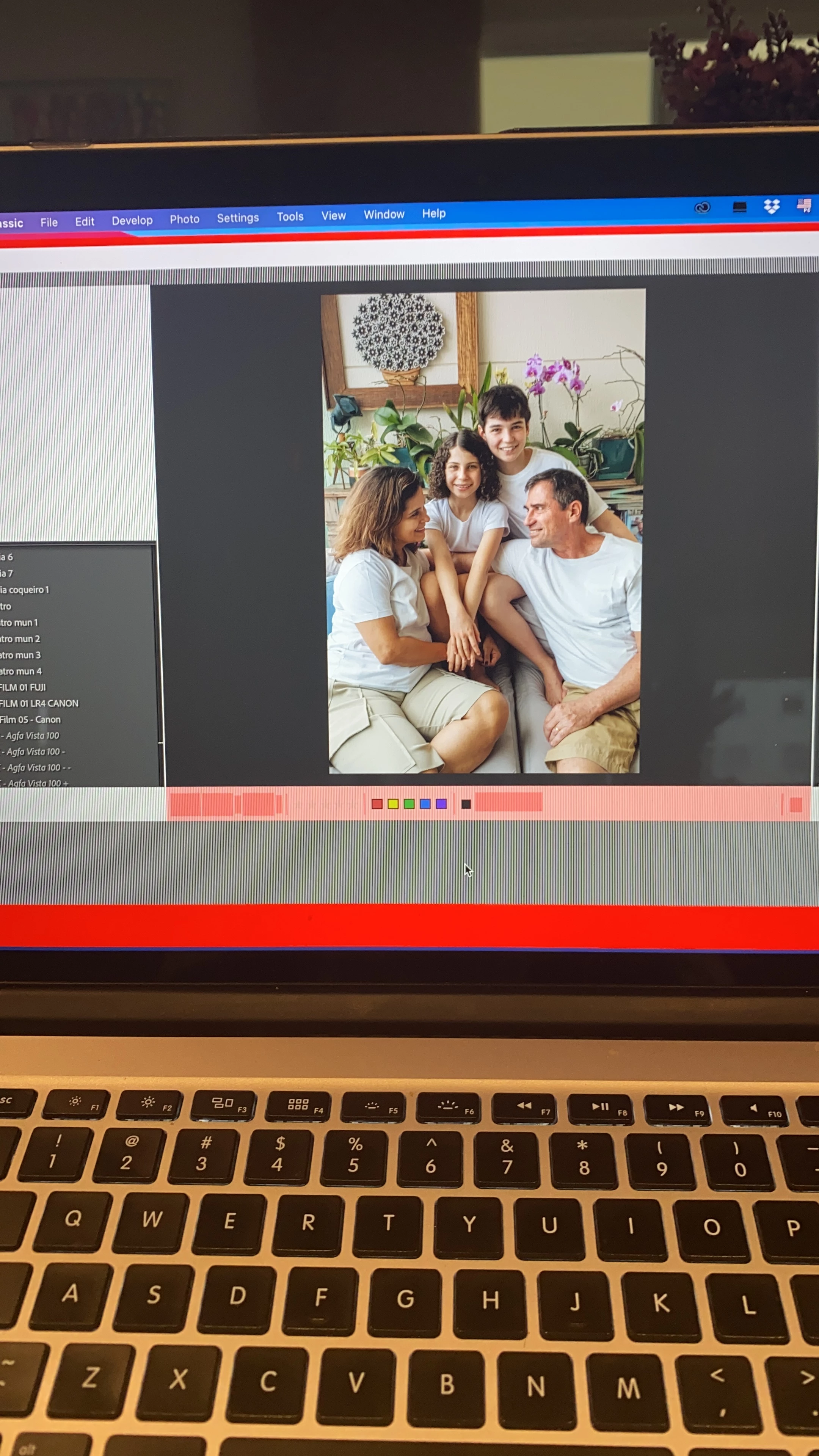
My Lightroom Classic 10.1 is very slow now and LR is blocking all the time and some red blocks (freeze the screen)  appears when I'm using the program, as the example


Could you guys helps me please


Thanks
 

This topic has been closed for replies.

3 replies

KR Seals
Community Expert
Community Expert
December 25, 2020

@Ian Lyons  I think you meant to say downgrade to V 10.0.

Ken Seals - Nikon Z 9, Z 8, 14mm-800mm. Computer Win 11 Pro, I7-14700K, 64GB, RTX3070TI. Travel machine: 2021 MacBook Pro M1 MAX 64GB. All Adobe apps.
Ian Lyons
Community Expert
Community Expert
December 25, 2020

Edited to fix LrC version number

The issue you describe is most likley caused by a GPU conflict introduced by Big Sur. You have two options:


1. Disable GPU support in Lightroom Classic Perferences (Performance tab)

2. Downgrade to Lightroom Classic 10 using the Creative Cloud App


Unfortunately, disabling the GPU can result in reduced performance when using some tools within the Develop module (e.g. local adjustments, texture, clarity, dehaze and noise). Therefore, if performance is important, then you may wish to revert to LrC 10. The process is quite simple when using the Adobe Creative Cloud App.


  • Launch the CC App
  • Choose All Apps
  • Click on the 3-dots button to right of Lightroom Classic
  • Choose 'Other Versions (see below screenshot).


Note that you do not need to unintstall 10.1 as this is handled by the version downgrade process.


KR Seals
Community Expert
Community Expert
December 25, 2020

This is a known issue on some Mac by Adobe. You should try rolling back to Lightroom Classic V 10.0

In the Creative Cloud app list of applications, click on the dots to the right of the Lightroom Classic listing and select "Other Versions". Select V10.0


Advise if that works for  you

Ken Seals - Nikon Z 9, Z 8, 14mm-800mm. Computer Win 11 Pro, I7-14700K, 64GB, RTX3070TI. Travel machine: 2021 MacBook Pro M1 MAX 64GB. All Adobe apps.
Participant
December 26, 2020

I had the same problem. Reinstalling version 10.0 seemed to fix the problem