

Answered
Error: "Unexpected error opening catalog" occurs in Lightroom after Windows 10 upgrade
I have had this problem since before Christmas when MS upgraded Windows again.
I have followed the instructions on the support page for this problem
Solutions
Solution 1: Install the Microsoft Visual C++ Redistributable 2012
- For instructions, see: Error in MSVCR110.dll opening apps in Windows 10
Solution 2: Run Lightroom as an Administrator.
- Open the Program Files/Adobe/Adobe Lightroom folder.
- Right-click on the Lightroom.exe file.
- Choose Run as administrator.
Solution 3: Change the permissions on your catalog's folder.
- Select the folder your catalog is in. By default, this is your Pictures/Lightroom folder.
- Right-click on that folder.
- Choose Properties > Security > Edit.
- Select your user name in the Group or user names section. and click Full Control under Permissions.
- Click Apply, then click OK out of all the dialog boxes.
but still get the same result:-
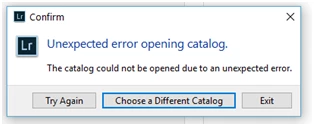
I have tried choosing a backup catalog to see if that would get me going but it does not seem to want to take the old file names and load any of them up.
Anyone any suggestions?
Regards
Steve


 AdChoices