
Participant
September 15, 2019
Question

Excessive use of CPU and RAM

  • September 15, 2019
  • 2 replies
  • 230 views

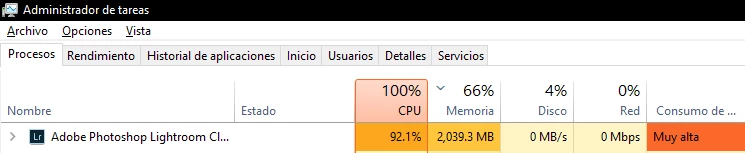
Today when I was editing a photo I realized that the CPU usage increased too much like the RAM and when trying to export that photo increased even more, any solution? PD: I want to clarify that the something that had never happened to me, I have 2 years with lightroom
This topic has been closed for replies.

2 replies

Ian Lyons
Community Expert
Community Expert
September 15, 2019

As ManiacJoe has indicator the CPU and RAM shwn in your screenshot is not unusual, espcially if there are more than a few and/or complex images (i.e. HDR or Pano).


If you're unsure that what you're seeing is not norma, then please provide details of your OS and hardware. This may be achieved by Opening Help> System Info and copy/pasting the contents of the window to your response.


1. Operating system (includes build number)

2. CPU type and speed

3. 

ManiacJoe
Inspiring
September 15, 2019

Exporting is very CPU intensive. 92% is not unreasonable. However, you can use the Admin tools to lower the priority of the LR process, which will make the computer more responsive to other processes.


2 gig memory usage is not that unreasonable for exporting.


Which exact version of LR are you using?

What are the hardware specs of your computer?