
Participant
November 30, 2019
Question

Export without losing quality

  • November 30, 2019
  • 4 replies
  • 4414 views

Hello everyone, 

My post here is regarding the quality lost after exporting my files from Lightroom.

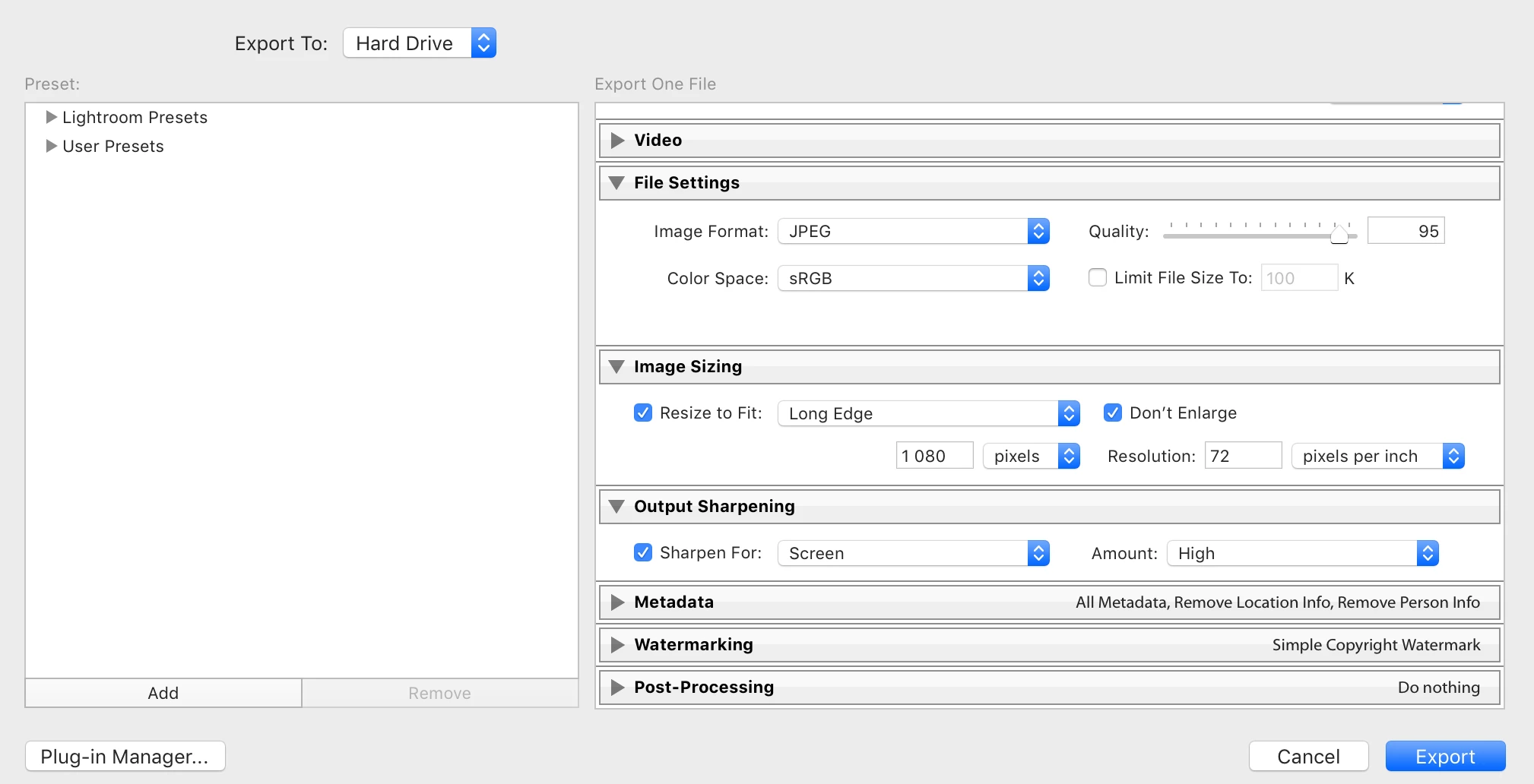
Once I finish editing my pictures on Lightroom (just simple highlights, shadow etc..) I notice that the pictures lost lots of sharpness and its basically not the same quality as before. I'm wondering if you guys can help me out. Attach I leave you an example of my export details. 
 

This topic has been closed for replies.

4 replies

josephlavine
Community Expert
Community Expert
December 1, 2019

Something you always want to consider is the use of the images. For example, are you planning on printing the files and if so, how large, are they for social media, is a client using them in a publication...?

The highest quality will always be the original full resolution, and whenever we reduce files for a specific output, we lose quality.

Your best bet is to always work on the raw file and then export/output for the specific need.

Per Berntsen
Community Expert
Community Expert
December 1, 2019

I don't think using Photoshop will make any difference, Lightroom is very capable when it comes to resizing files on export.

But as others have said, a 1080 pixel file is what it is, you only have so many pixels, and you cannot expect the quality to be the same as for the full resolution file.

Having said that, it's perfectly possible to export a 1080 pixel file that looks good.

It helps a lot to have a sharp, good quality original that has been properly processed.

I see that you are using Output sharpening set to High, which in my experience leads to over sharpening for a normally sharp image. I find that Standard sharpening works well in most cases.

And for the record, using Long edge for image sizing is perfectly OK, it does not stretch the image.

JP Hess
Inspiring
November 30, 2019

An image that is reduced to just 1080 pixels on the long side is a significant reduction in size in today's image size. For instance, my camera isn't very recent. However, a full-sized image has 6000 pixels on the long side. So exporting an image with just 1080 pixels is really reducing the size, and therefore is going to degrade the quality of the image. If you want the best quality you should consider not reducing the size. If you must reduce the size to meet the requirements of some website or some project you are doing then you might consider creating the smaller image using Photoshop to see if that makes a difference.

Legend
November 30, 2019

Well, In theory it won't look as good as the original when you create a JPEG, because you are compressing the image.


That said, I am not sure what resolution your original image is, but if you're resizing down to 1080px on the long edge, you very well could be bringing the resolution down quite a bit. Try unchecking "Resize to Fit" to keep the original source resolution.


95% is certainly a fine quality setting for JPEG, but again if you're taking a much higher resolution source image, then bringing it down to 1080px wide, and stretching that to fill your frame, it won't be as sharp as the full resolution copy, which very likely is supersampling down to your display.

Participant
November 30, 2019

Hey thank you so much for your reply.

You mean like this?  

Legend
November 30, 2019

No, I mean uncheck the checkbox to the left of "Resize to Fit", it is under the Image Sizing drop-down. When you have that box checked, you're then defining a new resolution for the image with whatever you input (in this case, 2400 x 1080). When unchecked, you keep your final export at the image's full resolution (minus any cropping you did).