
regg63660891
Participating Frequently
March 9, 2021
Answered

Exported Catalogs do I need them?

  • March 9, 2021
  • 2 replies
  • 584 views

I use Lightroom Classic on a Mac Deskto and a Macbook and all the original images are stored on a SAN. Over the years I have always exported a years catalog to the SAN without exporting originals of course. I would then import from the catalog into the MacBook so all was upto date. If I used the Macbook to import pictures whilst on the move I would then copy the originals directory to the SAN and import them to the desktop remove and re-import to the Macbook if I use the Macbook at home I import directly to the SAN.

My question is do I really need to keep the catalogs on the SAN as all that information is still in the Library on the Desktop and Macbook, is it a waste of space or something worth keeping, to import from them they have to be copied to either the internal or directly attached disk, or are they a useful backup?.
This topic has been closed for replies.
Correct answer Rob_Cullen

"I can't see where in Lightroom to configure the location of the backups..."


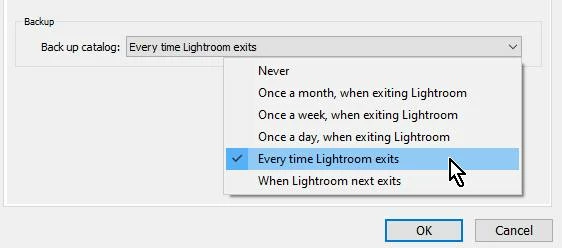
When you have the Catalog Settings (MENU: Edit > Catalog Settings...) set to create a Backup (on any option other than "Never")-

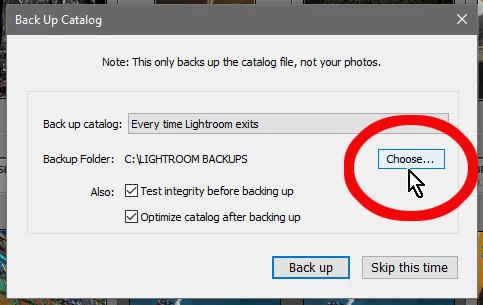
And you exit Lightroom-Classic, you will see the Catalog Backup dialog where you can [CHOOSE] exactly where, and to which connected drive, the Catalog copy will be saved (in a ZIP folder)-


2 replies

Rob_Cullen
Community Expert
Rob_CullenCommunity ExpertCorrect answer
Community Expert
March 9, 2021

"I can't see where in Lightroom to configure the location of the backups..."


When you have the Catalog Settings (MENU: Edit > Catalog Settings...) set to create a Backup (on any option other than "Never")-

And you exit Lightroom-Classic, you will see the Catalog Backup dialog where you can [CHOOSE] exactly where, and to which connected drive, the Catalog copy will be saved (in a ZIP folder)-


Regards. My System: Windows-11, Lightroom-Classic 15.1.1, Photoshop 27.3.1, ACR 18.1.1, Lightroom 9.0, Lr-iOS 10.4.0, Bridge 16.0.2 .
regg63660891
Participating Frequently
March 10, 2021

Thanks for that, that worked so I can now happily save some space on my SAN as the catalogs and previews took up 33GB and although I still have over 1TB free I can use that for a lot of images.

dj_paige
Legend
March 9, 2021

My question is do I really need to keep the catalogs on the SAN as all that information is still in the Library on the Desktop and Macbook, is it a waste of space or something worth keeping, to import from them they have to be copied to either the internal or directly attached disk, or are they a useful backup?


Only you can determine if you still need these exported catalogs, by examining what is contained in your current catalog, and examining what is contained in your exported catalogs. No one here across the internet can know this.


The proper method of making a backup is to use the built-in Lightroom Classic catalog backup feature on a regular basis. I suppose all of these exported catalogs might be a weak form of backup, but really, the true backup is the one that the Lightroom Classic backup feature creates.

regg63660891
Participating Frequently
March 9, 2021

So I suppose what my question really is, as everything is in the local catalog I run the Lightroom backup weekly as well as Time Machine backup regularly what is held in the catalog that is not in the xmp file for raw files edits?. In the event of a major machine failure I can restore the local catalog but in the event that this can't be done is there enough in the image source directories to recover.  Previews I assume can be easily rebuilt as the Lightroom backup just contains the lrcat file.

dj_paige
Legend
March 9, 2021

XMP files do not contain the following information that is contained in the catalog (might not be a complete list):


  • collections
  • pick flags
  • virtual copies
  • edit history sequence
  • slide shows created in Lightroom Classic
  • web pages created in Lightroom Classic
  • photo books created in Lightroom Classic


So essentially, using XMP files only, you lose information that is in the catalog; and so backups of your catalog file are the way to restore in case of disk failure.